
*This post may contain affiliate links. As an Amazon Associate we earn from qualifying purchases.
Do you have some old NES games sitting around, and you were wondering if they could be played by your SNES? Maybe you have some original NES games that you like but don’t own a NES. No matter why you are looking for this answer, we are about to answer all of your questions!
So are NES games compatible with SNES?
When Nintendo designed these two games systems, they did not make either of them able to work with the other. Although this is true, with modern technology there is actually a converter you can purchase to play NES games on your SNES.
If you continue to read below, we will go into more depth about the two systems, the newer released systems, as well as where to buy that converter to make your NES games work on the SNES.
Are you a huge Nintendo fan? Then you have to check out the Mario and Nintendo gear that you can get. Whether you want a Mario wallet, a Nintendo sweatshirt, or a classic NES hat there are plenty of choices to choose from. You can find them all by clicking here.
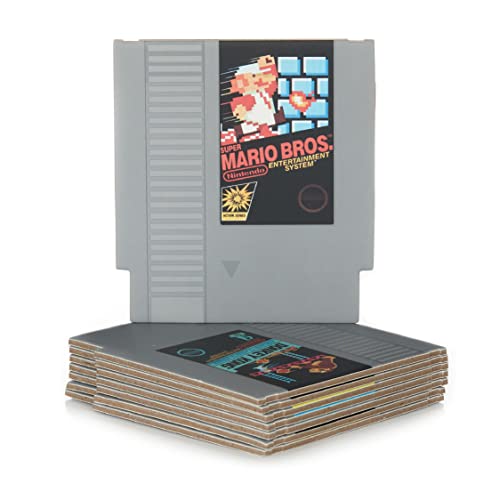
Do you love Nintendo? Then you have to check out this amazon NES cartridge drink coaster set!
This set includes 8 double sides drink coasters that look just like the classic NES cartridges.
This set is a perfect gift for the gamer in your life!
Why would Nintendo design game systems like this?
Sadly beyond the physical limitations that prevent an NES cartridge from even fitting in a SNES, there are some technical barriers to this as well. If somehow you could even get the cartridge to fit, in the SNES, it wouldn’t work.
When Nintendo designed these game systems, they wanted you to have to purchase different games for each console as this made them more money. They claimed the reason was for a better user experience, but we all know the real reason.
However, here are some tricks that you can do to make it actually happen.
When we were looking for ways to play NES games, we came across this little device that allows you to play your NES games on your SNES. Here is the video that shows you how to use the device.
Now that you know how to use the device, here is the best place we found to purchase one. You should be aware that some people have not had luck with these working, and some have even reported that the NES games would actually play faster than on the original console. Although we have not had any personal issues with it working, we still wanted to let you know about the possible issues with the converter.
The new NES Classic
While only a few people actually still own the original NES, The NES can still be played today by millions of people. If you are wondering how this is possible, it is only because Nintendo actually released a brand new mini console called the NES Classic edition
This official emulator brings you 30 pre-packed games, as well as the option for wireless controllers! Even though nothing can compare to the original 8 bit gaming system of its time, Nintendo did a remarkable job when they created this system! It comes preloaded with 30 of the most popular NES games ever made.
Since you can connect the new NES classic to your tv with hdmi, you would assume the graphics would be better. This was not true though as Nintemdo wanted to keep the nostalgia of the original 8 bit gaming system.
Not only does the NES Classic look the same as the original NES, (besides the fact it is about one quarter the size) it even plays the same games with the same 8 bit graphics.
This Game system was released in November 2016, and still today is in high demand! Because everyone loves the original NES so much, the market became so flooded with gamers, that the game system on its release date actually sold out within minutes of going live!
The people who were lucky enough to get one have spent countless hours playing the game and bringing back their childhood memories. Those who did not get one either had to wait until more were available in stores, or pay three to four times the price!
The SNES
The Super Nintendo Entertainment System (SNES) is also a great video game console.Some people say that this console is the greatest console ever made on this planet. When the SNES was released, many people were so excited about it they ran to the store to get one.
The SNES has not stopped being a classic hit that is loved by all even today. The SNES ruled the market by improving the quality and developing every game to its best extent.
The SNES had the latest features, advanced graphics, and vibrant colors! These made it super classy where every single gamer wanted it for their collection! The original NES has a wide range of games, and some of the best games that were ever made.
However, the SNES games took everything to the next level. The best SNES games played and looked superior to other games that were available during its time. It did not matter what game was introduced during that time, the SNES games were far superior.
Although many people still today prefer using SNES games rather than NES games, both systems and games are loved by everyone no matter the age.
Why aren’t NES games Compatible with SNES?
Nintendo had a few alternatives when it came to compatibility issues. Many gamers believe that they could have designed the NES and the SNES to be compatible. Although that is probably true, Nintendo decided that with the SNES being 16 bit and way more advanced than the 8 bit NES, that it was not worth the time to try and develop.
Nintendo was at the top of their game, and taking time to fix something that wasn’t necessarily an issue at that exact time would have cost them the lead in the gaming world as it was quickly changing.
On the other hand, When Nintendo released the SNES they could have made it where it simply had two places to insert games. One would be for the newer SNES games while the other would have been for the original NES games everyone loved.
Although this may have taken longer to produce, this could have expanded the revenue of the company expenancially.
Does the SNES or NES have better games?
There are some critical questions that arose in the mind of many gamers. If we compare both NES and SNES, which games are better? Below we will mention some top hits of both video games. You can select any game according to your budget and taste.
No matter what games you choose, you will find that the time you spent playing will warm your heart and bring your love of Nintendo even closer to your soul. Below are our top 5 NES and SNES games that we love and enjoy playing.
Top 5 NES & SNES games of all time
If you are a super gamer like me and these 10 are not enough, here is a video showing the top 100 SNES games!
NES Classic
- Balloon Fight
- Castlevania
- Mario Bros.
- Ninja Gaiden
- Pac-Man
SNES Classic
- Street Fighter II Turbo: Hyper Fighting
- Super Mario Kart
- Super Mario RPG: Legend of the Seven Stars
- Super Mario World
- Super Mario World 2: Yoshi’s Island
Conclusion
Although there are alot of different games for the NES and SNES, we are sure you will love them all. Nintendo has always been a top contender in the world of gaming, and even today is well known and loved by everyone.