
*This post may contain affiliate links. As an Amazon Associate we earn from qualifying purchases.
Have you ever played the Nintendo Wii, but felt something was missing? Maybe you have played on one of your friends PlayStations but still something wasn’t right? Well you will be happy to know that PlayStation released the best of both worlds with the PlayStation Move. It only does everything. Although it sounds fun, you probably still have one question.
Are PlayStation Move controllers worth it?
If you love to have the mobility of the Nintendo Wii, but love the platform and speed of the PlayStation, then you will definitely want to get the PlayStation Move! It is 100% worth it as you get so much from the entire setup and get the best of both worlds.
If you want to know more about the PlayStation Move and the games that were available, you will want to keep reading. You can also watch this short video showing you all the capabilities of the PlayStation Move and everything that it can do.
If you love PlayStation you need to check out this amazing game room light decor. It looks just like the buttons on the PlayStation controller and the light reacts to the music that you are playing as well! You can check it out by clicking here.
If you do not own a PlayStation Move, but want to get one, This place has the best price around!
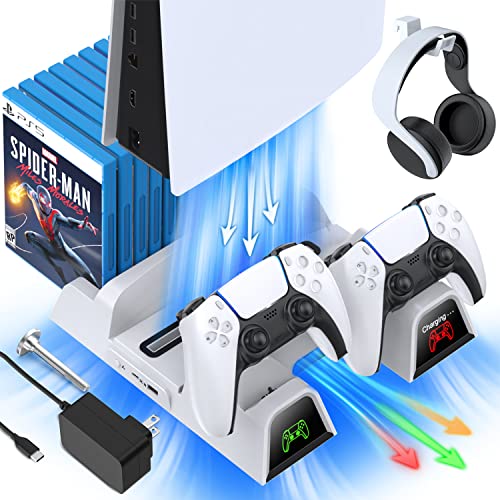
If you have a PlayStation console you should also have one of these stands. It makes it incredibly easy to organize your console and games as well as charge your controllers at the same time.
Plus it has a cooling fan to make sure your console doesn’t overheat when you have your weekend gaming marathons!
What is the PlayStation Move?
The PlayStation Move is an advanced tech device that has changed the perception of PlayStation gaming. It is used to play outdoor games inside, enjoy motion sports, enjoy VR games, and much more.
When it came out, it looked like the technology of the future because of the things it performed. Since it gave a new look to the gaming world, changed the engagement in the game, and increased the features of motion sports, it is surely worth it.
The PlayStation Move is a handheld motion-sensing device that is designed by Sony for PlayStation 3, 4, and PlayStation VR. Initially, they were designed only for PlayStation 3, but their usage was extended when the PlayStation 4 and VR headset came as a new tech piece.
When they came out in the market for PlayStation 3, they used the PlayStation eye to complete the full set. By having all of these devices, you were able to play virtual games. Although getting a complete set could be expensive, it is not that expensive anymore.
Their usage was extended in later years when the PlayStation 4 and PlayStation VR game. It used the PlayStation Camera in the following consoles to connect and play.
Features of the PlayStation Move Controllers
The PlayStation Move Controllers have tons of features. They are used with the PlayStation 3 or PlayStation 4 consoles and PlayStation VR headsets. Although if you see them separately, they serve no purpose and will look like a microphone to you, they are much more than that.
They are almost the same size as that of a typical microphone. Additionally, it has a few buttons and a light-sensing bulb on its top.
It tracks the motion of a person using its motion-sensing technology and delivers accurate results. Additionally, they are rechargeable and come with charging cables in the box.
The PlayStation Move supported tons of features. The most basic of these include multiplayer real-time gaming, family games, simulations, battlefield games, and action games.
You can enjoy its sports and other games with your family. Plug it in, take the Move Controllers and you are good to go. Enjoy competitive battles and sports such as baseball, tennis, table tennis, shooting, fighting, archery, etc. with other players.
Because of the PlayStation Camera in place, you will feel the accuracy of the target and motion in the games. This means as you move the controller, the character in the game moves. It follows the direct command from the controller without any delay! This gives you the perfect and real representation of the game.
If you don’t want to go outside to play some sport or have a family gathering at home, you can enjoy these outdoor games at home. Also, you can add multiple members depending upon the requirement of the game. Add yourself to the simulation to get the real and actual perspective of the games. Similarly, if you like to play fighting games such as boxing, battles, etc., you can also do it with its advanced games. Because of this immense amount of features, The Move is a must buy!
The PlayStation Move controllers use Bluetooth to connect to your console. Once you are connected, you will need to start the camera and the game that supports these Controllers.
These controllers work similarly to that of the Wii remote. To operate them successfully, you will need to place them in front of the PlayStation camera so that the light can be detected easily.
The PlayStation Move has the haptic touch technology that is used for intense vibration situations of the video game. These little details are added to it to have the real flavor of the sporty environment.
PlayStation also provided some separate devices along with the Move that added more advancement to the real world. These products included the Move shooting gun, racing wheel, and many others.
The PlayStation Move as a Recreational Activity
The PlayStation Move has made its name as a fun device because of its recreation and entertaining properties. It is used by people who suffer from obesity as physical movement games are used to reduce weight. It also enhances the importance of exercise and healthier choices.
How do they Work?
PlayStation Move Controllers work when they are placed in front of the Camera. The Camera detects the motion of these LED bulbs, and they accurately place their motion result on the screen.
PlayStation Move with VR Setup
PlayStation Move is also used to play VR headset games. With these components, you can add a new level of entertainment to your living area. Although it offers only a limited set of games, they are essential as they cover sports.
Difference between PlayStation Move and Wii devices
Although the Nintendo Wii and Playstation Move may seem similar, there are actually quite a few significant differences between the two. The PlayStation Move remotes were released after the Nintendo Wii. Because of this reason, many people think that the move controllers are a copy of the Wii remotes.
The answer to this question is that although they follow the same direction, there is a big difference between the technologies. Because the PlayStation Move came later, it has better features with a more accurate representation of the motion of the characters. Also, you can add up to 4 devices in a single game.
Conclusion
Although there are some people that prefer the Nintendo Wii over the PlayStation Move, this is simply because they prefer the name Nintendo over the PlayStation name. If you look at all the differences between the two devices, there is no comparison that the PlayStation move has better control and just an overall better feel than the Nintendo Wii.
If you want to compare the two yourself, you can purchase the Nintendo Wii here. You can also buy the PlayStation Move here. If you do not want to go through all the hassle of this, you can also just watch this person compare the two side by side.