
*This post may contain affiliate links. As an Amazon Associate we earn from qualifying purchases.
Do you own an Atari 800 and wondered if you could play the games from the 2600? Maybe you are looking at buying one of the systems. If you need to buy the Atari 800 you can get one here, and if you want the 2600, it is available here!
So can the Atari 800 play 2600 games?
Although many people have tried to make the Atari 2600 games work on the 800 it just isn’t possible at this time. The cartridge designs and system shapes are just too different to work. At this time there is not even any adapter that has been made to make it possible either.
If you want to know more about the Atari 2600 and 800 games, you will want to keep reading this article! You can also watch this video to find out the difference between the Atari 2600 and the Atari 800.
If you are an old-school Atari lover then you have to get a classic Atari T-Shirt to show it! To see the most popular Atari T-Shirt retro designs that will stay classics for years just click here.
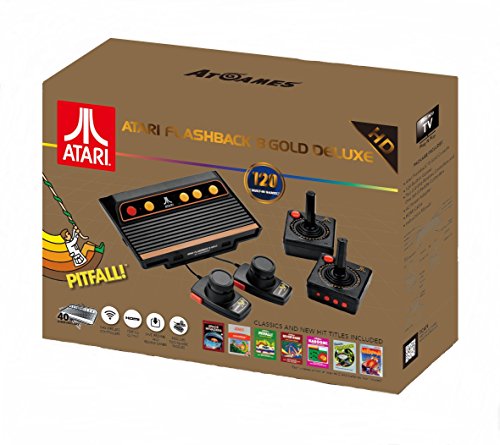
If you love all things Atari then you have to check out this awesome Atari Flashback console.
The Atari Flashback 8 comes with two wireless controllers (YES, WIRELESS!) two paddle controllers, and 120 authentic Atari games.
History of the Atari 800 and 2600
The Atari 800 is also known as Atari 8-bit home computer. It was released and manufactured by Atari Inc. in 1979. This home computer is based on MOS Technology 6502 CPU running at 1.79 MHz and it was the first home computer that is designed with coprocessor chips.
This 8-bit home computer comes with more advanced graphics and sound capabilities than most contemporary machines of its time, and the gaming on the platform was what people loved about the machine.
The Atari 2600 is a home video game console and Atari first introduced it on September 11, 1977. It is credited with popularizing the use of microprocessor-based hardware and games stored on ROM cartridges instead of dedicated hardware with games physically built into the unit. ROM cartridges are a format that were first used with the Fairchild Channel F in 1976.
The Atari 2600 originally came with two joystick controllers, a game cartridge and a Conjoined pair of paddle controllers. The cartridges originally were able to play 9 simple low-resolution games.
Other Atari Consoles
Atari 5200
The Atari 5200 is also known as Atari 5200 Super system, and is a home video game console introduced by Atari Inc. in 1982. It is the higher and complementary console for the popular Atari 2600. The Atari 5200’s controllers had a keypad along with a start, reset and pause button. The internal hardware of the Atari 5200 is almost the same as the Atari’s 8-bit computer. The 360-degree non-centering joystick was touted as offering more control than the eight-way joystick controller that was offered with the Atari 2600.
Atari 7800
The official name of Atari 7800 is the Atari 7800 pro system. It is a home video console released by Atari Inc. in 1986 and it is the first backward compatible console released by Atari. It is almost fully compatible with Atari 2600. The Atari 7800 is a slightly improved version of the 2600. The best thing was that the 7800’s graphics hardware was extremely improved over the 2600.
Which one is good? Atari 800 vs Atari VCS (2600)
We know all about the Atari 800 and Atari 2600 specifications and there are a lot of things to know; but which one is good to depend on game comparison when it’s about game consoles? I personally play on the Atari 800 and also Atari VCS with one of the popular games called Defenders.
When I started to play the defender game on Atari VCS (Atari 2600) game console the graphics quality was not the best. Every time you would fire your lasers, your ship would disappear because the 2600 was very limited graphically.
On the other hand, the game on the Atari 800 is far better! The one thing I really love about that, is that the graphics and game quality were improved from the 2600 version. There are many reasons to play the game on the 800 but for me the graphics is the most important.
Graphic capabilities of Atari 800 and 2600
Atari 800
The Atari 800 computer graphics system provides easy access to a limited subset of graphics modes. These modes are exposed by the BASIC Atari graphics command and to some other language. Oddly, the mod is not directly supported by the original OS.
The later version of 800 known as 800Xl/800XE computers supports most of these mission graphics modes.
The supported Graphics chip was the ANTIC chip. This chip allows a variety of different playfield modes and widths. ANTIC text modes support soft, definable character sets as well. ANTIC has four different methods of glyph rendering related to the text modes. Those modes are Normal, Descenders, Single color character matrix, and Multiple colors per character matrix.
The ANTIC chips use a display list, and the geometry of the ANTIC screen is not fixed. The hardware can be directed to display in several playfields. You will start with a narrow playfield (128 color clocks/256 hi-res pixels wide), then the normal width playfield (160 color clocks/320 hi-res pixels wide), a wide and over scan playfield (192 color clocks/384 hi-res pixels wide). The ANTIC hardware is awesome, as it supports horizontal and vertical scrolling.
Atari 2600
The 2600’s video device provides two 8-pixel bitmapped sprites, two 1-pixel “missile” sprites, a 1-pixel “ball”, and a 40-pixel “playfield”. Each line is scanned, a game must identify the non-sprite objects that overlap the next line, assemble the appropriate bit patterns to draw for those objects, and write the pattern into the register.
Similar to its predecessor Pong, the right side of the screen is a mirrored duplicate of the left to control it separately, the software may modify the patterns as the scan line is drawn. After the controller scans the last active line, a slower vertical blanking interval begins, during which the game can process inputs and update the positions and states of objects in the game world. Any mistake in timing produces visual artifacts, a problem that programmers call “racing the beam”.
This is why the 2699’s home game console video hardware is highly flexible and also challenging to program. The Atari 2600 was designed to be compatible with cathode-ray television and uses different color palettes depending on the television signal format.
Why was the Atari 2600 so popular?
It is hard to believe but the Atari 2600 home video game console was one of the best-selling and popular consoles from 1997 to 1982. The Atari 2600 was the best Christmas gift in North America in 1979 based upon sales.
A lot of the love and popularity Atari gets is just for their games. The game library of the 2600 was quite impressive. There are 526 games available for the Atari 2600. It was first released in North America on September 11, 1977, and featured nine launch games. Those games are: Air-Sea Battle, Basic Math, Blackjack, Combat, Indy 500, Star Ship, Street Racer, Surround, and Video Olympics.
What is the last computer Atari produced?
As I said before, the Atari 800 has some graphical errors, and that’s why Atari released the Atari 800XL or XE. But these are not the last computer by Atari. Some of the other models are the 800XLF released in Europe in August of 1984. In 1985 a new line of computers to replace the XL line called the Atari 65XE and 130XE computers were introduced. The original internal name of the 65XE was the 900XLF. So as of right now, the 900XFL was the last Atari computer that was released.
Conclusion
Even though the Atari 800 cannot play 2600 games, there are still a lot of games that Atari has made that are extremely popular. Many people even today still play the original Atari games on a daily basis.