
*This post may contain affiliate links. As an Amazon Associate we earn from qualifying purchases.
Before there was Xbox, Wii, online games or PlayStation there was SEGA. SEGA changed the world of video games with their game console the Sega Genesis. The Genesis offered an improved game arcade experience for all of those who were playing at home. After the creation of the game console and improvements in storage media, Sega incorporated the CD-Rom drive into their games and created Sega CD.
So, can the Sega CD play burned games?
If the burned CD was formatted correctly when it was burned, the Sega CD will be able to play burned Sega games. Of course this means that if it wasn’t burned properly then it won’t.
This is the answer we all wanted to hear! Now you can go ahead and start burning your Sega games, so you can start enjoying them again and not worry about having to sell them and then repurchase them all in CD format.
You will want to keep reading to find out the best way to format the CDs to ensure that they work properly as well as learn more about the Sega CD and other consoles. You can also watch the video below if you prefer.
Are you a huge Sega fan? Then you have to check out the amazing Sonic and Sega gear that you can get. Whether you want a Sonic wallet, a Sega sweatshirt, or a classic hat there are plenty of choices to choose from. You can find them all by clicking here.
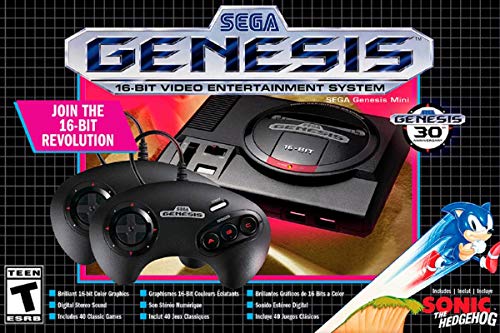
If you love Sega then you will want to check out this Sega Genesis Mini console. It comes with two controllers and even comes preloaded with 42 Games!
Enjoy these classic Sega Genesis games without having to purchase a single game cartridge!
History of Sega CD
If you have a home game console then you need video games to play with it. Even though SEGA CD was an exciting new invention in its time, users critiqued that it failed to maximize the video and audio capacity that it had. Instead of creating new games, SEGA moved their old games to CDs so players could use the new add-on.
SEGA gave free copies of SEGA CD games as a part of their marketing strategy, but only one game came with the purchase of a SEGA CD console. Since a lot of gamers already owned a bunch of the Sega games, they began looking for a way to change over the games they already owned without spending a fortune.
So, those who were unable to purchase original copies of the SEGA CD games opted to burn their own copies. This worked very well with the SEGA Genesis console. The format of the burned CDs was the only possible issue. This issue caused some challenges to the quality output of the games that had been burned.
Because of many how-to videos and blogs online to help get the best results it was very popular for people to burn CD copies of games and music they already owned. The best tip is to save the burned CD in a .wav format and not mp3 or mp4. If the CD was saved in either of those mp formats, the SEGA CD will only read it as an audio file.
SEGA CD features
The SEGA CD is an attachment for the SEGA Genesis game console released in October 1991. It also allowed users to play music CDs in the West, and karaoke CDs in the East, where it was known as Mega-CD.
It attaches to the underside of the SEGA Genesis game console with a front-loading CD compartment. The specifics included a faster central processing unit, better graphics, and the ability to play audio disc and CD-G discs which were used for karaoke machines.
CD-Gs or CD-Graphics played audio along with low-quality video graphics hence the name CD + graphics. The ability to play CD-Gs made SEGA CD or Mega-Drive as it was called in the West, very popular in Japan.
The initial reason for creating the SEGA CD was to extend the life and capabilities of the Genesis (Mega-Drive) game console while persuading loyal customers not to switch to the competitors. It was not the first game to use optic disc technology, but it was the most popularly used at that time.
SEGA CD Games
Popular SEGA CD games at the time were
- Sonic The Hedgehog
- Night Trap
Sonic was a family-friendly game that rivaled Nintendo’s Super Mario. Both games are still well-known today, with several versions made for all ages to enjoy over the decades.
However, SEGA’s Night Trap and others like it were a game-changer. The Original Nintendo and other video games did not show blood in their fighting games and some users thought that this took away from the authenticity of the gaming experience.
SEGA pushed the boundaries when they offered games that showed blood while playing. This was one of the main attractions to playing SEGA CD and SEGA games since many players appreciated the authenticity of the blood provided in fighting games. This attracted an older clientele and started a new hobby for some.
Before the regulation of game content, most games were family-friendly or without vulgar language and vivid details (like blood and beheading). Although the gaming community loved the details that the blood and beheading added, others such as mothers and non-gamers were not too keen on the idea of blood and gore on video games.
Nevertheless, SEGA persevered and created 210 SEGA CD games. Many gamers enjoyed playing these video games with bloody and gory visuals, while the outrage by some concerned parents and consumers eventually led to the game ratings we see today.
Some other popular SEGA games of that time included:
- Ecco the Dolphin 1992
- Snatcher 1988
- Eternal Champions 1993
- Final Fight (1989).
Other games drew heavily on inspiration from popular movies and comics such as Demolition Man (1992) which is based on the movie Terminator, and comic book characters Batman and Spiderman in Batman Returns (1995) and Spiderman versus the Kingpin (1991).
A brief history of SEGA CD and SEGA Enterprises
SEGA CD was created by a Japanese video game company in the 1990s. Before closing the console making division, Sega sold 3 million consoles in the early 2000s. A vast difference compared to the more than 30 million SEGA Genesis consoles sold during its peak years in the 1990s. The company saw a decline in home game console sales after the market was taken over by its competitors Nintendo and Playstation.
SEGA was widely known in Japan for making arcade video games, however, the home game consoles made by the company had a hard time making sales. At first, the home console was called the SEGA Mega-Drive and still is in the East, but it was rebranded as the SEGA Genesis when it came to America.
Before there was SEGA, the company was known as Standard Games. The company was founded in 1940 in Hawaii and made coin-operated games for military bases. After moving to Japan in 1952 the company was renamed to “Service Games of Japan”. A few years later, Service Games of Japan merged with Rosen Enterprises to become SEGA Enterprises. The company created popular arcade games Periscope (1965), Zaxxon (1982) and Out Run (1988).
The company then changed management several times during the 1980s while making several home game consoles. The SG-1000 was the first console made by the company which made over $200 million. After this success, the company made the SEGA Master System in 1986 and the more popularly known SEGA Genesis in 1988.
Recently, SEGA stopped creating home game consoles due to poor marketing and low sales. They made the game consoles, Saturn in 1994 and Dreamcast in 1998 before completely leaving the game console market besides making a few retro throwback consoles in recent years.
Video Games and SEGA
While SEGA Enterprises has discontinued manufacturing many of its game consoles, it is still loved by many people today. With an increase in game collectors and the gaming community, SEGA CD and games can be traded or sold at a reasonable price. There are several videos and blogs online with care tips, set-up instructions and other information for each SEGA console created in the 1990s.
Check out this video of the top games for the Sega CD.
Conclusion
Video games have been around since the mid-1900s and have become a favorite pastime for many children, teenagers, and adults. It has grown so much over the years that many players make a living by playing video games competitively or as entertainment.
Video games will probably be around for generations to come, as several improvements are happening in the industry right now. No matter where gaming systems go in the future, we know Sega will always have our hearts with the original consoles as well as any new ones they come out with (if they ever do get back to making consoles).