
*This post may contain affiliate links. As an Amazon Associate we earn from qualifying purchases.
Have you ever wondered if your Sega Genesis could play games that were not from the United States? Maybe you are wanting to try, but don’t want to ruin your console. Either way, this article is here to help you!
So can the Sega Genesis play Japanese games?
Although most people would not want to play games from a different country on their console, some gamers prefer games from different countries. If you are one of these gamers then you will be happy to know that the Sega Genesis can play Japanese games on the system.
If you would like to know more about the Sega Genesis and how to play Japanese games for the system, you will want to keep reading this article.
Are you a huge Sega fan? Then you have to check out the amazing Sonic and Sega gear that you can get. Whether you want a Sonic wallet, a Sega sweatshirt, or a classic hat there are plenty of choices to choose from. You can find them all by clicking here.
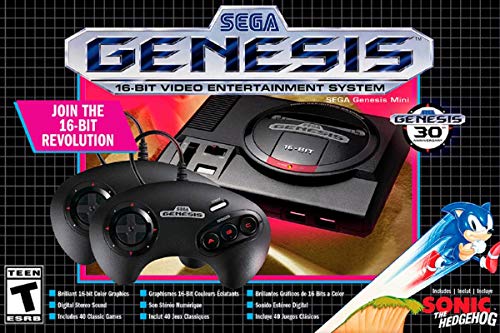
If you love Sega then you will want to check out this Sega Genesis Mini console. It comes with two controllers and even comes preloaded with 42 Games!
Enjoy these classic Sega Genesis games without having to purchase a single game cartridge!
Why would you want to play Japanese games on your SEGA Genesis?
Gaming enthusiasts across the world, whichever region they are from, generally have an appreciation for most of the same games. However, culture has played a huge role in accounting for the different games being released in different markets. The different tastes and just the general way of doing things will allow games to thrive in their respective industries when it is tailored to suit them. If we look at the SEGA Genesis in North American that is what it is known as but over in the Japanese market the Genesis is known as Mega Drive.
Often gamers develop an appetite for games that may have not been developed in their region. This is based on reviews they have read and what fellow gamers have raved about. An appetite for overseas games is actually quite normal in the gaming community. This is why people would want to play Japanese games on their system.
How to make Sega Genesis play Japanese games
Although the Genesis can play Japanese games, Sega did not make it easy to do so on the system. While the process is not necessarily difficult, it is still not the case where you can just buy a Japanese game cartridge and plug it into your SEGA genesis and it just plays. There are a few modifications that need to take place before you can enjoy your Japanese game. The three problems that you will have that require modifications are:
- The shape of the cartridges is different.
The Japanese game cartridge is bigger and shaped slightly different from the North American game cartridge. Because of this, you will find that the Japanese game will be bigger than the cartridge slot for the SEGA Genesis.
- There is a region lock on the game, restricting you from playing the game.
Although most games do not, there are some Japanese games that do have a region lock and will not work for the Genesis.
- The language will be in Japanese.
The risk you take with buying a Japanese game is that the language will not be able to be in english, and you may be forced to play the entire game in Japanese.
How can you fix these problems?
The problems that you will face are not difficult problems to fix. You are only a few modifications away from having the time of your life.
How do I widen the cartridge slot on the Genesis?
Depending on the model of the Genesis gaming console widening the slot may vary. However, it will not vary significantly so these steps can be universal. To widen the slot, your options are:
- Cutting away the plastic that surrounds the cartridge slot
To do this you can simply use a file, saw, or even a knife to cut the plastic away from the cartridge.
- Force the Cartridge
This option is not necessarily recommended because if too much force is applied you run the risk of damaging the game cartridge and the game console. I am pretty sure you do not want this to happen to your beloved game. If you do try this option you will want to proceed with caution.
You should note however that the SEGA Genesis 3 is far easier to insert a Japanese cartridge into by just using a little bit of pressure.. The irony of this is that the SEGA Genesis 3 is smaller than the original and generation 2 Genesis console. So, if you have a Genesis 3 you are in luck and may not have to do any modding at all!
What if my Japanese game is region locked?
Although most Japanese games do not have a region lock, you may come across one or two that do. To modify the region lockout there are 2 options:
- Using a Game Genie
A game genie is a cheat video game cartridge that will help in changing the region of the game. Coders have designed this to help solve problems game enthusiasts face in certain games. The Game Genie also has a code developed to help get by any restrictions including the region lock. You can purchase a game genie here for just a few dollars.
- Soldering the hardware
Soldering the hardware might sound like an intense skill but it is not. With careful consideration and the right tools, you can learn how to solder not just for this, but everyday life. Here is a short video that will teach you how to solder in just a few easy steps!
To fix the game, you will need to remove the jumper once you have opened the back of the game. The jumper is essentially responsible for putting the game in a North American Mode. You will need to use your soldering iron to remove the jumper from the game. Always make sure the game is turned off before you do any kind of soldering.
Sega Genesis History
Let us face it. SEGA is a well-renowned game developer. Their impact in the game market has been evident especially in industries such as North America, Japan, and Europe. SEGA has had a lot of wins up their sleeves and the SEGA Genesis is one of those wins. SEGA has released a variety of the Genesis consoles including the Genesis 1, 2, and 3, and even the minis to match them all.
The hardware for the SEGA Genesis was a top tier development put out by Japan. Japan is a major gaming stronghold, and has a lot of love for SEGA. This is not just because of its gaming consoles but also its games. Japan’s Genesis Gaming consoles have an extensive game library with games that have never been released in the North American market.
SEGA Japan and SEGA North America have always done things a bit different from the inception of SEGA and especially through the 1990s. The easiest example is the games that were released in Japan for the Genesis, but not in North America. Although gamers have gotten used to more games being put out in Japan, it is something that they wish didn’t happen. Some gamers even prefer Japanese games over some North American games!
Conclusion
Now that we know the Sega Genesis can play games from Japan, and we know how to fix any issues we might have, we can go ahead and start playing! We hope you enjoy playing all the games from around the globe as much as all the other gamers do.