
*This post may contain affiliate links. As an Amazon Associate we earn from qualifying purchases.
Do you own the Sega Saturn, and want to play your Genesis games on it? Maybe you are looking at buying a Sega Saturn, but don’t want to buy all new games so you are trying to figure out if the Saturn will play Genesis games or not.
So can the Sega Saturn play Genesis games?
Although many people have tried to play Genesis games on the Sega Saturn the Saturn is actually not backwards compatible so it won’t play Genesis games. The slot that is on the Sega Saturn is for Ram cartridges and will not play Genesis games in it.
Some consoles that are newer are made to be backwards compatible meaning that they will play games from older consoles but unfortunately the Sega Saturn was not built with that capability. The only games that will work with the Sega Saturn console are those games that were specifically designed to play on it.
In the rest of this article we will go into more depth about the differences in the consoles so that you can see why the Genesis games will not work in a Saturn console. If you want to play some of the best Genesis games you can find them included with the Sega Genesis mini console found here.
If you prefer to watch a video instead of reading you can do so below.
Are you a huge Sega fan? Then you have to check out the amazing Sonic and Sega gear that you can get. Whether you want a Sonic wallet, a Sega sweatshirt, or a classic hat there are plenty of choices to choose from. You can find them all by clicking here.
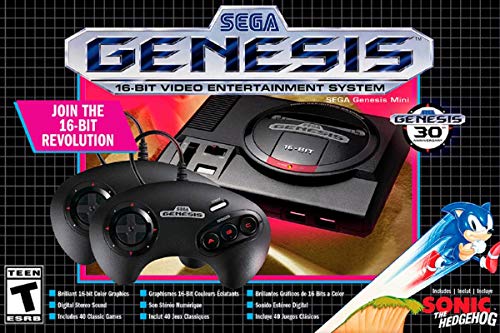
If you love Sega then you will want to check out this Sega Genesis Mini console. It comes with two controllers and even comes preloaded with 42 Games!
Enjoy these classic Sega Genesis games without having to purchase a single game cartridge!
Differences between the Sega Saturn and Sega Genesis games
The Sega Saturn uses discs to play the games on the console. At that time, it would have been unimaginable to create a converter to move the Sega Genesis cartridge to allow it to play in a CD disc drive. Although Sega did talk about having both cartridge and CD slots on the Saturn system, it just didn’t work out.
The Sega Saturn does have what appears to be a cartridge slot on top of the console however it will not allow Genesis games to be played through it unfortunately. It can be used for Ram memory and even for imported Sega Saturn games to be played but the software used in the Saturn and the Genesis games don’t work together.
The best Sega Saturn games
The Saturn did not quite have the horsepower of other consoles but still had to try and compete with both the PlayStation and Nintendo 64.
Night Into Dreams was a popular game on the Saturn and is a mixed version of both old and new games. You can easily play this game with both 2d and 3d processors. After the success of Night Into Dreams, Sega developed the Burning Rangers and many other games that included Virtua Fighter 2, Fighters Megamix, Daytona USA, Die-Hard Arcade, Dragon Force, Shiny Force Three, Guardian Heroes, and many more.
The trendiest games from the Saturn are Virtua Cop, Virtua Cop 2, House Of The Dead, and Saturn Bomberman.
The Sega Saturn had many other successful games that they released. The following are some of the games that were most popular for the Saturn console.
- Panzer Dragon
2. Radiant Silver
3. Street Fighter Alpha Three
4. Guardian Hero.
Although Guardian hero looks like a mindless fighting game, it is not. This is a real type of fighting game on a high level. The opposite party in the game has a good IQ level and that makes the game very challenging. If you like any of these games, you definitely need to watch this short video of the top 10 Sega Saturn games ever made!
5. The Shining Force III
This arrangement was one of the most prized establishments on the SEGA Saturn because of its addictive turn-based vital interactivity. This game has many raving fans, and even today many people still play this game. The sad news is that this is the last game that the Camelot software introduced.
Several feature games that are included in the Sega Saturn and Genesis are Astral, Mr. Bone, Policenauts, Bulk Slash, Power Slave/Exhumed, and many more.
In the Astral game scenery is a past color fantasy world in which the handmade graphic designs are outstanding. All of the characters are very big and designed with amazing eye-catching colors. Also the 3d monstrosities are amazing due to the color scheme. There are several other continuations of Astral that were introduced but they do not have any secret features. Also several other popular and memorable games are included in them like music or rhythm.
The Sega Saturn is also well known and designed for multiplayer games. With the help of multi-tap accessories, more than 10 players can play simultaneously on the console. So with the help of the Saturn Mega Player, you can increase your team up to 10 people.
Sega Saturn homebrew
The Sega Saturn homebrew allows a variety of games to be played including Gaganoid, SEGA Blur, Destiny Kingdom, Dezaemon 2 Save Game Manager, Police Officer Smith and more. The VBT game uses the Sega basic library for the performance of low-level hardware access. Manufacturers gave the games a very professional look with excellent quality game play. Your success is guaranteed when paired with its unique SBL skill.
Destiny Kingdom was first invented in 2005, and was loved by many gamers for its fun gameplay.
Life after the Sega Saturn
If we look forward from the Sega Saturn and Genesis, we can see that Sega did release the Sega Genesis mini console more recently This console came preloaded with 40 games originally, but a newer version has now been released with 85 games! The original version with 40 games is available here. It comes with 2 wired controllers and is able to hook up to a modern TV via HDMI.
The newest Genesis mini has a total of 85 games on it, and the best part is that the two controllers that come with it are now wireless! This game system is still available here, but be warned they tend to sell out around the holiday season.
Both of these consoles include many popular games, but the most iconic games on the systems are: Sonic the Hedgehog, Gunstar Heroes, Castlevania, Shining Force, Dr. Robotnik’s Mean Bean Machine, and Ecco the Dolphin. Because of these games, and the nostalgia of playing on the Genesis once more, these consoles have both had great sales for Sega.
History of the Sega Saturn
If you want to know the history behind the Sega saturn, you can keep reading, or if you are like me and you learn visually, here is a short video explaining some of the history of the Sega Saturn.
The Sega Saturn has a capacity of 32 bit and is a fifth-generation device. This video game console was released on November 22, 1994. After the success of the Sega Genesis, Sega expected a lot out of the Saturn but unfortunately they were sorely disappointed as the Saturn only sold 1/3 of the number of units that the Genesis did.
The Sega Saturn has dual CPU and eight different processors. Although people speculated that the Saturn would be able to play Genesis games, that was not the case. Sega did not try to make them compatible, but actually changed how the games were played. The Genesis used a cartridge to hold the game’s information, while the Saturn actually used a CD disc instead.
Conclusion
If they ever find a way to take the Sega Genesis cartridges and transfer them to a Sega Saturn Disc, there might be a major comeback for those games. As most gamers only have one of the consoles and not both, they are forced to choose which one they like more because they cannot play the games on them both. This causes conflict among the gamers in the Sega community and the Genesis console is far more popular even today.
Although it may be a little more expensive, Sega should have taken a hint from consumers and made all of their consoles backwards compatible so people didn’t have to choose what console they wanted. If people didn’t have to choose, then they could spend more money buying games and building a bigger library for them to play and enjoy.
Even though Sega had its issues, and the Sega Saturn was not perfect, there are still many people today that love to play all of their games on the Sega Saturn as well as many other great Sega consoles.