
*This post may contain affiliate links. As an Amazon Associate we earn from qualifying purchases.
Have you ever been playing on the PlayStation Network and wondered if game sharing was allowed? Have you heard about someone getting banned for sharing their games with one of their friends?
Well, no matter what question you have we are going to answer it in this article.
So can you get banned on your PS4 or PS5 for game sharing?
Game sharing on the PS4 or PS5 is not illegal and it will not result in a ban. However, if the game that was shared with you was downloaded illegally, you do have a risk of getting banned.
As of now, Sony isn’t banning people for it but being that they continue to crack down on people for more and more things it is definitely a possibility that sometime in the near future game sharing will be made against their terms, and will start banning people who do it.
Most of the profits that console manufacturers make are from the sale of games and accessories from game retailers so it’s honestly surprising that they haven’t already made it a bannable offense.
There are a lot of things you need to be careful about when game sharing in order to not get in trouble. We will discuss all these scenarios in this article. So if you want to learn more about game sharing on the PSN, then you will want to keep reading.
You can also watch this video below to learn how to game share on the PSN and not get in trouble.
If you love PlayStation you need to check out this amazing game room light decor. It looks just like the buttons on the PlayStation controller and the light reacts to the music that you are playing as well! You can check it out by clicking here.
Gaming is something loved by many people. It has surely made a special place in the hearts of many because of its benefits. One can enjoy playing whenever they want to as games are easily available online.
One of the best things about this is that you can use these platforms as a great way to entertain all the guests coming to your house. As everyone loves gaming, it can be a great thing that everyone will enjoy.
Another great thing is that everyone can find a game that they love because of the wide variety of games that are available online today. If you ever play on the PlayStation console, then we are sure you are aware of how great the PSN is.
If you are looking for a way to get the PlayStation Plus online account cheaper, this place has discounted subscriptions all the time that work great!
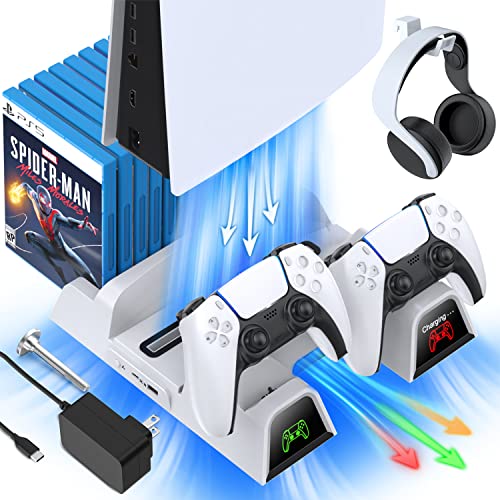
If you have a PlayStation console you should also have one of these stands. It makes it incredibly easy to organize your console and games as well as charge your controllers at the same time.
Plus it has a cooling fan to make sure your console doesn’t overheat when you have your weekend gaming marathons!
So you know that you can share your games with your friends and family who also have a PS4 or PS5 but how exactly do you do that? Is there a share button that you click to be able to play each other’s games? Are there any vulnerabilities when sharing games that you need to know about?
To game share on the PS4 or PS5, you will go to the menu and select the Settings option. Then you will click on the Users and Accounts section. Once that is open you will go down and click on the option that says Other.
You will then select the Console Sharing and Offline Play button. You will then have your friend sign in to their PSN account.
When you do this you can then share consoles with your friend or family member and in turn, have access to their game library. You will want to be careful not to do this with just anyone though as logging into their console also allows them access to your console so if they have nefarious purposes they could access parts of your account that you don’t want them to.
So only use the game sharing on the PS4 or PS5 with friends and family that you actually trust. Don’t try game sharing on the PSN with strangers from the internet.
Important Things To Consider When Game Sharing On The PSN
There are a few things that you must keep in mind so that you don’t mess it up.
When sharing a copy of the game from your games library, it is important that both the users have their own PSN accounts and none of them have a ban. The primary console to be used must have the right to download games easily and without any problem.
It is not recommended to share games from the PlayStation library if you have used an unauthorized source for getting it, as this will probably get you banned as well as the people you share the game with for violating the community code of conduct.
When using the console, multiple players cannot play with one account. All of them must have their own accounts, and must have paid for all the games they own. You can have access to this feature but it comes with a few limitations.
Your friend will be able to play with you but he or she won’t be able to actually own the game till the time they buy it themselves. One more restriction is that only two people can have access to the same game at one time.
PSN and Game Sharing
One thing that many users get confused about is whether or not you can get banned for sharing the games. Every gaming platform has some rules and so does PSN. It is important that you go through those to prevent any kind of unnecessary hassle or problems.
You can know all the details about the PlayStation platform by continuing to read.
Game sharing is a great feature that players can use to enjoy playing with their friends or family. This feature is also known as “Share Play”. Game sharing makes it to that you can have access to all the games that your friend owns for free!
Although game sharing is not recommended, you won’t get banned for using it at this time.
Another thing that you can do for game sharing is to exchange your details with some friend of yours, but he or she must have an account of their own. Exchanging games without an account is not valid as the other person hasn’t paid for the PlayStation Plus subscription which is not allowed according to the PlayStation Network terms of service.
You must also make sure not to install any games from an unauthorized source to avoid being banned as well.
Also, if you are sharing games from someone who has downloaded them from a pirated source, then you also have a good chance of getting banned as well. This is why it is important to avoid doing those things and know what games your friends downloaded and where they got them from.
All About The PSN
The PlayStation Network or PSN is something every PlayStation user should know about. Without it, gaming on the PlayStation can be incomplete. You can get your subscription for the PlayStation Plus online for under $5 a month if you buy it a year at a time.
It is basically an additional source for you to get all that you are looking for. You can have access to various different things like online games, movies, music, and many other things in one place.
It is known for the additional features it provides as well as specific free games (from the PS Plus collection). Anyone can have access to the PlayStation Plus network if they own a PlayStation.
The PlayStation Network is a highly recommended network as you can have access to many great features by only having one account. It comes with a yearly subscription which is either $10/month if you buy it one month at a time, or you can find it for $5/month for a year subscription if you buy it from here.
If you are someone who has a passion for gaming you must definitely go for this one as there are so many great features as well as a bunch of great games that PlayStation has put on there for free! Yes, you read that right, PlayStation Plus has free games for anyone to download and play!
If you want to know more about PlayStation Plus, you will want to check out this article!
Conclusion
Now that you know game sharing between people’s consoles on the PlayStation Network will not get you banned, You can get all of your friends together and start to download all of their really awesome games!
I mean, why would you pay for games when you can play them for free right?
PlayStation was extremely nice to allow this to happen, and this shows gamers that it does actually care about them and not just the money.
Another thing you have learned is about the PlayStation Plus network. This network is a place where people who own a PlayStation can come and play games online with their friends as well as play games for free!
Although most gaming subscriptions are expensive, the PlayStation Plus network is extremely cheap coming in at under $5 a month.
No matter if you share your games with your friends or if you don’t share games at all and only buy your own, you have to appreciate PlayStation for allowing gamers to share their games. This has allowed many people who would normally not spend money on a game, to have the chance to play one of these games that are a little out of their price range.
This is very important and shows that the entire PlayStation network actually cares about people.