
*This post may contain affiliate links. As an Amazon Associate we earn from qualifying purchases.
Have you been playing on the Xbox for a while and think you can play better when you use a mouse and keyboard? Maybe you recently heard about Microsoft banning people for using certain devices to play some games and you want to know if a mouse and keyboard are included in those items. Well, no matter what questions you have, we will answer them in this article.
So can you get banned on Xbox for using a mouse and keyboard?
Although there are many rumors about getting banned by using a mouse and keyboard to play on the Xbox, none of them are true. Microsoft said they are not banning people who play using a mouse and keyboard while gaming on Xbox Live.
If you want to know more about playing on the Xbox with a mouse and keyboard, you will want to keep reading this article.
You can also watch this video below if you prefer instead.
Are you a huge Xbox fan? Then you have to check out this amazing Xbox gear and decor. Whether you want an Xbox-styled wallet, a sweatshirt, or a pair of Xbox socks there are plenty of choices to choose from. You can find them all by clicking here.
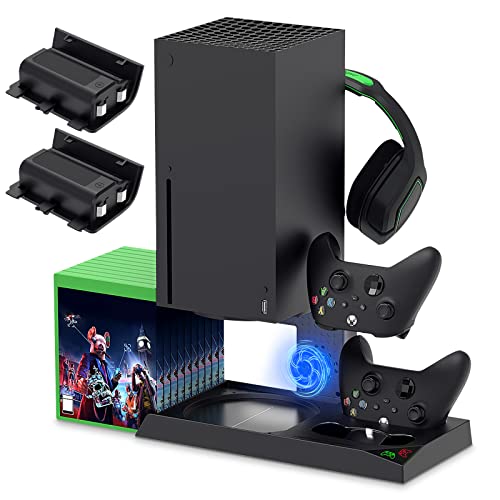
If you have an Xbox you need to get this cooling/charging stand for your console/controllers.
There is nothing worse than being ready for a long night of gaming only to realize your controllers are dead. With this stand that never has to happen again!
Are using a mouse and keyboard encouraged?
Although people wanting to use a mouse and keyboard on the Xbox Live platform is not new, it is newer that Microsoft is allowing it. Microsoft has informed all of its users that they are working on introducing the usage of mouse and keyboard for all of the Xbox Live users. They have asked their developers to come up with this project so it flows more smoothly so that the users may enjoy the benefit of the keyboard and mouse.
Some users are waiting for this decision to be implemented by Microsoft so they can play games with greater ease and comfort but users really don’t need to worry at all if they are using a mouse and keyboard for playing games on Xbox Live right now as Microsoft has no problem with anyone using them to play.
Why do people use a mouse and keyboard for playing games on Xbox Live?
There are a variety of users with different skill levels and preferences on Xbox Live and that’s why many users want a different way to play online besides with the regular remote. Sometimes gripping the remote for hours on end while playing can cause problems and other people have a problem holding a remote while they can use a keyboard just fine. Playing games with the assistance of a mouse and keyboard is a lot of fun and many users are demanding the usage of it on the console so that there will be more options for people to play online more comfortably than before.
Some users believe that the usage of a mouse and keyboard is cheating and they don’t think it is fair that other people get to use it. They are demanding that people shouldn’t get the option to play with a mouse and keyboard on Xbox Live at all. Although some people who use a mouse and keyboard are trying to gain a competitive advantage, that is not true of the majority of the people who play with them.
Most of them are innocent and honest and just want to use something that they are more comfortable playing games with or are more used to the controls on.
How can you enjoy playing games on Xbox Live?
Xbox Live is a great way to add to the enjoyment of playing video games and users know this fact very well. A lot of gamers are on Xbox Live so you will always have plenty of people to play with or against. Many people have been using this online service for a long time and so they are likely to have tons of games that they enjoy playing which in turn opens up your options as well.
People use various equipment for playing games on Xbox Live so that they can have more fun and also have more control while playing the games. While some people believe the usage of a mouse and keyboard is cheating, some players use a modded controller which is even more frowned upon to accomplish the same thing.
Many users feel that a modded controller disturbs the real aura of the game and aids the user mechanically so the fear of this happening the same way with the usage of a mouse and keyboard is there as well.
That’s why some of the users hesitate to have the features of a mouse and keyboard widely available while playing Xbox Live.
When will the Xbox network ban your account?
Xbox is very sensitive and non-tolerant for those users who are using unfair means when playing games on Xbox Live. If a user gets reported for using a modded console or cheating in any way, Xbox will almost always ban that person, and sometimes even ban them forever from playing on the Xbox Live platform. The network can’t check each and every user of the network in regards to their manner of playing the game, but if the enforcement team can in anyway trace someone’s illicit ways of playing games, then they can ban your Xbox account after investigating the matter and what was reported to them.
Because there are so many people that play on Xbox Live at any given moment, they have to rely on someone reporting the cheaters so they can look at the footage in order to try and keep up with all the people modding in the game. If someone is not reported, most of the time the person will be able to continue to play without being caught. This is why it is important to do your part and report those who are obviously cheating.
Accounts are not easily banned on the Xbox network as after proper investigation, the members of the enforcement team will reach a conclusion about what to do. To save yourself from getting a ban on the network, you are supposed to play all of the games on Xbox Live by following the rules. Your honesty will help you in being able to play and not have any issues with being banned.
Just because other people are cheating or using hacks doesn’t mean that you should do it as well!
In today’s day and age, there are such a wide variety of games, that in order for users to be able to use a mouse and keyboard to play on the Xbox Live platform, some updates need to be made to the system so the gamers can change what keys do what commands in the game. This will help those players have a more enjoyable time playing as every person can customize what keys control the player on every game.
Microsoft is currently working on these updates as well as new ways for people who have a keyboard and mouse to play the games they love without any adapters or glitching.
What is Xbox online called?
If you have played Xbox for a while you probably know the answer to this question, but there are quite a few people that are just getting into the online gaming world. The online gaming area where people from all over the world can play together online is called Xbox Live. Although there are restrictions on this platform as well, they do not normally ban your console if you say something bad online like other companies do as instead they issue communications bans.
Conclusion
Now that you know you are not going to get banned by playing with a mouse and keyboard, you can play those games you love. If you want to get the best gaming keyboard, here is the best one around! Now that you are prepared and don’t have to worry about being banned, you can sit down and enjoy playing the games you love on the keyboard you enjoy every day.