
*This post may contain affiliate links. As an Amazon Associate we earn from qualifying purchases.
Have you ever owned a PlayStation and wanted to take it with you on vacation? Maybe the place you were going didn’t have any gaming systems so you wanted to take yours, but did not know if you could put it in your luggage?
Well, in this article we will go over everything you need to know about traveling with your PlayStation.
So can you put your PlayStation in your checked luggage?
You can bring any Playstation console (PS1, PS2, PS3, PS4, or PS5) on the plane in your carry-on bag or your checked luggage. If your console is still sealed (and you want to keep it that way) you will want to put it in your checked luggage as the TSA agent could make you open the box if it’s in your carry-on.
When going through the security checkout your Playstation (or other consoles) will need to be removed from your carry-on bag so it can go through the x-ray machine on a separate tray by itself. At TSA security checkpoints they will require you to remove the console or any other electronics that you have (like a cell phone) and put them in plastic bins.
Once your personal electronic device, your console, or laptop have gone through the screening process you can then put them back into your carry-on bag and continue to your plane.
This X-ray screening is required for all electronics so if your Playstation console is sealed putting it in your checked baggage will keep you from having to open it during this portion of security.
You can also take your game discs for your Playstation (or Xbox) console in either your checked bag or carry-on. However, because of the possible mess that the baggage handlers could make of these fragile discs, I would recommend taking them in your carry-on.
If you want to know more about putting your PlayStation in your checked bag, you will want to keep reading.
If you love PlayStation you need to check out this amazing game room light decor. It looks just like the buttons on the PlayStation controller and the light reacts to the music that you are playing as well! You can check it out by clicking here.
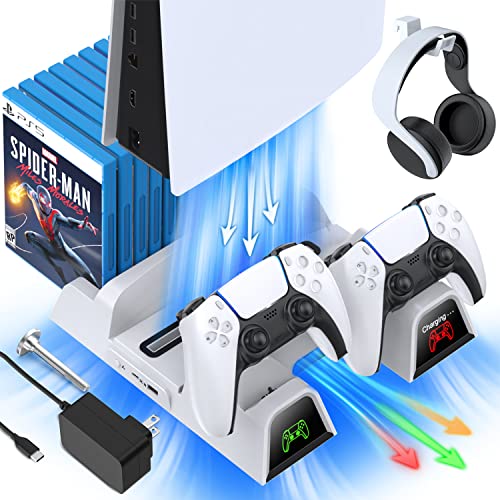
If you have a PlayStation console you should also have one of these stands. It makes it incredibly easy to organize your console and games as well as charge your controllers at the same time.
Plus it has a cooling fan to make sure your console doesn’t overheat when you have your weekend gaming marathons!
Putting Your PlayStation Console In Your Checked Luggage
Many people often put their PlayStation console (or other devices) in their checked luggage. Before you do this, you should check with the airline you are traveling with. Although it is not forbidden by the TSA, to put an electronic device like a gaming console in your checked bag your airline may have more strict restrictions especially if you are traveling overseas.
Before putting the console in the checked luggage, you will need to first find out whether it is allowed by your airline or not. Many people pack their baggage without taking this into consideration and have had to pay to send it back to their country or throw it away.
This is why you need to make sure that electronics and some sort of delicate items are allowed in the checked luggage on the airline you are flying with.
Is It Risky To Put Your PlayStation In Your Checked Bag?
Putting something electronic such as a gaming console in the checked luggage can be risky. It all depends upon you and if you are willing to risk putting it in your luggage. Most people prefer to keep it with them and carry it onto the plane to make sure that it does not get taken or possibly lost.
This is because many people have faced the problem of a lost or damaged console in their checked luggage. If you keep it in checked luggage, then it will be checked, and sometimes they are rough before moving it to the plane.
In this checking, there are big risks involved. The people who handle your baggage normally do not care for the fragility of the items inside. Your bags will normally be put on a conveyer belt and will fall down and get banged around quite a bit.
So, if you do decide to put your PS4 or PS5 in your checked luggage its a good idea to wrap it in some bubble wrap to keep it as safe as possible.
Additionally, if you put your PS4 or PS5 console in the checked baggage, there may be a possibility of it getting “lost”. As the employee checks items in the baggage, they can remove the items themselves considering the rules of the airline. You may not even be notified that it was taken as a result of the violation of the airline.
To solve this issue, you can read the complete policy and restrictions placed by the airline on the checked luggage online.
As it is said earlier, there are even cases that the PlayStation safely travels with you to the destination without getting damaged. So it all depends upon the rules and your airline.
Many times people have placed their consoles in the checked luggage by packing them around their heavy clothes. In this way, the consoles are saved from damage and it travels easily. Although this has worked for some people, it is better to simply buy a Playstation suitcase like this one to hold your PlayStation.
Even if it is allowed, you will need to make sure that it remains safe there. Typically, checked luggage is treated very badly therefore sensitive material in it gets damaged. To save the console from such a situation, you can put them in a bag as mentioned above.
One important thing to be noted in this respect is the duration of the flight. If the flight is long enough and has many layovers, then you should keep it in your carry-on bag, or personal item.
This is because, during the layover flight, the luggage is placed on and off as you travel in different planes. Therefore this is a bigger possibility of your luggage getting damaged or lost. So for those scenarios, you can use a backpack to put the console in and you can carry it easily with you without keeping it in the checked luggage.
Other Things To Consider When Flying With A PS4 or PS5
The best way of taking your PlayStation console through the security checkpoint and onto a plane depends upon many other factors as well. First, you will need to check the rules of the country you are traveling to see if the PlayStation is even allowed in the country.
Not all countries allow you to take electronic products into their country. This is why you need to make sure that you are traveling to the one that permits you to take consoles and games with you.
Additionally, you will want to check for the weight of your checked luggage and carry-on bag. If you decide to keep the PlayStation in the checked bag, but its weight gets too heavy then you will need to put it in the carry-on luggage.
Can You Bring A PS4 or PS5 On A Plane?
So I have already covered whether you can put your PlayStation console into your checked luggage. But what about just bringing your PS4 or PS5 on a plane?
Can you bring a PlayStation on a plane?
You can take any Playstation console onto a plane in either checked luggage or your carry-on. Since it is an electronic device it will have to go through security separately (similar to a laptop) but it can certainly be brought with you on a plane when flying anywhere in the USA.
If you are flying internationally there might be different rules for a specific country however in regards to customs and carrying gaming devices into that country. For example, I recently wrote an article about whether China has banned Playstation consoles. And although China doesn’t ban PlayStations they do restrict certain games from their country.
So if you are traveling anywhere overseas on a plane you will want to check with the customs and rules for that country before you bring your Playstation on an international flight.
Can I Put Any Gaming Console In My Luggage?
When traveling there are a lot of questions about what you can and cannot take on a plane. It seems like recently the TSA (Transportation Security Administration) has been extra sensitive about flagging the smallest things that should not be flagged.
Because flagged items are taken by the TSA you do not want to risk losing your video games and having them taken when you are going through airport security. Even if it does not get taken, you don’t even want to cause issues or be stopped by the TSA when you are flying.
People want to take their video game consoles on a plane with them, but can they?
You can put any gaming console (Xbox, Playstation, or Nintendo) in your carry-on or checked luggage without ever having any issues. If it is in your carry-on bag, you will need to remove it and put it in a separate bin when going through security.
The TSA does not have any issues with gaming consoles being in your luggage. This is because they are built similarly to computers. The TSA does not have problems with electronics in your luggage, as they are only looking for explosives and items that can be used to cause harm.
A gaming console falls into the category of items that are acceptable to bring on a plane in either of your bags. This means that you do not have to worry about being stopped or your gaming system being taken when you are traveling.
Is It Safe To Put Electronics In Checked Luggage?
When traveling most of the time you probably do not want to be walking through the airport carrying a big bag, or one that is super heavy. This is why many people will check a bag at the front counter instead of carrying it all the way through the airport and onto the plane.
With you not having control of the bag once you drop it off at the front counter, people often wonder if it is safe to put electronics in their checked bags. The last thing a traveler wants is for their electronics to get broken or stolen.
It is safe to put electronics in your checked bag, and they will get to your destination, but it is not recommended. That is because electronics can easily get damaged in a checked bag as they are put on conveyor belts and not handled cautiously all the time.
People who handle luggage at an airport most of the time do not care about your bag. They work hard to get all the luggage onto the plane as fast as possible as well as in good order. If they are running behind, bags can be handled rough and tossed around in order to make up time.
Another issue with putting electronics in your checked luggage is if you do not have a direct flight it is possible that your checked bag will get lost or left on your original plane. There are thousands of bags that get lost every year and if they hold your electronics, you are simply out of luck.
Is A Backpack Considered A Carry-On?
When packing for a trip, you obviously need to know the rules for the airline you are flying with and what you can and cannot bring. Another big issue that you have probably faced is what bag is considered a carry-on item.
When traveling it always seems like there is never enough room in whatever bag you brought with you. This is why many people are looking to push the limits and bring the biggest bag possible without any extra fees when traveling.
If you are looking at what a backpack is considered, you are not alone. So is a backpack considered a carry-on?
A backpack can be either a carry-on or a personal item when flying on a plane. It really comes down to the size of the backpack and how full you have it packed.
If you have a normal small backpack and have it packed full, most of the time it will count as a personal item. If you have a big Swiss backpack and have it packed super full, most of the time you can get away with it as a personal item, but you may get stopped and be forced to pay extra to have it as a carry-on.
It is always a good idea to look at the sizing of what the airline you are flying with allows for luggage and then simply pack your bag accordingly.
There have been many times when the airline allows you to have a carry-on and a personal item at no charge. If this is the case, you will probably want a small suitcase rather than a backpack for your carry-on.
How Heavy Can Your Carry-On Be?
When packing and making sure your bag is as full as possible, you will want to make sure you do not get charged an overweight fee at the airport. This is why many people will check the weight of their bags before they even go to the airport.
If you have a carry-on bag, you are probably wondering if those same weight restrictions apply to your bag, or if they have lighter amounts are allowed. The last thing you want is to pay an overweight fee at the airport.
Carry-on bags are only limited to size and not weight. This means if your bag is within the carry-on size limit for your airline, you can make it as heavy as you want without worrying about being charged an overweight fee.
I normally will take full advantage of the fact that there are no weight restrictions for carry-on luggage. I do this by using vacuum-sealed bags to make more than double the amount of clothes that fit into the bag. You can buy these bags by clicking here.
With so many clothes packed in such a small space, there have been times when my carry-on bag has weighed nearly 50 pounds! This is a great way to save money, and take advantage that there are no weight limits for carry-on bags.
What Is Your Checked Luggage?
Although some people may think that your checked luggage is all the luggage you take with you when you fly, that is not correct. Your checked luggage is the luggage that you give to the airport administration when you check in for your flight that will be stored below the plane.
You do not have access to this checked luggage during the entire flight as it is kept with all the other baggage. Checked luggage has a lot of restrictions and policies implemented by the TSA. These regulations are here to keep your items safe and to keep everyone safe while traveling.
Since most checked luggage is carried roughly, you should not put sensitive and delicate things in it. You can however purchase a special carrier that will keep your PlayStation safe while traveling.
This case is the best thing, and since it looks like a laptop bag, most of the time you will be able to keep it with you if you don’t want to put it in your checked bag.
Conclusion
Although traveling with a PlayStation can sound like it will be a problem, most people do not have any problems traveling with their gaming system. This is because they either only travel from state to state, or they simply follow the airline’s and country’s rules.
If you follow all of the rules, then there is nothing that you will need to worry about as far as getting your system taken from you.
The best option to travel with your PlayStation is to keep it with you as your carry-on in order to make sure that it is not damaged or lost during the flight. Almost every airline recommends you always keep all of your valuables with you in order to ensure that they arrive at your destination safely.
Now that you know that you can travel with a PlayStation in your luggage, you can feel safe about traveling and taking your PlayStation with you on your vacation or wherever you may be heading on the plane.