
*This post may contain affiliate links. As an Amazon Associate we earn from qualifying purchases.
Do you own a Super Nintendo and wanna know if you can save games on the device? Maybe you are interested in purchasing a memory card for the Super Nintendo, but you can’t find a spot to insert it. Well if you are wanting to know more about the Super Nintendo and Memory cards, you will want to keep reading.
So did the Super Nintendo have memory cards?
When the console originally released, it did not have memory cards like the modern consoles of today; but after a few years of being released, there were some memory cards that were made available for saving games on the Super Nintendo.
If you want to know more about the Super Nintendo and the memory cards that are available for the System, you will want to keep reading!
If you are like me though, and you don’t like reading, you can always watch this video.
Are you a huge Nintendo fan? Then you have to check out the Mario and Nintendo gear that you can get. Whether you want a Mario wallet, a Nintendo sweatshirt, or a classic NES hat there are plenty of choices to choose from. You can find them all by clicking here.
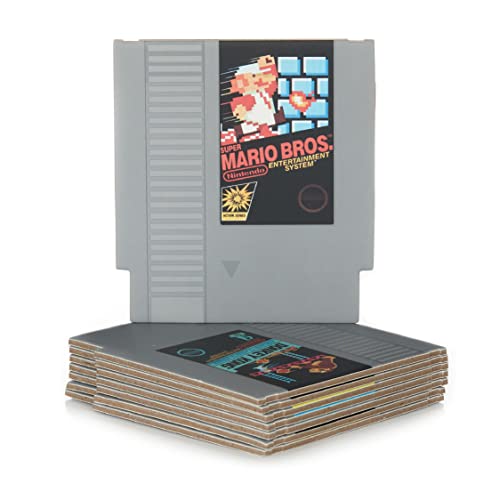
Do you love Nintendo? Then you have to check out this amazon NES cartridge drink coaster set!
This set includes 8 double sides drink coasters that look just like the classic NES cartridges.
This set is a perfect gift for the gamer in your life!
What is the Super Nintendo?
The Super Nintendo Entertainment System which is also known as “Super NES,” is a 16-bit home video console developed by Nintendo. The gaming console was released in 1990 in Japan and South Korea. In South Korea, the gaming console is famous with the name “Super Comboy” and was distributed by Hyundai Electronics.
Nintendo gaming consoles use cartridges to play the games and some of the cartridges have memory cards built into the games. The Super NES was released in 1991 in North America, and sold over 23 Million consoles in America alone.
So, the answer is “YES,” super Nintendo has memory cards and you need extra memory cards as well if you want to save your data in it.
What are the technical specifications of the Super Nintendo?
When you look to buy a gaming system, you should always look at the technical specs of the gaming system.
CPU and RAM
The speed of a 16-bit gaming console uses a powerful machine known as “Ricoh 5A22” and the speed of the CPU is 3.58Mghz, but the speed of the CPU will drop down to 2.5 MHZ when dealing with the slower peripherals.
Let’s break down all the information of the CPU and RAM:
- Processor: 16-bit Custom WDC 65C816 core
- Clock Rates (NTSC): Input: 21.47727 MHz Bus: 3.58 MHz, 2.68 MHz, or 1.79 MHz
- Clock Rates (PAL): Input: 21.28137 MHz Bus: 3.55 MHz, 2.66 MHz, or 1.77 MHz
- Buses: 24-bit and 8-bit address buses, 8-bit data bus
- Additional Features: DMA and HDMA, Timed IRQ, Parallel I/O processing, Hardware multiplication and division
In the 16 bit system of Nintendo, usually 128KBs of Ram is used, but you can still use extra ram (Extended Ram) for your usage of Video and Audio Subsystems.
Video
When the Super Nintendo released, it was extremely loved by all of the gaming comminity. The reason it was loved was because When Nintendo created the Super NES, they did not sacrifice the quility of the video or the system when they created it. Instead Nintendo pushed the limit of what the Super NES could accomplish. There are basically 8 video modes available for the programmers to set-up everything for their games.
Let’s break down all the information related to Video:
- Resolution: Progressive: 256×224 (8:7), 512×224 (16:7), 256×239 (256:239), 512×239 (512:239) Interlaced: 512×448 (8:7), 512×478 (256:239)
- Pixel Depth: 2, 4, 7, or 8 bpp indexed; 8 or 11 bpp direct
- Total Colors: 32768 (15-bit)
- Sprites: 128, 32 max per line; up to 64 × 64 pixels
- Background: Up to 4 planes; each up to 1024 × 1024 pixels
- Effects: Pixelization (mosaic) per background, Color addition and subtraction, Clipping windows (per background, affecting color, math, or both), Scrolling per 8 × 8 tile Mode, 7 matrix operations
Audio
The audio quality always matters the most on every gaming system. Nintendo knows that if the quality of the video game isn’t great, then you’re not to enjoy it. Below are the audio specifications of what Nintendo put in their system.
- Processors: Nintendo S-SMP
- Clock rates: Input: 24.576 MHz SPC700: 1.024 MHz
- Output: 8 channels, stereo
- Effects: ADSR envelope control, Frequency scaling and modulation using Gaussian interpolation, Echo: 8-tap FIR filter, with up to .24s delay, Noise generation
What is the difference between an 8-bit system and the 16-bit system?
The difference between the 8-bit system and 16-bit system is pretty understandable and easy for most people. The 8-bit gaming console was also known as “Third Generation Console” and was able to perform 256 Calculation at one time. When we talk about the 16-Bit gaming console, it was able to perform 65536 calculations and is known also as “Fourth Generation Console.”
Generally speaking, if the numbers of bits are greater, it means that “The console is going to perform better.” With better performance, the console works faster, runs games smoother, and even gives the gamers a better experience.
Nintendo 16-bit gaming console games
Many people have asked what the top games were for the Super Nintendo. While there are many opinions, below we have outlined the top games and their rankings.
- Mortal Kombat II – Score: 5 out of 5 stars
The game was famous for bringing blood (fighting) into the game and one has to beat another in order to open different features, skills and levels.
- Mega Man X – Score 4.7 out of 5 stars
The game is known for introducing the horrible anime for the very first time in the gaming industry of 16-bit gaming console. Also, they revived the Mega Man franchise by introducing the “X” series.
- Super Mario World – Score Score 5 out of 5 stars.
This game was one that took the world by storm. Based off of the original Mario and Super Mario, the Super Mario World was just one more game that users fell in love with instantly.
- The Legend of Zelda – Score 5 out of 5 stars
The game was instantly a hit with its great storyline, and it’s amazing graphics and gameplay. This game is definitely one of the top rated games among every single game ever made for the Super Nintendo.
Conclusion
Although many people did not realize the Super Nintendo had some Memory cartridges made for the system, it did. These designers went so far as to make the Super nintendo cartridge a masterpiece that could adapt a SD card and even download entire games! If you have not gotten around to purchasing your Super Nintendo yet, or maybe you wanted to find out more about them, you can still purchase one here!
If you have purchased one, there are so many gaming options that are available. If you have not found the games you love, you can always try by starting at the top rated games of the Super Nintendo. These games can be found by watching this short video.
Now that you have all of your good games, and you know about the Super Nintendo you can go ahead and play the games that you and so many others like you all around the world are playing!