
*This post may contain affiliate links. As an Amazon Associate we earn from qualifying purchases.
In this digital era, music has transformed from the big record player to mp3 devices and in the last few years, mobile phones. The feeling of listening to a vinyl record is far more than just the music it plays. It is the feeling that those records bring and the memories that return every time you hear that crackle before a song starts.
Whether you are a record collector or just a person who has a few records you want to keep your records and player in as good shape as possible. That is where this article comes in to help you answer an important question:
Do scratched records damage the stylus?
Playing scratched records won’t damage the stylus but certainly could further damage the record and will affect your listening experience. Those scratches will cause the stylus to jump or move out of the groove. Often the stylus will follow the scratch rather than the groove causing even further damage.
Since it won’t damage the stylus the main answer to the question is no, however it can damage your record and make it unplayable.
Vinyl records are an amazing way to listen to music of the past and present but a lot more things can go wrong with physical media than can go wrong with streaming it.
Of course with that extra work comes not only nostalgia but also better sound quality (according to many “experts”).
In this article I will discuss the issues that might come with trying to play scratched records and what you can do to avoid damaging your records any further.
Do you love playing your vinyl records but your record player has seen better days? Well, you are in luck! There are tons of great record players that not only have great sound quality but also won’t break the bank. You can find them by clicking here.
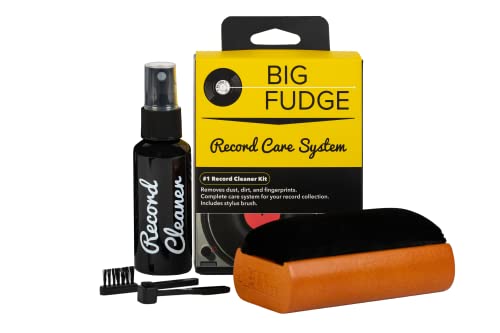
If you love records and record players, you must get a record-cleaning kit like this one. It is designed to ensure that your records stay in excellent condition to last you for decades.
Get this cleaning set and keep your vinyl records in perfect condition!
What is a stylus?
Ok this might seem like a simple question but I wanted to start with the basics. A stylus (also called a needle) is the part of your record player that fits into the grooves on the record and makes it play.
The stylus can be made of a variety of materials with some stylus’ even being made of diamond! The quality of the stylus will normally vary depending on the quality and expense of the record player that it is on.
The better the stylus, the better the sound quality that your machine will be able to produce.
What could happen when you play a scratched record?
If you have a scratched record and play it accidentally or even decide that it is worth the risk there are a couple of possible things that could happen.
#1 Horrible sound quality
This obviously isn’t a huge issue besides hurting your ears a bit. If you have minor scratches this will normally be the only issue that playing a scratched record could cause. It might squeak or play some off pitch music for a second before going back to normal.
Of course if your record has a lot of small scratches then that minor inconvenience quickly becomes a huge issue. Having a squeak, crack, or off pitch note isn’t a big deal once or twice per record but when it starts happening all the time you should probably do something about it.
We will discuss how to fix scratched records in the next section.
#2 Damage the record further
This is what happens in most cases. Most of the time if you play a record with scratches on it the stylus will jump around. Not only does this make the music unlistenable but it will also damage your grooves.
Once you damage your grooves severely then the only way to fix it is to sand the record down some to try and remove the scratches. This is a much more difficult process and something that should be avoided if possible.
It is a good idea to check every record before you put it on your player to check for scratches. If there are any that are visible then you should stop and take the time to fix them before you play the record.
The last thing that you want to do is make the record worse because you tried to play it!
How to fix a scratched record
At this point I am assuming that your record is scratched enough where it is noticeable and you either don’t want to risk playing it with how deep the scratch is or you tried playing it and made it worse.
Whatever the case you don’t have to worry. Since records are quite durable there are a few steps that you can take to remove the scratches from the records. Rather than forcing you to read all of those steps and trying to imagine how to do them I’m going to give you a couple of videos that you can watch to learn how to fix your damaged record.
The first video is best if you have a minor scratch jumping that your record is doing. This method will only work if your scratches are across the groove and not with the groove. This method isn’t the best for your records long term so if the scratched record is valuable I wouldn’t use this first method.
This second video is the end all solution to fixing records that are scratched. It works great with large or small scratches and can make your record play like new again. This method is more time consuming and can be far more work but it is the best way to fix your record.
If you have never fixed a scratched record before I would try and find one at a second hand store or flea market to text your skills on first before you do it with any records from your personal collection.
Is it ever possible to damage the stylus?
Hypothetically if your record has scratches so large and so deep that the stylus could get stuck in them then yes, it could damage your stylus. A scratch that deep would be impossible to ignore and would look like the Grand Canyon compared to the grooves on the record.
Even with a scratch that large it might not damage the stylus as the stylus will normally just pop out once it comes to the end of the scratch. All the conditions would have to line up perfectly for this worst case scenario to ever take place.
If you have a record that a cat has been suing for a scratching post for the last few months then maybe that record could damage your stylus. Hopefully you are smart enough to not try and play records like that but it isn’t IMPOSSIBLE to break a stylus with a record that is that badly scratched.
Some common sense is a great way to ensure that you don’t damage your stylus or even your record player. If you look at a record and whistle at how bad the condition is… it probably isn’t a good idea to try and play it.
Watch out for dirt and dust
Now that we know that damaging your stylus with a scratched record is virtually impossible (assuming that you use some common sense) let’s discuss something else that could cause issues for your stylus…
Dirt and dust.
Now I know that sounds like an exaggeration, afterall how could some dirt and dust hurt the needle on your record player? Playing over dirt and dust that is on the record will normally be more harmful to the stylus than a scratch could ever be!
This is especially true because dirt and dust is harder to see and people are far more likely to throw a dirty record on the player than they are to try to play a record that is scratched. The truth is that dirt can have a serious impact on your stylus.
Because of the dust, your stylus will not only have the music not sound as good. But it will significantly shorten its lifespan as well. The dirt causes friction between the tip of the stylus and the record’s surface which will cause the stylus to wear out.
This of course isn’t immediate but it will significantly reduce the time that it will last as well as hurt the sound quality of your records.
If you have been playing your records while dirty or dusty there are solutions. There are some excellent stylus cleaners and brushes on the market that all do an excellent job at cleaning up your dirty stylus.
Of course prevention is better than trying to clean your stylus after the fact so I always recommend that people give their record a quick brush off before they play it each time. This will help ensure that the stylus stays as clean as possible and in good operating condition.
If your record has some serious dust or dirt on it then it might require more than just a record brush. In the video below it gives some helpful tips on how to clean your records if they are really dirty.
Conclusion
Vinyl records can be an amazing thing to collect and listen to on a regular basis. For many people they are a symbol of excellence and of how the “old time” music was better than the songs of today. Whether that is true or just people not wanting to let go of the past is hard to say but it is undeniable that putting a record on a player and hearing it start is an exciting thing for many people.
Even though a scratched record won’t damage a stylus it is a good idea to fix the scratches before you play your record. Yes, it can be difficult and time consuming but the end result is far better for your player.
Always be sure and check your records before you play them for scratches but also dust and dirt. It is always a good idea to keep a record brush handy so you can easily dust off your records before and after you play them.
This will ensure that they stay dust free and help your stylus last as long as possible.
Records and record players can last many decades but you have to do your part to take care of them and make sure that they stay in tip top shape!