
*This post may contain affiliate links. As an Amazon Associate we earn from qualifying purchases.
Have you ever wondered if the Atari gaming consoles actually make sound? Maybe you just purchased a used one, and you cannot get it to make any sound. Either way, you are about to find out if Ataris actually have sound.
So, Does Atari have sound?
Although the early versions only played a combination of a few tones, with the advancement in technology, the sound quality has also improved. Atari models such as Atari 2600, Atari 5200, Atari 7800, Atari Jaguar, and Atari Lynx all played game sound. The earlier versions had very poor audio quality, though, they were added to make the gameplay a little more interactive.
Although it may sound simple, these Atari models create a lot of exciting and creative sounds. These sounds added innovativeness and liveliness in the games. Some of the game sounds are still quite popular.
Today, these separate game theme sounds and general Atari sounds are not limited to only these consoles but can be played over the internet. Many people have uploaded the complete soundtrack of these Atari games as an iconic Atari memory. Although I am not going to post the hour long video, I will share my favorite 10 with you guys.
If you are an old-school Atari lover then you have to get a classic Atari T-Shirt to show it! To see the most popular Atari T-Shirt retro designs that will stay classics for years just click here.
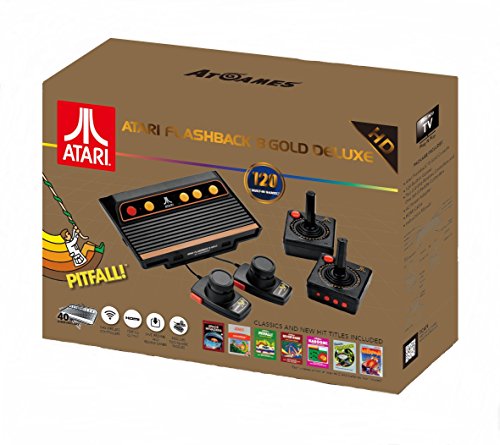
If you love all things Atari then you have to check out this awesome Atari Flashback console.
The Atari Flashback 8 comes with two wireless controllers (YES, WIRELESS!) two paddle controllers, and 120 authentic Atari games.
The sound quality in different Atari Consoles:
When the former models of Atari 2600 were released, they added a new big break in the market. This was because of its cutting-edge and innovative gameplay. One other thing that also got popular was the audio these games played. The 2600 versions used the basic sounds of the game, such as beep, tone, signal, warning, etc. It fulfilled the standard requirements of the games but was not that much of a big deal. The sound pitch value was the same, but the length differentiated different tones.
The later varieties of Atari played better sound as compared to Atari 2600, but still, they were not very good quality. The games developed in the next phase of the Atari era included game theme sounds, but even with the improvement of technology, the music did not seem to have improved much.
The audio sounded the same, but a little sound chip improvements were made. Today, a lot of people still remember what Atari games music sounded like, which adds to the nostalgic memories that people have for Ataris.
Sound Setting options
Almost all of the Ataris displayed the option of manual adjustment of sound. You can customize the sound type by adjusting the type, pitch, and volume. It can be done by simply leveling these options by moving it up or down with a controller. Most people do not even deal with changing the sound setting on their Atari gaming systems, but a lot of gamers actually prefer it as they can customize the tune of what they are going to be listening to.
By adjusting the type, pitch and volume, of the Atari, it is easy to duplicate the sound that you originally heard when you were a child, or even that you have memories of as a young kid. No matter the reason, being able to adjust the sound you were hearing is one of the big steps most gaming consoles did not allow in that day and age. Even today very few gaming consoles allow you to adjust the sound besides up or down.
Sound problems with early Atari consoles:
As popular as the Atari consoles were, they had a lot of sound issues. Even the mint condition consoles had audio interference after some usage. This error message was displayed on the console output as a red indicator. This sound problem happened because of the wrong adjustment of the sound symbol.
In almost all the Atari consoles, a sound problem occurs in a way that it does not play sound on the first run. This can be solved by restarting the game. When you are unable to see the red alert mark but also can’t hear the sound, then the only resolution could be to restart the game.
Although there is no permanent solution to it, this is the only solution that works. You may find it hard to believe, but the same problem will even occur in a brand new console.
A lot of people complained that the Atari consoles played an interfered sound. The actual sound cannot be heard, or it gets frozen which, again, is a significant problem that has no stable solution.
Why was sound an essential ingredient for Atari?
Because Atari sounds increased the engagement level of the games they were hoping more people would buy the games. The person playing the game got to enjoy a much more immersive experience when there was sound.
Sounds defined the situation and mode of the game. Sometimes the sound speed increases to a frenzy during an important part of the game, while other times the typical theme would play all the time.
How to customize the Atari sound quality?
Atari consoles come with a built-in sound chip. The problem is that the sound chip has inferior quality. Because of the interference, noise, and distortion it played, there are custom adaptors and methods through which the sound can be made better.
Since the music of the game, such as beep, tone, warning, etc. adds association to the game, it should be there for the period of the console. To do this, all you need is an Atari supercharger. Different companies made it so that there can be a variety of different branda that you can use.
The adaptors not only improved the sound, but graphics and memory as well. This is why it improved the overall gameplay of the console.
The supercharger adaptor contains separate 6-8 KB of RAM. It can be easily connected with a cable. Once it is connected, it should enhance the sound quality to its original level. It may even give you a little bit better quality than the sounds that the system originally had.
Conclusion
Now that we know all about the Atari sound, and what makes it, we can reminisce how life used to be when you were growing up and turned on your Atari.
Although not everyone who is reading this will have grown up with an Atari in their home, I hope that you will take advantage of the era we live where you can purchase an original Atari for your house.
If you haven’t enjoyed the soundtrack of Atari, give it a shot. We are sure you’ll recall your memories related to this game by only hearing the music.
I hope this article has helped you relive your childhood and enjoy your Atari once more! There is nothing better than coming home from the office, sitting down with your kids, and playing games that you played as a kid!
If you want to go down the memory lane and want to enjoy the musical gameplay, but you don’t want to look it up online, you can always just plug the console in and start the process. If you have any sound related problems or want to know any specific detail, feel free to let us know.