
*This post may contain affiliate links. As an Amazon Associate we earn from qualifying purchases.
Have you ever looked at getting a Super Mario Bros Wii game, but did not know if you had to use a nunchuck to play it? Maybe you hate playing with them and just find them annoying so you are hoping to not have to use one.
No matter what question you have, we are here to help.
So does Super Mario Bros Wii need a nunchuck?
Although you have the option to play using a nunchuck, one is not required to play Super Mario Bros. on the Wii. Most people do find them useful though when playing the game, even though they are not required.
If you want to know more about playing on the Wii and specifically Super Mario Bros, you will want to keep reading.
You can also watch this video below if you prefer as well.
Are you a huge Nintendo fan? Then you have to check out the Mario and Nintendo gear that you can get. Whether you want a Mario wallet, a Nintendo sweatshirt, or a classic NES hat there are plenty of choices to choose from. You can find them all by clicking here.
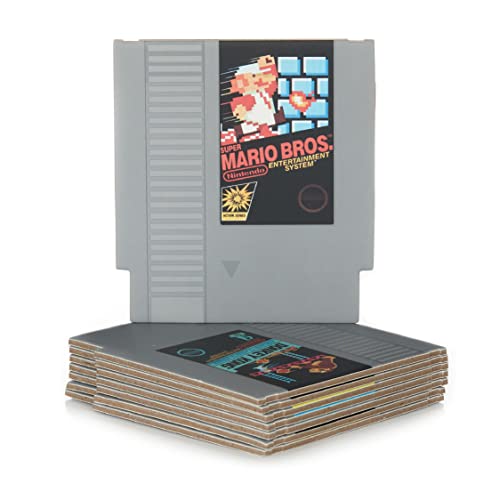
Do you love Nintendo? Then you have to check out this amazon NES cartridge drink coaster set!
This set includes 8 double sides drink coasters that look just like the classic NES cartridges.
This set is a perfect gift for the gamer in your life!
How do I use the nunchuck to play on the Wii?
You can use the nunchuck to play Super Mario Bros on the Nintendo Wii console by first syncing the original controllers to the Wii and then going into the game on the Wii. Next you will connect the nunchuk to the Wiimote using the cord that plugs into the bottom of the Wiimote.
This is a straightforward step that will lead to a whole new experience playing the game.
Because of the connectivity of both of these devices, most people prefer to play with just the classic remote. Some people just don’t like the cord hanging between the two remotes and would just rather play with just the one controller.
Is the nunchuck a required part of the controller when playing on the Wii?
Super Mario Bros can operate just fine without the nunchuck, although most people maneuver better and find themselves playing better while using it. Many people think that since the Wii comes with a nunchuck, all of its games will also need it to play smoothly.
However, this is not the case, as we have seen above. It can be an additional feature that some people love, but it is not a requirement on all games.
However, there are some games that require the use of the remote and nunchuck so make sure to check that out before buying a game for your Wii. It should say on the back of the game’s case whether a nunchuck is required or not.
Nunchucks are limited to only the Nintendo Wii consoles, whereas Super Mario Bros is a universal game that is available on all off the Nintendo consoles that have ever been released.
What console is Super Mario Bros. made for?
Super Mario Bros is available on all of the Nintendo consoles. Since it is a classic game and is very popular, all of the consoles that Nintendo has made to date all have a Mario game on them.
Super Mario Bros. can also be played using a lot of different controllers as some Nintendo controllers work across different platforms.
If you are trying to play this game on the Wii, you can even use the original Nintendo Gamecube controllers with the Wii! This is great as a lot of gamers and people just prefer regular controllers instead of ones that pick up on movement however the downside to this is the Gamecube controllers are hardwired unlike the Wii remotes that are wireless.
Because the game is simple and fairly easy to play, it does not require a bunch of buttons and can be played by whatever controller you prefer. Nintendo wanted the gaming experience to be pleasurable, and while some people prefer the nunchuck, others prefer a regular controller.
The Wii nunchuck includes all the buttons that are available on a classic and straightforward Nintendo console. Additionally, it contains some more buttons that are supported by advanced games. Because of this, the nunchuck gained a lot of popularity, and most of the classic Nintendo people switched to using this controller.
The people who still enjoy Super Mario Bros on the Wii can make use of their Nintendo nunchuck if their original game controller is not working.
What is Super Mario Bros?
Super Mario Bros is a universally loved and renowned game that has been enjoyed by almost every gamer for the last 3 decades! It broke all the records when it was originally released, and it is still considered as Nintendo’s all-time best game ever made!
It can be enjoyed on tons of platforms that Nintendo has developed including consoles, handheld devices, and even throwback consoles. They even created some apps for every single phone that you can play as well!
What is the best console to play Super Mario on?
While a lot of the older generation swear that the only way to play this game is to play it on the original NES, those systems are expensive to buy in many cases and the graphics just simply put are horrible when compared to today’s consoles!
Since there are many consoles to play this game on, it all depends upon your personal preference.
I personally prefer to play Super Mario Bros on the NES Classic or the SNES classic as both of them have wireless controllers that you can use as well as saving options. I know that might be a horrific statement to some people but I am getting too old to sit on the floor only a few feet from the console and TV!
If you like to play Super Mario Bros. on the Wii, I would recommend using the nunchuck, as that is the way it was designed to work. Since some people don’t like the nunchuck though, they may choose to use just the Wii remote, or even the Gamecube controller.
No matter what controller you play with, you are going to have a good time!
What makes the Wii nunchucks different from the classic Wiimotes is the style of play and design. Since the Wii nunchuck has a very relaxed and stylish design, it is more likely to help you relax while playing the game.
If you want to play the Super Mario Galaxy for the Wii though, then you will need the Wii nunchuck as it has to be used for all the functionality to support the in game controls. If you want to enjoy the other Super Mario games such as the original Super Mario or Mario Kart, then you can play with whatever controller you like to play with the most.
Nintendo was sure to give you options as the gamers know what they like.
In the classic version of Super Mario and Super Mario Galaxy, you will need at least one nunchuck since they only support a single player. However, if you want to play Mario Kart with your friends or family, then you will need more than one compatible nunchuck with your console, or you can use a Gamecube controller as well.
Although playing with the nunchuck does not add new characteristics to the game, it will give you a unique way to play the game. Instead of the classic playing style, you get a different feel as you play the game. Because the nunchuck was specifically designed to work with the Wii, this is the best way to play the game.
Conclusion
Now that you know that you can play the Super Mario Brothers game on the Wii with more than just the regular controller, you can learn how to do special moves and impress your friends with how good you are.
No matter what controller you prefer to use, Nintendo wants you to be able to play the game and enjoy playing with whatever controller you felt comfortable using. For some people this is the Gamecube controller, and for others it is the regular Wii controller.
Some people even prefer to use the nunchuck when they play.
It honestly doesn’t matter what controller you play with, as long as when you play you make sure you are having fun and enjoying the game with the controller you chose.