
*This post may contain affiliate links. As an Amazon Associate we earn from qualifying purchases.
With the massive rise in the popularity of video games, Xbox has acquired its fair share of the market. One of the interesting factors while playing Xbox games is the Live feature in which a player can play online while interacting with other players while playing against them or together with them either by themselves or as part of a team.
Numerous people believe in trash-talking but this may lead to their Xbox Live being banned if they do this too regularly.
Cursing and trash talking are far from the only reasons that you can get banned as you can be banned for any violation of the terms and conditions but these two are the most popular reasons for being banned.
So how do you check if you are banned from Xbox Live?
Normally a notification will pop up that will detail the exact ban and how long the ban is for. You should also receive an email to the email address on file for the account. If you are unable to access Xbox Live but you didn’t receive a notification you can contact the Microsoft support team by clicking here.
In the rest of this article we will go into more detail about the Xbox Live ban as well as other related bans for your Xbox console.
If you would prefer to watch a video rather than reading the whole article you can do so below.
Are you a huge Xbox fan? Then you have to check out this amazing Xbox gear and decor. Whether you want an Xbox-styled wallet, a sweatshirt, or a pair of Xbox socks there are plenty of choices to choose from. You can find them all by clicking here.
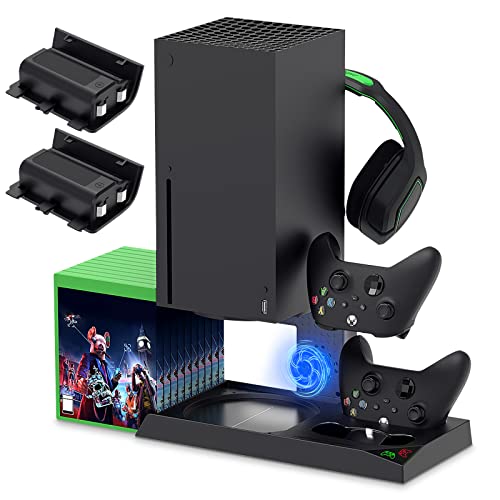
If you have an Xbox you need to get this cooling/charging stand for your console/controllers.
There is nothing worse than being ready for a long night of gaming only to realize your controllers are dead. With this stand that never has to happen again!
What is an Xbox Live ban?
Normally there are two types of bans that are imposed on people depending on the severity of your “crime”.
They are Xbox Live bans which completely removes the online ability for your Xbox and then there are communications bans which don’t allow you to communicate on Xbox Live for a period of time.
Knowing which of these bans you have incurred is quite easy as a communications ban will allow everything to work except for communicating. An entire Xbox Live ban (also known as a console ban) will not allow you access anything at all on Xbox Live.
![Xbox Live Gold: 12 Month Membership [Digital Code]](https://m.media-amazon.com/images/I/51nM8or-YZS._SL500_.jpg "Xbox Live Gold: 12 Month Membership [Digital Code]")
How to check whether your account is banned from Xbox Live?
Some people aren’t sure if they are having technical issues or if they are facing a ban. If you have a full Xbox Live console ban then you will get a specific notification that gives the fact that you are banned but not much else besides that.
Below is the specific message that you will get when your Xbox Live is banned:
Xbox 360
“This console has been banned for violations of the Terms of Use. To protect the Xbox Live service and its members, Microsoft does not provide details about console bans. There is no recourse for Terms of Use violations.”
Xbox One
“Your console is banned. This console has been banned for Terms of Use violations. To protect the Xbox service and its members, Microsoft does not provide details about specific console bans. For more information out console bans, visit xbox.com/Xbox one/console ban.”
If you are getting this prompt on your Xbox screen, then your Live account is surely banned. Sometimes there are just codes that depict nothing but some of the source code that doesn’t describe the reason for the ban.
Microsoft has some pretty strict rules against those who disobey their policies or service agreement.
If you don’t see either of the above notifications then you shouldn’t have a full Xbox Live ban. You might have a communications ban or other issue which you should contact Microsoft support about.
Possible reasons for the Xbox Live ban
Even though the ban language is anything but helpful in telling you why you were banned there are a few reasons that people have reported for being banned. Remember just because the ban went into effect today the actions that caused the ban could have been done many days or weeks ago.
Some people have even reported being banned for something that happened many years ago as well!
Some common reasons for an Xbox Live ban are:
- If you have posted something in a disrespectful way, such as comments, ideas and opinions and keep on doing that regularly while playing, then it may lead to a ban or suspension of the account.
- If you have been rude or insulted anyone while playing online and if the player complains then it may cause a ban or suspension as per the policies of Microsoft as there are numerous admins and players associated with it.
- If you post any type of profanity, then it can also be a reason for suspension or ban.
- If you have posted some misleading personal information on the platform or sensitive information such as physical or email address, age, phone number, credit card, etc. then this can be a reason for suspension or ban. This information sharing is totally against the policies of Microsoft.
- One of the main reasons for a suspension can be the naming and shaming of other users. If you have done this then the people may complain about you and that leads to suspension or ban of your Xbox Live service.
- If you are talking or trash talking on controversial topics, then it can also make you an offender of violating the policies. It is best to avoid anything controversial when using Xbox Live.
- Personal attacks on any of the players or an abusive post can also get you suspended from Live services.
- When it comes to repetitive action of some of the violations or malpractices such as trolling or negative rants then it may cause your Live services to be suspended or banned.
- Fraud such as account theft, stolen information, etc. can lead to a suspension or ban.
Of course these might not seem like that serious of issues but Microsoft will only suspend your account for most of these and then the suspension will be lifted after a number of days. A repeated violation of these and other rules is what will eventually turn into an all out Xbox Live ban.
If you repeatedly receive suspensions from Xbox then that is a warning that you need to change the way you are acting while playing online before you are permanently banned. Bans are rarely issued without warning except in the most serious of cases so you will likely have plenty of warnings before you finally get banned.

Conclusion
While permanent bans come with specific notifications, a suspension will often just give you error messages. If you notice that you have an error message on your console then it is a good idea to search online and see exactly what the error is for.
Don’t just assume that everything is fine and stick your head in the sand as every suspension on your Live account means you are a little bit closer to an all out Xbox Live console ban.
Ultimately, if you think that you have a ban and are unable to access Xbox live then you are probably right. Because of the rise in online bullying as well as the increase in deaths because of it the gaming platforms are all stepping up their games to remove trash talking, vulgar language, slurs, etc.
It is important to remember that even though you are online and the person might be on the other side of the world they are still a real person with real feelings. If you keep that in mind when you are interacting with people online or off then you will not ever have to worry about being banned from any online service or console.
It is also important to note that just because someone else was using the console when the ban took place doesn’t mean that Microsoft will lift the ban for you. You are responsible for anything that is said or done using your console and account so if you have some friends or family members that don’t know how to control themselves it might be a good idea to not allow them to use your console.