
*This post may contain affiliate links. As an Amazon Associate we earn from qualifying purchases.
Are you looking to clear out several shelves of storage space packed with Vinyl records? Maybe you just found some records for dirt cheap and want to try to do a little weekend DIY project.
There are tons of things that you can do with records but most of them require actually cutting the record. How exactly do you cut vinyl without breaking it into a bunch of small pieces?
To cut a record without it breaking you need to heat the record in the oven to make it partially soft. You will then want to use a hot knife or scissors to cut the record as needed.
Many people have old vinyl lying around and if they are damaged or you simply don’t listen to records anymore don’t just throw them away! There are tons of different things you can do with vinyl records once you are done with using them for music.
To learn more about the best way to cut a vinyl record you will want to keep reading or you can watch the video below as well.
Do you love playing your vinyl records but your record player has seen better days? Well, you are in luck! There are tons of great record players that not only have great sound quality but also won’t break the bank. You can find them by clicking here.
There are plenty of ways you can reuse your vinyl records but most of them involves cutting the record. But how can you cut a vinyl record into different shapes to create a cool project without breaking it?
That’s what this article will help you with.
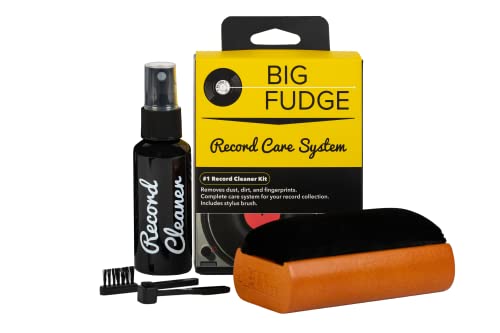
If you love records and record players, you must get a record-cleaning kit like this one. It is designed to ensure that your records stay in excellent condition to last you for decades.
Get this cleaning set and keep your vinyl records in perfect condition!
How to repurpose a vinyl record
Cutting a vinyl record can be as simple as cutting a piece of paper. Although the process takes a lot of practice and safety precautions to master you can make tons of great arts and crafts out of them.
In this article, you will learn how a cut vinyl records into shapes without breaking them
What you will need?
- Vinyl record
- Oven
- Cutting board
- Safety gloves
- Wood-burning tools or heat knife (optional)
- Metal snips or utility knife (if you don’t have the tools above)
- Paper cutter
- Pencil
- Masking tape
- Cookie sheet
- Sandpaper
- Oven mitts
- Safety goggles
Have a plan
In every art project, you will want to start with a plan, template or outline on how to complete the task. Start by knowing exactly what you are wanting to create before you ever put your knife on the record.
It’s incredibly helpful to have a plan drawn out if you are going to be cutting specific shapes. That way you can either trace the template on the record or look at the template while cutting the record.
If you can’t draw very well by hand you can even use drawing software. For those who are crafty, find a superb photo editing program online to create an image outline that can be transferred to the record.
You can also get some shapes and trace them on a paper and cut them out. Remember, you are removing the negative space when you create the image.
Transfer the image
Once you have created your template on a paper, you need to cut it out and tape it to the vinyl record. Make sure you can trace the image on the record edges. To make the design onto the record use a pencil as the pencil marks are much easier to wipe away if you make an extra mark or end up messing up.
Preheat the vinyl record in the oven
Place the rack in the center position and turn on your oven. You will want to preheat your oven to 200 degrees Fahrenheit. Place your marked vinyl on a cookie sheet in the oven for three minutes. (don’t put the template in the oven or it will likely catch on fire) When heating the record keep the oven light on to watch the vinyl heat. The heat will soften your vinyl making it easier to cut.
Once you’re done, remove the record using oven mitts. The record must be malleable, if it is not you will need to reheat it a little longer. To avoid your oven rack/tray from being covered with melted vinyl, use aluminum foil under the record so it stays on the aluminum foil. You will also want to put a try of some sort under the foil to help the record stay flat during the heating process.
For most people a pizza pan covered in aluminum foil works best for this process.
Begin to cut the record as soon as you remove it from the oven. In about thirty seconds to one minute, the record will begin to harden. You will want to cut or shape it quickly but if you aren’t fast enough you can certainly put it back into the oven as needed. It is a good idea to keep the oven on during this part of the process just in case you need to reheat the record.
To make the cutting flow as smooth as possible, ensure your workspace is ready. Have all the essentials you need such as a cutting board, and cutting tools, ready and nearby. You can also use wood-burning tools or a heat knife to cut the record.
These tools will work far better than just using a utility knife or scissors.
If you use a wood-burning tool or a hot knife, it’s recommended to use a smooth surface resistant to heat. Don’t cut for more than ten seconds at a time with these tools as cutting for longer than that can cause the record to begin to warp which might ruin your design.
Don’t forget to wear safety gloves when using heating tools as they can reach up to 1000 degrees Fahrenheit.
Cutting your vinyl record
Use a pair of heavy-duty scissors to cut the heated record. A utility knife does a great job too. To cut the record, place the record on a flat, smooth heat-safe board. While holding the record with an oven mitt or potholder, follow along with your design as you cut.
If the record begins to get hard and you are unable to cut it with the scissors or knife then pop it back into the oven for a minute or two. Depending on how intricate the design or how fast you are, you might have to reheat it multiple times before you are done.
Whether you are using scissors or a knife it is important to make sure that they are sharp. Replacing the blade on the utility knife before using it or buying a new pair of scissors is a good way to ensure that they are sharp.
You can also sharpen an old pair of scissors that you no longer use specifically for this purpose. You can learn how to sharpen scissors in the video below.
Cut using a hot knife
You can also use a hot knife to cut your record. Get one from an art or crafts shop. Hot knives are used in crafts and woodworking for a precise cut on delicate materials. Hot knives are the best cutting tool for vinyl records.
If you use a hot knife you don’t have to mess with using the oven and it will save you a lot of time.
You can visit your local store (craft or art), or home improvement store to buy a hot knife to use specifically for cutting records. Hot knives have a variety of other cool uses so if you are into doing DIY projects it is a great tool to have.
Hot knives are heated using electricity. Just turn on the knife for about three minutes for the blade to heat up to ensure that you make a smooth cut. Cut on top of a wooden or heat-resistant surface so that your knife doesn’t burn through it when you cut.
to achieve a smooth cut, poke the knife through the record and pull it along your design. Don’t hold the knife in one spot for too long as this might cause the record to melt and bubble up.
As you cut, remember that vinyl contains chlorine gas that escapes when heated. Wear a face mask while cutting to avoid breathing in the gas.
After cutting along the design marks, punch the vinyl pieces out when you are finished cutting them. Gently punch the entire cutout part so as to not damage the part that you are going to use.
The video below shows someone using a hot knife to cut out a record. The video is a bit long because it shows them doing the entire cutting process. If you have never used a hot knife before then watching someone else do it can be incredibly helpful.
Sanding
After you’re done cutting, the next step is sanding. It’s important you sand any rough edges and trim the lines you didn’t quite get cut all the way through. The best sandpaper finish to use on the edge is 120-300 grit. Carefully sand around the cut to remove any jagged and sharp corners so the record is easy to easily handle afterwards. Wipe off all the extra graphite marks you may have left from when you traced the template.
Once the sanding is complete and the record has cooled down you are ready to hang it, use it in your larger project, or simply admire your handiwork.
Conclusion
There are so many crafts you can cut out of an old vinyl record. You can also cut your record using a rotary tool or a laser cutter for tiny items with a lot of details to them. You can also make plenty of craft/arts without cutting.
There are many different vinyl projects that simply involve you melting the record and turning it into a bowl or fusing multiple records together to make an art piece.
Cutting records can be difficult but with the steps given above and the videos on how to do it you should now be much more prepared to cut your records than you were when you started this article.