
*This post may contain affiliate links. As an Amazon Associate we earn from qualifying purchases.
A phonograph, in its later forms also called a gramophone (as a trademark since 1887, as a generic name in the UK since 1910) or since the 1940s called a record player, is a device for the mechanical recording and reproduction of sound. The sound vibration waveforms are recorded as corresponding physical deviations of a spiral groove engraved, etched, incised, or impressed into the surface of a rotating cylinder or disc, called a “record”.
To recreate the sound, the surface is similarly rotated while a playback stylus traces the groove and is therefore vibrated by it, very faintly reproducing the recorded sound. In early acoustic phonographs, the stylus vibrated a diaphragm which produced sound waves which were coupled to the open air through a flaring horn, or directly to the listener’s ears through stethoscope-type earphones.
So how do you fix a record player arm that keeps sliding?
There could be many different reasons why the record player’s arm keeps sliding. To fix the issue, you will need to make sure the record is clean, the table is balanced, and the arm is properly attached and lubricated. If these do not fix the issue, you should take the record player into a shop to see if they can repair the record player’s arm.
If you would like to know more about how to fix a record player’s arm that keeps sliding, please keep reading or check out this video!
Do you love playing your vinyl records but your record player has seen better days? Well, you are in luck! There are tons of great record players that not only have great sound quality but also won’t break the bank. You can find them by clicking here.
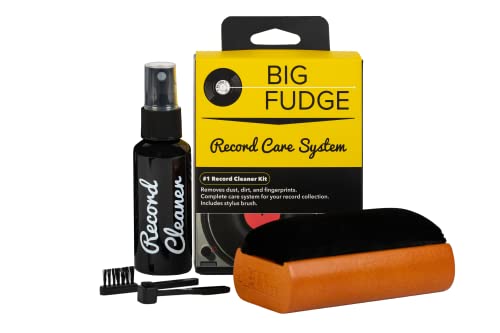
If you love records and record players, you must get a record-cleaning kit like this one. It is designed to ensure that your records stay in excellent condition to last you for decades.
Get this cleaning set and keep your vinyl records in perfect condition!
Diagnosing The Issue
This is the type of error in which the record player’s arm slides or skips or sometimes the record player’s needle slides across the record. This is very annoying and happens for several reasons. For solving this issue, you need to make sure the record player is placed level, along with the cleanness of the record player and the recording reel. The record player may not be level or the record possibly dirty.
First of all, you will need to make sure that the record player is on a balanced surface. The surface should be flat and properly levelled. After this, you can carry on with cleaning the record player, which may be done with help of a cleaning brush by utilizing a good-quality stylus cleaning brush or any other available brush. Be careful of touching it by the fingertips. The cleaning of the record player must be carried out with the help of a fluid stylus or record player cleaner. You need to take special care not to moisten the stylus unreasonably.
Now, you need to confirm the record is also clean and does not have any scratches on its surface. If required, clean the record, wiping comprehensively using a decent quality, commercially-available, record-cleaning kit. You can find one here.
Arm Movement
Check carefully to see if the movement of the arm did not stop after a while. If it did not, then you will need to inspect it for something out of place. Here, you need to implement a full deep service to your record player as it seems it is not serviced and is in need of the service as there are numerous dust particles which may be causing this problem.
Disassembling The Player
The sliding arm issue of these record players is pretty easy to tackle, but they must be isolated from the console for their proper service. When you remove the back of the console, you may be able to see the inner side of the faulty record player. The power cord along with RCA cables must be unplugged from the bottom of the record player. Take the assembly out of the casing of the record player. That is the tactic you can use to get the record player on a test bench to fix it properly and to service it meticulously. You need to clean the record player including every detail.
Deep Cleaning
Yet another thing that should be considered is, when you remove the platter for the purpose of service, there essentially is a need for deep cleaning. The proper re-greasing after cleaning must be carried out after the service as well. It may be more demanding and you might think it is a hard disassembly, but it brings more value to the service of the faulty recorder. Most of the recorders with the same problem are fixed after just re-greasing the parts properly. This is the simplest type of fix and it may prevent you from a lot of extra money spent on a technician.
Service Manual Coordination
Further than the above discussed practices for fixing the record player arm which keeps sliding, if the problem still exists, you will need to go through the diagrams and see if your friends have ever had the same type of problem ever occur to them and how they fixed the problem. You should also refer to the service manual for fixing the record player and discuss it with some reliable repair technician about the problem of the record player’s arm.
Sliding Due To Lubrication
The finger at the inside of the casing might be a problem if it is dusty or stained. This problem would be a real threat if the finger is lubricated. It is supposed to be dry and allowed to travel easily. The lubrication or oil would probably obstruct the operation of the finger. You could try cleaning it by utilizing a little alcohol on the finger first and then whisking or blowing it out of the finger so that no more dirt, dust and unnecessary oil is left after that it has been re-greased as necessary.
Servicing The Record Player
Next, you will need to practice by using some rubbing alcohol, denatured alcohol, or lithium grease shreds for servicing the record player arm. It is suggested that you use a good digital camera to take images of the mechanism before disassembling the record player. With the intention that you may have a reference as to how it was together before you took it apart. There are quite a few small varieties of clips, parts, springs etc. settled in the record player. All you need to do is to take your time and have a small amount of patience and then you will be able to service this record player by yourself.
Notch Fixing Trick
There ought to be a notch cut out of the gear which is used in the record player. This notch will be situated next to the point where the platter derives down as the tone-arm is at rest. There would be a ‘reject pawl’ which is a minor lever that is reddened to move back and forth generously over that notch, and is perhaps covering the notch. It must be positioned away from the notch for it to work properly. It is only expected to move over the notch as you alter to the end of a record or materially utilize the ‘reject’ function, and it rotated pushed back and away from the notch in the sequence of the reject operation. Occasionally this cleaning and fixing this notch finds the key to the problem with your record players arm.
Conclusion
You may face some difficulties in fixing a sliding arm on a record player. Even after you finalize it, and turn it on, you may be stunned as the arm moves over, and slides again. You do not need to be anxious about it as you tried all the potential actions to handle the problem but you are not a magician.
All such types of maintenance and repairing activities must be done with great care and control. It will be a great effort if you get your record player problem fixed by using the above discussed tricks. Try it with great care, and if none of those work, we suggest taking your record player to a technician.