
*This post may contain affiliate links. As an Amazon Associate we earn from qualifying purchases.
Have you been playing on your Xbox and recently received a notification that you were banned? Maybe you bought an Xbox console and just found out that it was banned and now you’re not sure what to do. Well, in this article we will walk you through step by step of how to get an Xbox console unbanned.
So how do you get an Xbox console unbanned?
Although there are many people that claim they have unbanned their console using hacking, the only official way to get your console unbanned is by contacting Microsoft and asking for the console to be unbanned. If you find the right person and plead your case then you may be lucky enough to have them unlock it right there.
Are you a huge Xbox fan? Then you have to check out this amazing Xbox gear and decor. Whether you want an Xbox-styled wallet, a sweatshirt, or a pair of Xbox socks there are plenty of choices to choose from. You can find them all by clicking here.
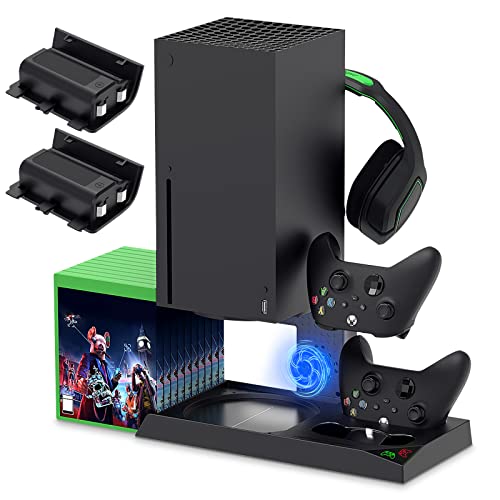
If you have an Xbox you need to get this cooling/charging stand for your console/controllers.
There is nothing worse than being ready for a long night of gaming only to realize your controllers are dead. With this stand that never has to happen again!
How to know if my Xbox console is banned
Microsoft is one of the leading companies in the field of software as well as technology. Xbox is one of the finest results of Microsoft, which has been entertaining users from around the world.
A large number of the populations use this gaming system for their entertainment purpose and they play spectacular games that are available on this network. Before getting yourself involved in playing, you are supposed to check that the console that you are buying is banned or unbanned.
Generally when you are purchasing the system or account from someone in second-hand the console may be banned. As a user, you have full authority to check the things and then get back to the purchase. The next thing is how you will come to know if the account is banned or not. Following some of the points below, you can easily know whether the account is a band or not.
Here are some of the points which will let you know that the Xbox console is banned or not. Follow these steps for confirmation of the ban.
- The very first thing which you should check to determine the ban of the Xbox console is to start playing the game. If the console is banned, then you will be unable to play online.
- An error code will reflect on the screen of your console and which will signify that the console has been banned.
If such things are happening to your console, then it is confirmed that the console is banned by Xbox. Now, in that case, you will not be able to do anything on your console as the banned consoles are completely worthless for playing games online.
How to get a console unbanned?
If you want to unban your console, then you need to talk to the customer care or Xbox enforcement team as they will consider your problem and help you in recovering it. It is pretty hard to get your console back if it is banned by the network.
Sometimes you will have to buy a new Xbox console if you want to continue playing on this amazing platform.
If there are some valid reasons that you can prove to the team member proving your account should not be banned, then Microsoft will take action and unban your account as they want to keep their customers happy.
As a user, you have the right to present your questions in front of the enforcement team and plead your case to them why you shouldn’t be banned.
How do we get banned consoles?
One of the major reasons behind getting the banned console is when users buy a second-hand console without checking the ban status of the console. As a user, you should always check the ban status of the product you were trying to purchase before you buy it.
Most of the users sell their Xbox console because they are banned and they can earn something from that. one thing should be clear to all the users that if a console is banned, then there is a good chance you will never get it unbanned.
There are some of the rare cases where the ban is uplifted from the console, otherwise, there it just doesn’t happen.
Why is an Xbox console banned?
There may be several reasons behind the ban on the Xbox console. An Xbox console is banned due to some inappropriate behavior of the users or their offensive steps against the rules and regulations of the company.
Users are of a different mindset and some of them are not ready to follow the norms and etiquettes which is very essential especially when you are on a social platform. They are very much rigid in their irregular approach which finally results in their ban from the network forever.
Once an Xbox console is banned, there is normally no chance of getting it back. Once it is banned, it will be banned forever.
Where should we buy Xbox consoles?
To save your money and time, you are supposed to buy Xbox consoles from a genuine retailer as there will be a guarantee for the console. Some people buy second-hand consoles, and in the long run end up with a banned console that is worthless.
At the time of purchase, it is hard to estimate whether it is banned or not. When you start using it though, you come to know the harsh reality and think about the money which you have used to buy that console which is basically no good.
What is the duration of the ban?
The duration of the ban of your console depends upon the fault you have committed. If you have committed a serious fault, then you will be banned for a long period or banned permanently. If the fault is minor, then the ban will be uplifted within a day or a week.
Generally, the duration of the ban is only a few days or a week. If it is the first time a user is committing a fault, then the network will ban the console for a short period. If there is severe misconduct, then the user may be banned forever from the network.
That’s why users are advised to play in a smart manner and follow the rules while being on this social platform. Otherwise if they don’t Microsoft would not think at all before banning you from the network.
How to never buy a banned console
Although people should never sell a banned console as in good working condition, they do. We do not live in a world where people are honest, and sadly that has to end with you being stuck with a basically worthless console. This is why anytime you want to buy a console brand new or secondhand, you should always purchase from a reputable store.
One thing to remember if you are buying a console from facebook or craigslist, is that if it sounds too good to be true, it probably is.
Conclusion
Now that you know how to unban your Xbox console, you can continue playing with your friends and playing all the games you love to play online and offline. Even though people do not like bans, Microsoft is only trying to keep the gaming platform free from cheaters and abusive people to keep the gaming platform fun for everyone.
So go ahead, play those games, and have fun, just make sure you follow the rules so your account doesn’t get banned again.