
*This post may contain affiliate links. As an Amazon Associate we earn from qualifying purchases.
Do you own an Atari Flashback, but cannot get the second controller to work properly? Maybe you and your friend always wanted to play a two player game but for some reason it just won’t work.
Well I have some good news for you! If you keep reading, you will be able to fix this problem quite easily.
So how do two players play with Atari Flashback Controllers?
All you need to do to play with two people on an Atari Flashback is:
1. Turn on your console.
2. Load the game.
3. Hit the button “Game Select” until you find the games “2 players” option.
Now that you know how to play two players in a game, you may want to read on to learn how to play certain games, or even learn the history of the original Atari.
With the latest 4k graphics, HDR, and virtual reality-based games, nothing can compare to the addiction of a retro game. Retro games are still ranking at the top of many people’s lists and reaching the height of success, but it is also because of new flashback systems of the original consoles like the Atari.
If you are like me, and you prefer to watch a video rather than reading, then the video below will be great for you.
If you are an old-school Atari lover then you have to get a classic Atari T-Shirt to show it! To see the most popular Atari T-Shirt retro designs that will stay classics for years just click here.
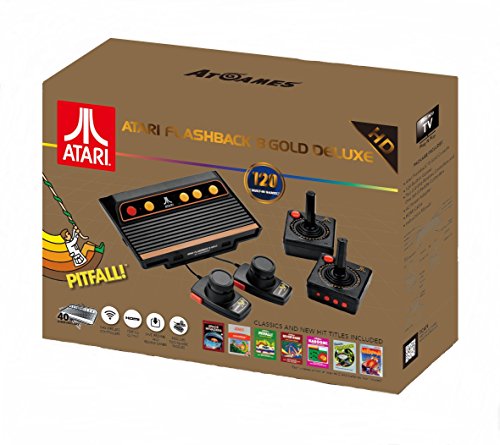
If you love all things Atari then you have to check out this awesome Atari Flashback console.
The Atari Flashback 8 comes with two wireless controllers (YES, WIRELESS!) two paddle controllers, and 120 authentic Atari games.
How to play two players with Atari Flashback Controllers?
Do you love playing games with your partner, sibling, or friend? Who doesn’t enjoy spending time with their friends, and playing video games. The Atari Flashback’s games give you access to play together with your friends using the same console box but with two different controllers.
In the Atari Flashback box, you will get two Atari Wireless Controllers. They are square-shaped and have a central joystick and a single red button on the top left corner.
If we compare these controllers to the original controllers, you will find out that although they may look similar, the joystick is actually removable for easy transportation and storage.
The rest of the system has a sleek and modern design to it while still looking similar to the original Atari.
With the Atari Flashback, two players can easily play games, but there are some games that are only one player. Most of the Atari 2600 is not difficult to figure out; which is one of the best things about the Flashback system.
Although you can easily play them by reading the instructions, we should warn you that the instructions are not that brief. Because of that, we will help you know which games you can play with two players. Most of the Atari 2600 games are just rapid-fire; Meaning they are “here you are plugged in, and here you go” type of game.
Although most of the Atari games are for two players, you can also select one player if you want to. However, you can even play Combat and Air-Sea battle with two players if you choose.
The Atari Flashback Classic Game Console was released at a very cost-effective price, and included an incredible amount of many different games for how cheap the console is.
What is on the Atari Flashback?
The Atari Flashback features 120 incredible Atari 2600 games. The Atari Flashback’s improved software is stepping up from Centipede, to Space Invaders, to Frogger, and creating a benchmark in the gaming field.
You’ll get a great selection of the top hits of Activision with the purchase of this Flashback console.
One of the biggest supporters of Activision gave Pitfall, Kaboom, and RiverRaid to Atari. The Atari Flashback comes with different items than the original Atari, and that is something that a lot of gamers love about the console.
The Atari Flashback comes with
1. An instruction manual.
2. Elegant, Authentic, miniaturized Atari 2600 console
3. Two high-performance 2.4Ghz wireless controllers
4. HDMI cable
5. AC adapter
Gamers everywhere are excited about the Atari Flashback coming with these different things, especially the wireless controllers. The Atari Flashback can be connected to TV very easily. All you will need to do is to attach the right wires in the correct ports to plug it in and run it.
You will want to make sure you have put batteries in your controllers before you try and connect them to the box, or they will not work.
The game allows two controllers to easily be attached so two people can play all the two player games this Flashback has to offer.
How can two players on the Atari be beneficial for you?
Built-in Atari games will not let you slow down for even a second. However, too much screen time can put a strain on your eyes. We have found that the best time to play your video games is in the morning or afternoon. You should never play any video games in a dark room even though you may think it is a good idea.
Although you may let your kids play the Atari Flashback console, it will likely challenge them, and make them think and use their brain. Allowing them to play consoles like this can even increase their mental level. It will allow them to even be a strategy analyst.
By playing video games on the Atari Flashback, some people have even said that you could become more of a fighter than a loser.
If you do allow your kids to play the Atari Flashback, we would recommend that you set a time limit for your kids to play these games. This is because we have found that the games on this system are so addictive that without strict rules, they may become addicted to these video games and stop taking care of their responsibilities.
Also it can help you not to have to yell at them all the time for not doing what they are supposed to be doing.
By playing together on a two-player game with two different controllers, your kids will most likely evaluate their strengths and weaknesses. They will be able to learn how they are performing, what mistakes they made, how they stumble upon something, and what they should not do in the future.
These are some of the things that you can benefit from when playing with two players on Atari.
Conclusion
As you can most likely see that the Atari Flashback brings back the old school video games in this fast-moving era. People of the 80s that grew up playing these video games are likely still in love with them today.
It’s additionally stunning to see that more classic games are being brought back for a different age of gamers to learn how to play.
The best part about the Atari Flashback is if you play alone or with your friends, you are able to play the old retro games, but with brand new technology that makes playing them much easier. There are no more cords being pulled around as everything is wireless, and you don’t have to worry about finding adapters for your flat screen because the game system even utilizes HDMI.
If you loved the classic games, then you will love the Atari Flashback, and will love all 120 games that come with this console. If you purchase the 40th anniversary console it will come with these games:
3D Tic-Tac-Toe
Adventure
Adventure II
Air Raiders ™
Air·Sea Battle
Aquaventure
Armor Ambush ™
Asteroids
Astroblast ™
Atari Climber
Backgammon
Basketball
Beamrider
Black Jack
Bowling
Breakout
Canyon Bomber
Centipede
Championship Soccer
Chase It
Chopper Command
Circus Atari
Combat
Combat Two
Cosmic Commuter
Crackpots
Crystal Castles
Dark Cavern ™ (Night Stalker)
Decathlon
Demons to Diamonds
Desert Falcon
Dodge ‘Em
Double Dunk
Dragster
Enduro
Escape It
Fatal Run
Fishing Derby
Flag Capture
Football
Frog Pond
Frogger
Frogs and Flies
Front Line
Frostbite
Fun with Numbers
Golf
Gravitar
H.E.R.O.
Hangman
Haunted House
Home Run
Human Cannonball
Indy 500
International Soccer ™
Jungle Hunt
Kaboom!
Keystone Kapers
Maze Craze
Megamania
Millipede
Miniature Golf
Miss It
Missile Command
MotoRodeo
Night Driver
Off-the-Wall
Oink!
Outlaw
Pitfall!
Polaris
Pong (Video Olympics)
Pressure Cooker
Radar Lock
Realsports Baseball
Realsports Basketball
Realsports Soccer
Realsports Volleyball
Return to Haunted House
River Raid
Saboteur
Save Mary
Sea Battle ™
Seaquest
Secret Quest
Shield Shifter
Sky Diver
Slot Machine
Slot Racers
Solaris
Space Attack™
Space Invaders
Space War
Sprintmaster
Stampede
Star Ship
Star Strike™
Starmaster
Steeplechase
Stellar Track
Street Racer
Submarine Commander
Super Baseball
Super Breakout
Super Challenge ™ Baseball (Major League Baseball)
Super Challenge ™ Football (NFL Football)
Super Football
Surround
Sword Fight™
Swordquest: Earthworld
Swordquest: Fireworld
Swordquest: Waterworld
Tempest
Video Checkers
Video Chess
Video Pinball
Warlords
Wizard
Yars’ Return
Yars’ Revenge