
*This post may contain affiliate links. As an Amazon Associate we earn from qualifying purchases.
A phonograph record (also known as a gramophone record, especially in British English), or simply a record, is an analog sound storage medium in the form of a flat disc with an inscribed, modulated spiral groove. The groove usually starts near the periphery and ends near the center of the disc. At first, the discs were commonly made from shellac; starting in the 1940s polyvinyl chloride became common, hence the name vinyl. In the mid-2000s, gradually, records made of any material began to be called vinyl records, or simply vinyl.
So how do you stop vinyl records from crackling?
Vinyl crackling can be caused by a number of reasons such as damage to the groove surface, scratches and items on the record such as dirt and dust. Crackling is a sign that your record might be dirty or damaged. The best solution would be to clean your vinyl record to see if that fixes the issue.
If you would like to know more about how to stop vinyl records from crackling, please keep reading or check out this video!
Do you love playing your vinyl records but your record player has seen better days? Well, you are in luck! There are tons of great record players that not only have great sound quality but also won’t break the bank. You can find them by clicking here.
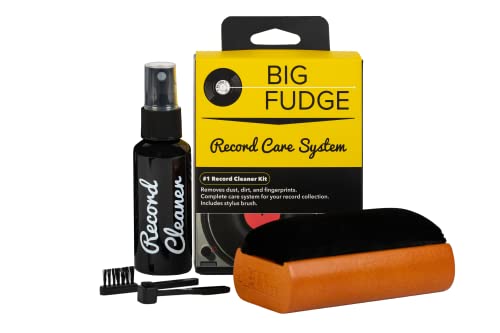
If you love records and record players, you must get a record-cleaning kit like this one. It is designed to ensure that your records stay in excellent condition to last you for decades.
Get this cleaning set and keep your vinyl records in perfect condition!
Cause Of Record Crackling
It is quite normal for your vinyl records to be crackling as most records go through this phase. The abnormal thing is to leave it that way. Crackling is a sign that a record is dirty or might be damaged. The vinyl appearance and sound is unpleasant when it is crackling. Vinyl crackling can be caused by a number of reasons such as damage to the groove surface, scratches and stuff on the record, such as dirt and dust.
The following steps can be used to stop the record crackling so that the quality of the sound can be improved.
Clean The Vinyl
Cleaning your vinyl records can never be over emphasized because it helps prevent and stop any irregularities found on the record including crackling. Use a micro-fiber cloth or soft cotton to remove dust on the vinyl, wash and rinse with a cleaning solution and bottle spray respectively, then dry it with a different soft cotton or cloth. Most of the time this stops the crackling and your records produce a good quality sound again.
Clean The Stylus
Your stylus must be properly cleaned too as this is one of the major ways that the record accumulates dust which also can result in crackling. To clean this, you need a stylus brush and cleaning fluid. This should be done carefully to avoid damaging the label. After the stylus is cleaned, the crackling will normally stop.
Milky Zerostat
This is a gun used to remove static electricity from the vinyl. Static electricity is one out of many reasons why a vinyl record produces a crackling sound. This gun is aimed directly at the record and neutralizes any static electricity on it, thus, making it attract less dirt or dust and stopping the annoying crackles.
Record Cleaning Machines
The grooves along a vinyl record are very thick which makes it a bit difficult to completely remove dust and dirt that results in crackling. The only way to completely achieve this result and stop the crackling is to use a powerful cleaning solution and a strong vacuum that will suck out the dirty liquid. For that, you will need a record cleaning machine. There are several machines that can be used for this purpose. Record cleaning machines like this one, is a perfect example. All you have to do is clamp a record down on the machine, use a brush to spread the cleaning fluid around the record, then use the vacuum to suck it out. The process is very easy and fast, your record will be freed of all dust in no time.
Wood Glue Method
This is another method to ensure that crackling is eliminated from your records. This is a hand-cleaning method that gets into the grooves. Using this method is an alternative to vacuum cleaning which was discussed above. This method requires patience but it is a tried and true method and results in your record being sparkling clean when you are done.
The materials needed are just the wood glue itself and a tool to spread it around the record. The process of spreading must be carefully done and avoid touching the labels as this may totally damage the record. After spreading a large amount of wood glue around the record, allow it to dry for about 24 hours then grab the edge of the glue and peel it off slowly. The glue will remove any remaining particles on the vinyl leaving your record spotless and ready to give a good quality sound with all the crackling stopped.
Handling The Record
Your vinyl records have to be handled with adequate care and gently. On no occasion should you touch the playing surface of your vinyl record to prevent/stop crackling. If you have to hold or carry your record either to the turntable or when you want to store it, you should keep it inside its sleeves. You can also use two fingers on the underside center label and your thumb should be on the outer edge of the record. This is the perfect way to handle a vinyl record and stop unnecessary crackling which destroys the quality of a record sound.
Hygiene Check
The way hygiene is so important to our health, vinyl records require its own care too. Don’t ever blow dust off the record surface with your mouth! If you do this, you will probably destroy the record, as you risk damaging your records with saliva vapor. You also shouldn’t be talking while holding the vinyl up to your face. We all spit a little while talking without even knowing it. Saliva is the clear, slightly alkaline liquid secreted into the mouth by the salivary glands and mucous glands, consisting of water, mucin, protein, and enzymes! Saliva is sticky and filled with organic materials making it a substance difficult to remove.Crackling can be a result of this too, so to stop the crackling you will want to follow this gentle hygienic guide.
Carbon Brush
There is no way to over emphasize the importance of a good carbon fiber record brush. The brush should be used to scrub the vinyl gently every time you play it. It removes all surface dust and any static electricity that may have been built in the record while handling it. This requires care and also uses a light touch while using the brush on the vinyl to prevent any dust or dirt from reaching the groove. If this is done as explained, your vinyl becomes squeaky and void of any crackling.
Storage Of Records
This is actually the most important and effective way of stopping crackling. Your records should be stored in a dust free environment. Make sure the records are always kept in their sleeves. If you know the dust eventually sticks to the record even after storing it, then you must make it a habit to always inspect your records and keep the storage dust free. If a microfiber cloth can be used to do this every morning, your vinyl record crackling will not be a problem.
Conclusion
Vinyl crackling can be caused by a number of reasons such as damage to the groove surface, scratches and dirt and dust. Crackling is a sign that your record might be dirty or damaged. The best solution would be to clean your vinyl record to see if that fixes the issue. Now that you know how to keep your vinyl record clean clean and clean them if they are already dirty you’ll be able to enjoy your records anytime you want without any crackling.