
*This post may contain affiliate links. As an Amazon Associate we earn from qualifying purchases.
If you own a Dreamcast or are just wanting to learn about one then you are in the right place. In this article we will discuss the Dreamcast’s backwards compatibility as well as what that even means!
Is the Dreamcast backwards compatible? The Sega Dreamcast is not backwards compatible and won’t play games from previous Sega consoles. Many people were hoping that Dreamcast would be able to play Sega Saturn games but unfortunately Sega didn’t build that into their system.
For many people, having a backwards compatible system is the ideal situation. Having to buy all new games and having your old games never get played every time that a new system comes out is not only expensive but it is also annoying!
To have to have a bunch of different systems around and change systems to play different games you own is honestly just silly. Some newer game systems do have backwards compatibility but not all of them have implemented it and even if they have it’s normally only for select games.
Backwards compatibility really pitts the wants of the consumers against the wants of the video game manufacturers. As a consumer being able to play your Sega Saturn games on the Dreamcast would have been amazing but from Sega’s point of view they want you to have a reason to buy all the new games with the new console.
Are you a huge Sega fan? Then you have to check out the amazing Sonic and Sega gear that you can get. Whether you want a Sonic wallet, a Sega sweatshirt, or a classic hat there are plenty of choices to choose from. You can find them all by clicking here.
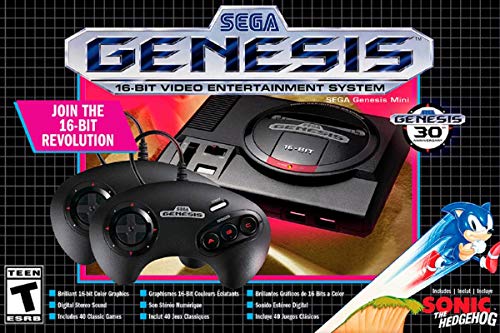
If you love Sega then you will want to check out this Sega Genesis Mini console. It comes with two controllers and even comes preloaded with 42 Games!
Enjoy these classic Sega Genesis games without having to purchase a single game cartridge!
What does backward compatibility even mean?
For a game system to be deemed backwards compatible it basically means that the game system will play games from the previous generation of consoles.
Sometimes systems will change slightly and still play the games from their earlier editions (think Xbox One games working on the Xbox One X). Although this is nice it isn’t truly considered to be backwards compatible since the Xbox One X is just the upgraded version of the Xbox One.
What would be considered backwards compatible is the Xbox One playing games from the 360 or even the original Xbox.
The Xbox One is backwards compatible for some older games but not all so it is partially backwards compatible. The older games that will play on an Xbox One can be found at the following link.
The Xbox compatible with Dreamcast?
As hard as it is to believe the original Xbox system was almost backwards compatible with Dreamcast games! Sega and Microsoft were in talks to have Sega’s Dreamcast games live on through the Xbox but the plans were eventually cancelled because of internet connectivity issues with the Dreamcast games.
For many people it seems impossible to think of Xbox and Sega making any sort of a deal but this was long before Xbox had become the massive video game powerhouse and they were looking for a way to bring gamers over to their brand new console.
Of course we all know now that it wasn’t necessary and Xbox is doing just fine on its own but it was almost a thing in the late 90s and early 2000s!
What if the Xbox had become backwards compatible with the Dreamcast?
It would have been awesome right? Can you imagine playing Sonic on the original Xbox?What about Soulcalibur?
Being able to play some of the best Dreamcast games on the Xbox not only would have been nice at the time but it certainly would have greatly increased the demand for Sega games and probably the Xbox system as a whole.
Would Sega have gotten back into the console game and made a system that played Xbox games? Would Sega and Microsoft have joined forces to make the SegaSoft XUniverse console?
Ultimately no one knows what would have happened had a deal actually been struck but one thing is certain, the gaming landscape would be vastly different if the deal had happened.
Could the Sega Dreamcast play Saturn games in the future?
The short and simple answer is, probably not. Being that Sega hasn’t made a stand alone console in over 2 decades holding out hope for Sega to do something to put backwards compatibility on machines that are multiple decades old is quite simpy a pipe dream.
Dreamcasts are not backwards compatible and unless Sega decides to get back into the console business after a 20 year absence, the Dreamcast will be the final chapter in the Sega console story.
There is no doubt if Dreamcast did play Saturn games then Dreamcast would be the ultimate system for retro gamers. The combined library of Saturn and Dreamcast features almost every major 2D fighting game from that era as well as many other well received classics.
Many people (myself included) are hoping that Sega will release a classic console with all the best games from all of their systems but if they do choose to go that route it is more likely that they will release a classic version of each console separately rather than releasing it as one amazing Sega console.
Why was Sega Dreamcast discontinued?
As we know, the Sega Dreamcast was an awesome game console once upon a time. If the Dreamcast was so amazing, then why was it discontinued?
In 1998, Dreamcast was first released in only Japan. After having a large amount of success in Japan Sega moved on to the US and Europe.
Sega had 9.3 million console sales worldwide and made up 31 percent of the gaming market in the US, but Sony held 60 percent of the game market in the US.
In 1999 Sony announced its next-generation Playstation (known as the PS1, which Ken Kutaragi claimed would allow video games to convey unprecedented emotions. The next generation Playstation had a new CPU and was jointly developed by Sony and Toshiba. Kutaragi announced that the next generation Playstation featured a graphics processor with 1,000 times more bandwidth than contemporary PC graphics processors and a floating-point calculation performance of 6.2 gigaflops, rivaling most supercomputers.
In the same year of Sony Playstation One announcements, Nintendo announced its next-generation gaming console as well. Microsoft was also almost done with its console the Xbox.
There was tons of competition in the video game market and Sega had sunk a lot of money into the Dreamcast.. After a few years of decreasing Dreamcast sales, in March 2001, Sega posted a consolidated net loss of ¥51.7 billion ($417.5 million).
That was a giant loss for the company (obviously) and they decided to change course. They left the console battles to Nintendo, Microsoft, and Sony and just started making games for the other companies’ systems.
Ultimately the Dreamcast was pulled because profits had fallen substantially and Sega knew there was no way they could keep up with the innovations that Microsoft and Sony were making in their next gen consoles.
Dreamcast Games
Dreamcast wasn’t without its classic games though! Just because it is the last console Sega ever made doesn’t mean that it didn’t have some great titles.
Digital Trends compiled a list of the best Dreamcast games that can be found here.
The Completionist also compiled a list of his favorite 10 games from the Dreamcast. That list can be seen in the video below.
Related questions
Will there be a Dreamcast 2? Many rumors and controversy surround Sega’s next possible game console. Some people believe that Sega has been biding its time waiting for the opportune moment to release a new console while others (myself included) believe that Sega won’t ever get back into consoles.
While it is possible that Sega will one day make a Dreamcast 2 (or whatever they will call it) the longer they wait between consoles the harder it will be to get back into the game. People who fondly remember their Sega consoles of years gone by are quickly getting older and 2 decades is an extremely long time to wait between consoles.
If Sega is going to capitalize on their name recognition or even the resurgence in gaming nostalgia they had better get moving with a console and quick!