
*This post may contain affiliate links. As an Amazon Associate we earn from qualifying purchases.
Do you own a PlayStation 4 and want to know if you can buy a PlayStation Eye and it works with your gaming console? Maybe you were just now getting an online streaming and I want to know if the PlayStation Eye will work for you.
Well, in this article we will go over everything you need to know about the PlayStation Eye and if it is compatible with the PlayStation 4.
So is the PlayStation Eye compatible with the PlayStation 4?
The PlayStation Eye will not work with the software that is on the PlayStation 4 and only works with the PS3. Although most people would think that the PlayStation Eye is compatible with the PlayStation 4 because they are both made by PlayStation, that is actually incorrect.
If you are going to stream with a PlayStation 4, you will need to buy the PlayStation camera which is specifically designed to work with the software on the PlayStation 4.
If you want to know more about the PlayStation Eye and the PlayStation 4, you will want to keep reading.
If you love PlayStation you need to check out this amazing game room light decor. It looks just like the buttons on the PlayStation controller and the light reacts to the music that you are playing as well! You can check it out by clicking here.
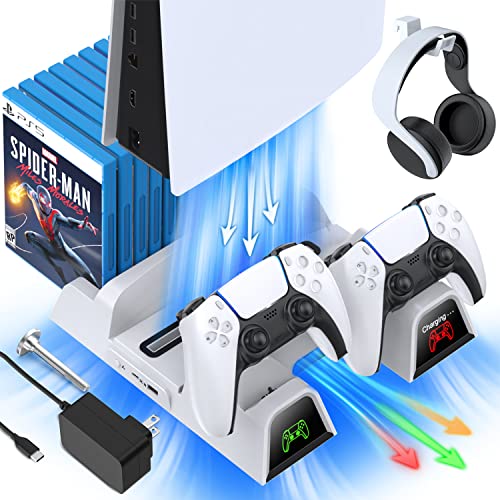
If you have a PlayStation console you should also have one of these stands. It makes it incredibly easy to organize your console and games as well as charge your controllers at the same time.
Plus it has a cooling fan to make sure your console doesn’t overheat when you have your weekend gaming marathons!
Is the PlayStation Eye Or PlayStation Camera Better?
Many people want to use their PlayStation 3 Camera, which is the PlayStation Eye, with their new console. Since they are made by the same brand, which is Sony, most people think that they are compatible; however, this is not the case.
The PlayStation Eye only works with the software on the PlayStation 3.
If you want a recording device for your PlayStation 4, then you will need to get the PlayStation Camera, not the PlayStation Eye. If you want to find out the compatibility requirements of the PlayStation, then you can check out Sony website to have an in-depth scenario analysis.
In case you want to find out the compatibility yourself, you can simply plug in the PlayStation Eye cable slot in the PlayStation 4 port. You will immediately see a message saying that the device is not compatible with the PlayStation 4.
On the other hand, the PlayStation Eye is compatible with PC and laptop as well as the PlayStation 3. You can use the PlayStation Eye to connect to your computers. This way if you ever do not have the PlayStation 3, then you will still be able to use this device to stream on any PC.
You can even use the PlayStation Eye for video calls and game streaming.
When you try and decide which one is a better fit for you, you may need to make that decision for yourself. On one hand the PlayStation Eye is better as it works with PC if you ever change how you game.
On the other hand, the PlayStation Camera is newer, has better technology, and works with the PlayStation 4. This is why you will need to decide which one is best for you. If you game on your PC, or you do not own a PlayStation 4, then you will want the PlayStation Eye.
On the other hand if you want the best of the best and you only game on the PlayStation 4, then the PlayStation Camera will be better for you.
Difference between the PlayStation Eye and PlayStation Camera
Although there is no significant difference between these two devices, there are still differences. Both serve the same purpose.
However, the later one, having a proper resolution of 720p, will have far better quality of video in comparison to just average quality of video on the PlayStation Eye. Also, there is a big difference in the audio quality and shape of the gadget.
PlayStation Ecosystem
Many electronic devices have an eco-system of their own. They support each other in the best way possible which will give the user the best experience. It is also developed to meet the needs of an entire audience.
Unfortunately, PlayStation does not follow this line of thinking. Because there is a big gap between the two devices, the new PlayStation models, the technical specifications of the two devices are quite different.
Because there is a big difference between the two devices, they are different in many different ways. From this aspect, they are not able to support each other to perform tasks that other consoles are able to perform.
For Example, you cannot use the PlayStation 3 controller to play PlayStation 4 because there is a big difference between the two. This is the PlayStation eco-system problem. This problem cannot be solved as video gaming consoles are not released every year.
PlayStation Eye
The PlayStation Eye was released back in 2007 to support PlayStation 3 gaming requirements. It was also used for online gaming and streaming. The Camera itself has a sleek circular design with a rectangular microphone on top.
Because of its shape, it looks like an eye. Most people think this is why the device is called the PlayStation Eye.
The PlayStation Eye is able to capture just average quality video with a rate of 60 frames per second. It does not have the high definition support and works only on the VGA display.
The primary purpose of this technology is to support the PlayStation Move Controllers. When they are adjusted on top of your PlayStation 3, you can use the Eye to sense the motion using the LED bulbs of the Move Controllers.
The PlayStation Eye is not just an average camera. It is an Eye that has the technology of gesture recognition and computer vision through which you can play motion and action games.
It has made it possible to play motion, gesture, family, sports, and live-action games by giving you the feature of realistic touch from the comfort of your living room.
It came after the success of the PlayStation Eye Toy for the PlayStation 2. Even though it was based off of the PlayStation 2,it is not compatible with the PS2. Sony made this device to where it will only connect with the PlayStation 3.
The PlayStation Eye is a peripheral device as it takes your input in the form of image and audio and gives the result to the PlayStation 3 console as output.
It has a better motion sensor as compared to the PlayStation 2’s camera. This is why it was able to judge better and differentiate the motion of the characters. It also has a solid piece called the focus adjuster that can be used to adjust the focus of the object manually.
Because of its ability to capture voice and good video even in a noisy room, it was the choice of PlayStation 3 gamers all around the world! Sadly, it lost its purpose after Sony released the PlayStation 4, and the PlayStation Camera.
The biggest plus of this device was that it was able to capture the audio along with the video. People did not need to buy the external microphones and perform the steps to connect it using different adaptors to your system. The PlayStation Eye already had all of this in place.
Because of the in-depth technology to identify an object, it was able to perform Eye, nose, mouth, and even smile recognition. It can take voice commands in the game and perform appropriate tasks.
Today, you will face a lot of difficulty in buying this product in the local stores as it serves little to no purpose because of the advancement in the gaming consoles, but if you have a PlayStation 3, then this camera is definitely for you!
Conclusion
Now that you know that the PlayStation Eye is not compatible with the PlayStation 4, you can decide if it is the camera device that is best for you. There are many options to the camera that best fits your needs, and PlayStation has done a great job filling all of those needs that you have.