
*This post may contain affiliate links. As an Amazon Associate we earn from qualifying purchases.
Have you thought about buying a Sega Genesis, but you aren’t sure if it’s for you? Maybe you love playing them, but want some more facts about the Sega Genesis. Well, in this article we will go over everything you need to know about the Sega Genesis, and if you should buy one.
So should you buy a Sega Genesis?
There are many great reasons that you should own a Sega Genesis. They range from it being a classic gaming console, all the way to the games that you can play with the Sega Genesis. So based upon these reasons and all of the other reasons below in this article, you should buy a Sega Genesis!
If you want to know more about the Sega Genesis and if you should buy one, you will definitely want to keep reading! You can also check out this video to see the entire history of the Sega Genesis.
Are you a huge Sega fan? Then you have to check out the amazing Sonic and Sega gear that you can get. Whether you want a Sonic wallet, a Sega sweatshirt, or a classic hat there are plenty of choices to choose from. You can find them all by clicking here.
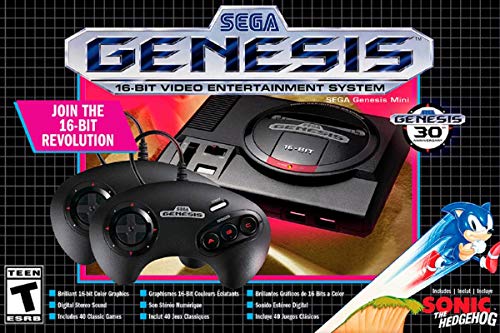
If you love Sega then you will want to check out this Sega Genesis Mini console. It comes with two controllers and even comes preloaded with 42 Games!
Enjoy these classic Sega Genesis games without having to purchase a single game cartridge!
Was the Sega Genesis known as the Sega Mega Drive?
Back in the 90’s, The Sega Genesis was also known as the Sega Mega Drive or Mega Drive. It is a 16-bit home video control game. The console first released in Japan in 1988, and in North America in 1989.
This game is designed by an R&D team supervised by Hideki Sato and Masami Ishikawa. The Genesis was adapted from Sega’s System 16 arcade board, and centered on a Motorola 68000 processor as the CPU. It also had a Zilog Z80 as a sound controller, and a video system supporting hardware.
It has a library of more than 900 games created by Sega and a wide array of third-party publishers. These games were delivered on ROM-based cartridges. Several add-ons were released, including a Power Base Converter to play Master System games. This add-on was released in several different versions. Some of them were even created by third parties. Sega created two network services to support the Genesis. They were called the Sega Magnet and the Sega Channel.
At that time, the two main competitors of the game were Nintendo’s Super Famicom and NEC’s PC Engine. If you are a classic game lover you probably already know this, but the Sega Genesis was the most selling game console at that time and also for Sega. It had more than 35 million sales all over the world.
Technical Specification of the Sega Genesis
A 16/32-bit Motorola 68000 CPU clocked at 7.6 MHz is the main processor of the Sega Genesis. An 8-bit Zilog Z80 processor controls the sound hardware and provides backward compatibility with the Master System. The system has 64KB of video Ram, 72 KB of RAM and can display up to 61 colors at once from a palette of 512. The games are in ROM cartridge format and inserted at the top of the console.
The Yamaha YM2612 FM synthesizer and a Texas Instruments SN76489 PSG were used to produce sound. Both of the sound chips were used by the Z80 processor to produce stereo music and sound effects.
Sega Genesis Game Console
The Sega Genesis is one of the iconic game consoles of the 1990s. The Sega Genesis has some model variations though. They are the Model 1 and the Model 2. The Sega Genesis is also known as the Sega Mega Drive or Mega drive here in North America. Even though you would think that there are only 2 models, the Sega Genesis actually had a Model 3 release as well.
Besides these three models, there are a lot of variations released by third-party developers and Sega itself. One of the most well known is the Sega CDX. This is almost like playing the Sega Genesis combined with the Sega Cd. There is a laser disc player that can play the Sega CD games, and it has a slot for the Sega Genesis games. Even though they are expensive, they are worth it.
The Sega Genesis Model 1 and 2, are very good consoles. You should stay away from the other consoles though, as these consoles have serious issues. So if you are going to buy a Sega Genesis, then you will want to choose the Sega Genesis Model 1 or the Sega Genesis Model 2.
Sega Genesis Game Library
The Sega Genesis has a large store of well-reviewed games. Back in the 90s, the best and top sellers included Sonic the Hedgehog, its sequel Sonic the Hedgehog 2, and Disney’s Aladdin. The Genesis library was initially modest but eventually grew to contain games to appeal to all types of players.
Many people want to know how many games the Sega Genesis has. There are a lot of variations, but the total number of games available is over 900! The best thing is that all of them were created by both Sega and a wide array of third-party publishers and delivered on ROM cartridges. This made playing the games fun and made them games that would last forever.
Sega Virtua Processor
On the Super NES, companies could add enhancement chips to cartridges to increase the console’s capabilities and produce more advanced graphics. Star Fox renders 3D polygons in real-time. Super Mario World 2, Yoshi’s Island demonstrates rotation, scaling, and stretching of individual sprites and manipulates large areas of the screen.
Sega started to work on enhancement chips to compete with the Super NES. This resulted in the Sega Virtua Processor. This chip enables the Genesis to render polygons in real-time and provides an Axis
The only game released with this chip is Virtua Racing. Because this chip was expensive to produce, the games that had this chip in them were far more expensive than normal games.
Genesis Add-ons
Unlike the other game consoles, the Genesis has a lot of add-ons. First of all, there is one that only works with the Model 1. That is the power base converter. Those converters let you play the game with the Sega Master system.
The Sega CD, is a compact disc-based add-on that can play its library of games in CD-ROM format.
The second one is the Sega 32X. This 32-bit add-on uses ROM cartridges and serves as a pass-through for Genesis games. Sega even produced a custom power strip to fit the ad-ons large AC adapters.
What is the difference between the Mega Drive 1 and 2?
The Sega Genesis has a lot of variations and names. It has two popular consoles though. One is the Model 1 and the other is the Model 2. The Sega Genesis is also known as the Mega Drive here in the United States. Both the Model 1 and model 2 versions are known as Mega drives. The Model 1 is the only version to include a volume control slide switch for the stereo sound output. The Model 2 is a smaller, and simplified design.
Conclusion
Now that you know about the Sega Genesis, you can clearly see all of the good stuff that comes from owning the console. Not only does the original console have great games but it was so popular, that they actually created a Sega Genesis Mini version. This version hooks up to modern tvs with HDMI and comes preloaded with many of your favorite games.
If you want to purchase a Sega Genesis original console or a Sega Genesis mini, you will want to get one here! This place has the best price and it seems like they have the best games as well for the system.