
*This post may contain affiliate links. As an Amazon Associate we earn from qualifying purchases.
One of the benefits that you get to enjoy as you progress up the analog food chain is quieter playback. Clean vinyl is a must but you also have to accept an occasional pop.
What are record player’s loud pops? The loud pops can be caused by simple static on the record all the way up to actual contamination on the record. Keeping your stylus clean by cleaning it in between records and of course cleaning your vinyl with an appropriate brush before playing it will help keep the pops to a minimum.
If the pop is particularly loud it usually means there is something on the record. Note where this happens and stop the turntable. Remove the record and look closely in the area where the pop occurs to see if there is anything “there” that would cause the noise. Sometimes it can be something as simple as a small piece of dirt that is stuck on that causes the “pop”.
These little things can normally be easily cleaned off with a little extra effort. Just make sure not to push too hard trying to get the dirt off that you damage the record.
“Pops” will be more likely with a used record than a new one but many people can’t afford to buy all new records so they will experience many different pops and crackles over their listening time.
Upgrading your turntable will also help with the issue. You will notice that better equipment will yield better sound and a lower amount of pops and crackles.
Do you love playing your vinyl records but your record player has seen better days? Well, you are in luck! There are tons of great record players that not only have great sound quality but also won’t break the bank. You can find them by clicking here.
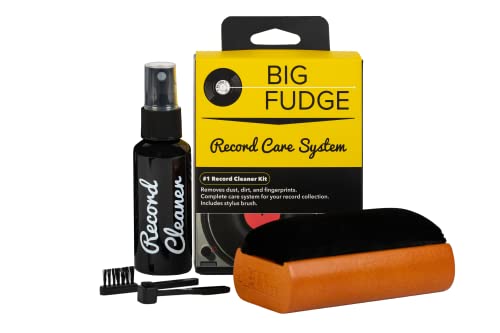
If you love records and record players, you must get a record-cleaning kit like this one. It is designed to ensure that your records stay in excellent condition to last you for decades.
Get this cleaning set and keep your vinyl records in perfect condition!
Will pops happen with new vinyl?
Pops should not happen with new vinyl (but unfortunately sometimes will). Cleaning records with a record vacuum once and then brushing with a double-row carbon fiber brush before each play will help minimize noise. Also using a cartridge with a flat treble response will help make the noise less audible.
Sometimes record players make some loud pop sounds when they are being turned on/off. It sometimes continues till the arm movement is completed or when the needle drops, then it is silent. But when the auto stop kicks in the arm moves back to its resting position the noise comes on again until the record player powers itself off.
The loud pops in the record player will most often be as a result of dirty records. Some record players can be extremely sensitive to even the slightest dust on the records.
Cleaning the records (even new ones) can be a great way to significantly reduce the noise generated from dirt. Some experts propose wet cleaning new records, because they don’t seem to be really clean when you get them. Once cleaned though, they shouldn’t have any surface noise. Also a lot of new records just come with a paper inner bag; add a polystyrene bag to make sure the record stays clean.
The Cartridge VTA
Another possibility is the cartridge VTA might just need a little adjustment, but before doing the adjustment; try changing the tracking force of the record player if you are using a turntable. It is worth noting that the cartridge could be damaged with rough handling, but usually just touch is enough to break anything unless the cantilever of the turntable is knocked out of alignment.
When cleaning a cartridge, it is wise to use a back-to-front motion (same direction as the vinyl moves across the stylus) with the tone arm loosely on its armrest. Use a soft carbon fiber brush so as not to put much pressure on the stylus or cantilever and don’t use a side-to-side or front-to-back motion. That is how cartridges are damaged. Cartridges are designed to have their stylus dragged through the groove and are built to handle that force. They are not designed to handle force from the side or from front-to-back.
Keep in mind that in a listening level of moderate to loud, any ticks or pops will be exaggerated even more so, even the sound of the needle touching down on the record or lifting up off of it can be quite loud if you have the volume turned way up. Once you get used to that, you will enjoy your records more than your CDs I am betting.
Surface Noise
Regarding surface noise some decks will cope with this better than others, some used albums will crackle and pop after being played while dusty, and leave damage impossible to fix by cleaning. New albums should not have any of the above anomalies at all, but some do. As suggested it would be virtually impossible to eradicate the odd click or rustle on some records completely, but this is a trade-off for superior sound. Part of the fun is finding and owning the best condition albums one can get, and not worrying too much about those “quiet” passages.
With all vinyl discs there is occasional background noise level, a clean hiss, that is present all the time but only really detectable when turned up loud during silent sections. This noise component of the sound is normal and it comes from the material of the disc itself. No one has ever found a way to get rid of it so it comes with the territory when playing vinyl.
Sometimes with analog recordings the background noise level of the analog tape machine and the microphones can be heard beginning and endings. This is again only detectable at high volumes and at track beginnings and ends. This is pretty normal and part of the analog recording process. With recordings made in the digital era the recorder noise is lower but microphone noise remains.
Clicks and pops throughout the content is very variable, I once had some thirty year old Philips solo piano discs where there was one small pop every minute or two and no loud clicks, I’ve also had records that were far newer that popper much more often.
Dust, accidental scratches and manufacturing defects all increase the number of clicks and pops. These are present with many new discs as well unfortunately. Like mentioned above sometimes cleaning helps, sometimes not.
The stylus is sensitive and easily damaged but touching it lightly is OK, what breaks them is being dropped onto the disc or even worse swiped sideways across a disc. If you observe the stylus rod (cantilever) carefully you will see that it is straight, lined up on the centerline of the cartridge body and has no bends or kinks in it. Do an experiment, with the platter not spinning lower the stylus onto the mat and observe the way the cantilever is pushed up gently by the tracking weight load, this is normal. If the tip starts to disappear up into the cartridge housing the tracking weight is too heavy, much too heavy.
Rough handling may damage the cantilever by bending or breaking it, this is the common type of damage. It is also possible in theory to damage the diamond stylus itself by ripping it or chipping it but this is not common.
Learn More
If you want to learn more about how to reduce or eliminate the pops, cracks, etc. from your records then watch the video below. It has a variety of different tips on how to help make your records quieter.
Conclusion
The loud pops that you hear with record players are relatively normal and will be found on most records no matter their age. If you keep your records clean and clear of all grime, dirt, dust, etc. then you are much less likely to have pops.
Even some brand new records will have pops and crackles as the manufacturing process can cause them to get dirty. If your brand new records are popping a lot try a quick clean and see if that fixes the issue. If it doesn’t then you might have a manufacturing defect on your hands and will probably need to exchange the record for a new one.