
*This post may contain affiliate links. As an Amazon Associate we earn from qualifying purchases.
If you played or owned an Atari console as a kid, you know how much fun those games were. While their time has passed, they still have some significance and can still entertain you. Throughout their production era, Atari produced about 200 games. These games range over several categories and involve different playing styles. Racing games, adventure games and some classic games that emulated popular games like Pong.
So What Atari Games Used Paddles
The paddle for the Atari is more flexible than a normal controller and will afford you more control over your game than a normal controller. Of their 200 games made, more than 40 Atari games used paddles for control. That is more than one fifth the total number of games made in one category. This shows how popular games were that used paddles.
If you would like to know more about which Atari games used paddles, please keep reading or check out this video!
If you are an old-school Atari lover then you have to get a classic Atari T-Shirt to show it! To see the most popular Atari T-Shirt retro designs that will stay classics for years just click here.
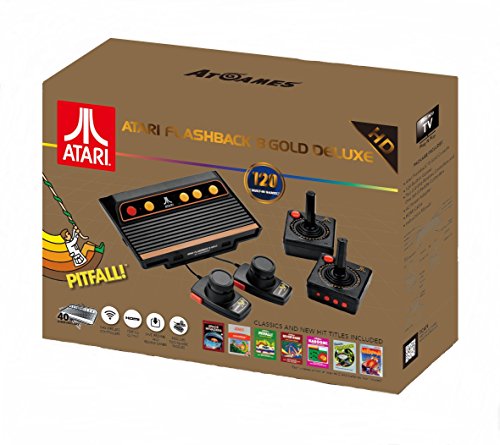
If you love all things Atari then you have to check out this awesome Atari Flashback console.
The Atari Flashback 8 comes with two wireless controllers (YES, WIRELESS!) two paddle controllers, and 120 authentic Atari games.
Atari Controller
The controller for Atari games had versatile add-ons that could be used to play all kinds of games. Whether it was driving a car, or climbing a brick, the controller could do it all. Some of the games made required a different kind of controller. For example, a shooting game may require a gun, and a racing game may be better with a steering wheel.
The different game categories have different responses from users. Each category has a different age group that is the most receiving. As a result of this, the popularity of certain games rises and falls according to the satisfaction of the users. One of the popular game categories in the Atari game family were the games with paddles. At the time Atari was released, Pong was the most popular game in the world, and loved by millions. Many variations of Pong were made and some of them were found on Atari. Due to the popularity of this category, there were many games made that used paddles.
Atari Paddles
As the games with paddles were a popular choice, it made sense to make a lot of them as they sold the most. You would need to buy the paddles separately, but the fun of playing the games made it worth it. The paddle is also more flexible than a normal controller and will afford you more control over your game than a normal controller. Of Ataris 200 games made, more than 40 used paddles for control. That is more than one fifth the total number of games made in one category. This shows how popular games that use paddles were. Even today, more than 20 years since the Atari game series was discontinued, fans of Atari still enjoy games with paddle-like controls. The paddles are available online, in vintage stores, and some collectors also have them. So, if you feel like recreating the feeling of your childhood playing Atari, you can get a paddle if you already own a console. If you don’t own a console, you can also obtain one online and enjoy your favorite Atari game.
Atari Games
There are too many Atari games that made use of paddles to go through all of them. We will be taking a look at some of the most popular games in Atari that made use of the paddles. The Atari games that made use of paddle controllers include:
- Backgammon
Backgammon is one of the most popular games in the world to this day. The game was so popular that it existed on almost every playable platform. A board game originally, it was adapted to fit video games with the video game revolution. The game is fun to play and it helps boost the brain as well since it is a strategic game that gets you thinking. The game is so popular that there were two versions available on Atari.
- Blackjack
There may be those who can claim to have never played this game, but very few who can claim to have never heard of it. Movies, TV shows, and documentaries that involve gambling always refer to this game. It is played all around the world and some people make a living playing the game. The game also had two different versions on Atari due to its popularity.
- Night driver
No surprise that a racing game makes the list of games that are played using a paddle. As covered earlier, paddles offer greater control to the gamer, improving the experience. The game has gone on to have advancements and has existed on numerous platforms after Atari including Xbox. Like the first two games on our list, the night driver also had two versions on Atari.
- Super Breakout
If you are a fan of Pong, you are sure to love this game. It is similar to the hit hidden game on Google, Atari Breakout. Here, you destroy bricks that are arranged with a ball that is constantly moving while protecting the ball from crashing off the screen with a paddle. It offers the advantage of being able to have more than one player. It is another game that was so popular that it had more than one version on Atari.
- Star Wars: Jedi Arena
During the period where Atari was active, the Star Wars fever was still in its infancy. This has only grown over time, with Star Wars being one of the most popular names in the television and game industries. Star Wars feature many scenarios including fighting and driving and due to this, it makes a lot of sense that the controller should be a paddle. Even though Star Wars was one of the most popular Atari games available, there was only one version made.
- G.I Joe: Cobra Strike
G.I Joe is another largely popular gaming franchise like Star Wars. It was also a new release around the time Atari was new and exciting and has grown over the years. More advanced games have been made to fit the advanced gaming systems in existence. This is because of the success the game had in systems like Atari.
Conclusion
There were many more games on Atari that used paddles including Breakout. If you played Atari as a kid, you may be familiar with some, and may even have favorites. The paddle for the Atari is more flexible than a normal controller and will afford you more control over your game than a normal controller. Of their 200 games made, more than 40 Atari games used paddles for control. That is more than one fifth the total number of games made in one category. This shows how popular games were that used paddles.