
*This post may contain affiliate links. As an Amazon Associate we earn from qualifying purchases.
Nintendo 64 or N64 as it is very commonly called, was released in Japan in the year 1996. This is the third video game console which was put out by Nintendo. It was the first console that made use of 3D graphics. The N64 had 4 MB of RAM that could be upgraded to 8 MB by using an expansion pack. N64 was part of the childhood of many people. There were a lot of versions of N64 versions though, and one of these was Nintendo 64 PAL.
So what is a Nintendo 64 PAL
A PAL is a color encoding system on the Nintendo 64 game system. It has an automated color correction for the games, but can also be changed to manual if you prefer to do it yourself. A PAL N64 is made for other regions of the world outside of North America.
If you would like more information about the Nintendo 64 Pal, you will want to keep reading this article. you can also check out this video to learn more about the Nintendo 64 PAL.
Are you a huge Nintendo fan? Then you have to check out the Mario and Nintendo gear that you can get. Whether you want a Mario wallet, a Nintendo sweatshirt, or a classic NES hat there are plenty of choices to choose from. You can find them all by clicking here.
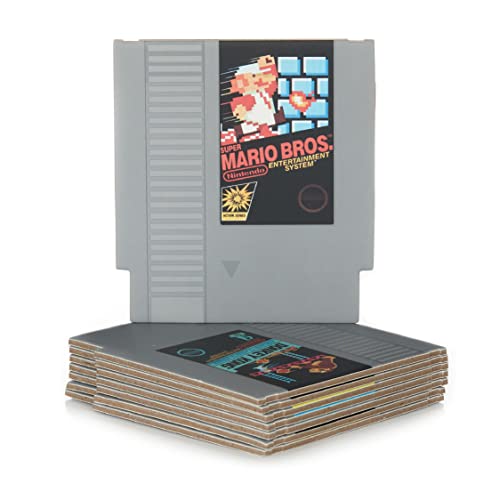
Do you love Nintendo? Then you have to check out this amazon NES cartridge drink coaster set!
This set includes 8 double sides drink coasters that look just like the classic NES cartridges.
This set is a perfect gift for the gamer in your life!
What Does PAL Mean
When you hear about PAL, you must have heard about NTSC simultaneously with it as well. PAL can be better explained in the context of NTSC. These are two kinds of color encoding systems available on analog TV which controls the kind of visual quality of the content you see. It is also used in HDTVs, but on a much smaller level. Here are the differences between the two:
- NTSC stands for National Television System Committee and it is the video standard that is used in the whole of North America and most of the parts of South America. In this system, the number of frames transmitted every second is 30. Each frame is constructed out of 525 separated scan lines. Here you get the resolution of 720×480.
- PAL stands for Phase Alternating Line and it is used in other parts of the world except the two places stated above in NTSC. Here, 25 frames are transmitted each second and each of the frames is constructed out of 625 scan lines. The resolution offered here is 720×576 and it comes with the option of automated color correction, unlike NTSC that offers manual color correction.
How To Recognize PAL Games
If you want to play PAL games, then the best way to distinguish them from other kinds of games is to check the cartridges to see if they have a cut out in the middle. Also, it will be useful to keep in mind that there are some types of European PAL games that are language locked and are not available in English. This is in contrast to NTSC games where the cart has the cut out on the edge.
You should know that all NTSC N64 consoles can play both the American and Japanese cartridge, but there is a possibility that the games might not fit. This problem can be fixed by just modifying the console. PAL consoles, on the other hand, are locked down to just the PAL carts, but as said above, the NTSC ones are not. The only way to play NTSC games on PAL is to get a cart adapter.
The Most Expensive and Rare N64 PAL Games
Flying Dragon
Anyone who has played fighter on N64 will know that the fighting genre of games isn’t a strong point of N64. N64 wasn’t built for this genre and so expectedly, this game didn’t do well. But it’s very pretty on the eyes and has a very Japanese feel to it. If you would still want to try it out, then you can try hunting a loose cart PAL copy of it. But tracking a completely boxed one or one that is in good condition is quite tricky.
Top Gear
Everyone loved Top Gear, or at least watched it at one point in time. After all, who doesn’t love a show about cars. The game though has nothing to do with the show apart from having cars. You should know that the Top Gear N64 series has some installments of it. There was Top Gear Rally 1 and 2 as well as Top Gear Overdrive. There is also one called Top Gear Hyper Bike which was centered around Dirt bike racing. Many people loved playing these games as they were very fun games. Today though, they are not just fun, but if you own them, then you could be sitting on a decent amount of money. These games are worth a decent amount of money depending upon what condition they are in.
Rat Attack
Rat Attack was developed by Pure and published by Mindscape. In the game, you will have to play as cats who want to catch rats. The game got its first release on Sony PlayStation 1 in 1999. It got a later release on the Nintendo 64 in 2000. If you go hunting for it, then you will see that the PS1 version is pretty easy to find but the N64 release ones are not. You might be able to find a loose copy of it easily, but a boxed one is not that easy to find. If you do happen to have a boxed copy though you’ll be happy to know that it will bring in a good amount of money if you sell it. Most people who have a boxed copy though are holding onto it as the value of this game is only going to increase.
Shadowgate 64
This one was quite a unique adventure game that was played through the first person. Shadow 64 was brought about by Kemco. It is pretty normal when it comes to gameplay. In spite of this, it is a hard game to find anymore.
Overall, N64 PAL games were a hit or a miss just like other versions of the console. Whether you love it or hate it will depend on two things- the actual game itself or your nostalgia for playing the games.
What Is A Nintendo 64 Worth Now
Used Nintendo 64 consoles, on average, sell for around $47, but systems can range in price from $6 to $100 depending on the condition the unit is in. Although the unit itself does not necessarily sell for a high dollar, some of the rare games that we have mentioned above can sell for hundreds of dollars each depending on the condition of the games.
Can You Use A Nintendo 64 On A New Tv
The Super 64 plugs right into the N64’s video-out port, replacing it with HDMI. All you need to do is hook up an HDMI cable from the Super 64 to your TV and you are on your way. Unfortunately, it doesn’t work with PAL consoles, so N64 owners in Europe, Australia, and certain other regions are out of luck,
Conclusion
A PAL is a color encoding system on the Nintendo 64 game system. It has an automated color correction for the games, but can also be changed to manual if you prefer to do it yourself. There are a few games that are rare and expensive for the PAL System. You will definitely need to watch out to make sure the system is compatible with the region you live in.