
*This post may contain affiliate links. As an Amazon Associate we earn from qualifying purchases.
Have you ever thought about buying an Atari? Maybe you used to own one when you were a kid, and want one for your kids today. No matter the reason you are looking to buy an Atari, this article will help you decide which is the best to buy!
There is a long list of Atari models, but which one is the best to buy?
The best Atari model to buy is the one that you love the most. Although this may seem pretty straight forward, you would be surprised how many people buy something because they heard it was good, but don’t actually love the game themselves.
So if you want to know the differences between the Atari models, and what one we think is the best, you will want to keep reading.
If you are an old-school Atari lover then you have to get a classic Atari T-Shirt to show it! To see the most popular Atari T-Shirt retro designs that will stay classics for years just click here.
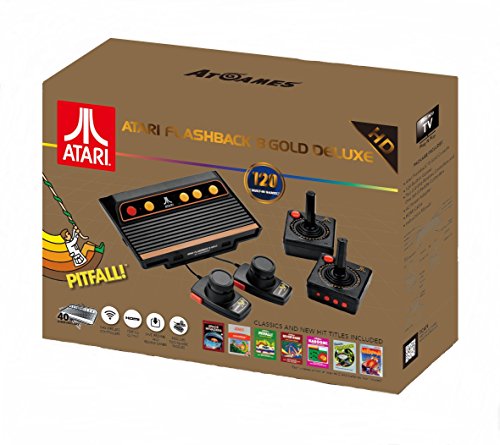
If you love all things Atari then you have to check out this awesome Atari Flashback console.
The Atari Flashback 8 comes with two wireless controllers (YES, WIRELESS!) two paddle controllers, and 120 authentic Atari games.
What Atari is the best one?
Atari consoles are available in several models released in a series of years. There were quite a few Atari systems released that included original as well as improved versions. Since there are so many models and all look pretty similar, it is often confusing for people to decide which one to buy. We will solve this problem for you in this article by doing a detailed description!
Although there is no replacement of the original Atari 2600 because of its revolutionary change in the gaming world, its later models tended to much more advanced than their predecessor.
Considering the technical side of things, it has been noted that most people prefer the Atari Flashback 8 Gold to be the best one of this era. It has fixed many of the major flaws of the previous versions; therefore, it is the one that most people prefer to purchase.
What makes the Atari Flashback 8 Gold different?
The Atari Flashback 8 Gold Deluxe has the same controllers and games, just like the Atari 2600. You will be happy to know, there is one major difference. This difference is that the Flashback 8 offers wireless controllers!
Yes you read that correctly, the Atari offers wireless controllers. It uses a signal level of 2.4 GHz to connect, which means that it does not need to be connected like traditional wired controllers. All you need to do is to pair it up using the AA batteries and play. However, if you still prefer to play using the wired ones, you can connect it up using two small ports on the consoles.
It includes all the prior Atari 2600 games as well as many new games you can enjoy. Contrary to the traditional 2600, the Atari Flashback 8 Gold and Gold Deluxe have an HDMI port. This makes a massive difference in graphics, so all the previous blurry games appear sharp on this one. Also, the games can be paused and played at once, making it stand out.
Features of the Atari Flashback 8 Gold Deluxe
The Atari Flashback 8 Gold Deluxe box comes with a console, two wireless controllers, a pair of paddles, and even built in games. It has a beautiful black design with multiple yellow-colored buttons. The original Atari 2600, in comparison, had a wooden design made with different material. The size is also alot smaller than the original Atari. Overall, the console is very small and lightweight and can be played basically anywhere in the house.
The controllers also have some new buttons that can be used depending upon the games. It has VGI as well as HDMI ports so that it can be connected to both old and modern TVs.
The Atari Flashback 8 Gold Deluxe offers around 120 built in games, so you don’t have to buy separate cartridges like you did for the classic games. You can see the game list on the back of the box before buying it, or you can read a list here. All you need is a console with enough memory capacity to store your memories from childhood. These 120 games also include the traditional Atari 8 games!
Because of the built-in gaming functionality, the games can be saved, paused, and then played. This makes it easy for its users to enjoy it when they are busy. You can simply pause it and get back to it when you are ready.
It was very expensive when it originally came out, but today, Amazon and other retailers sell it for a lot cheaper than most people ever imagined it would be sold for.
What Atari console sold the most systems?
The Atari 2600 version is the most sold Atari console ever. The reason is because of the popularity of it. Although the models released after this one offered many new, and improved features and functionalities, they never sold as many consoles as the 2600.
This is because the Atari 2600 brought a major change to the gaming setup. It brought people from previous old fashioned gaming styles to this digital one. Because of the versatility of the Atari 2600, it became very popular which in turn made it the largest selling Atari game console ever!
What Atari system do you like best?
The latest released Atari models like Atari Flashback 8 and Deluxe have a lot of additional features as compared to the previous ones. The improved technologies in these latest consoles have made it popular even in this new age. The wireless connectivity and 720p resolution have made it available on the latest and high-quality TVs as well. These are some of the reasons we like the Atari flashback 8 Gold deluxe edition the best.
When the console is connected to the TV and turned on, it displays a beautiful menu from which games can be selected. The playable games are arranged in alphabetical order. From there, you can select and play any game you would like.
The games can be marked as favorites in a separate menu so that you do not need to go through the list each time you want to play. Other menu options like “Recently Played Atari Games,” “Activision Games,” and “About” also appear on the side, which give you a more interactive experience.
Just use the directional controller and select using the red button placed on the side of the controller.
Retro equipment has recently gotten too expensive to collect for a lot of people. This is because of its scarcity and features. Because most people spend tons of money on outdated and un-usable materials, Atari wanted to come out with a game system that everyone could afford. This is where the Atari Flashback 8 Gold Deluxe comes in. Despite the features it offers, this nostalgic console is available at a pretty reasonable price, and it can be a valuable yet inexpensive addition to the collectible families.
Want to see an unboxing and review of the Atari Flashback 8? Check out this video below.
What are the models still available?
Almost all the good models are still available on the market today. You can conduct your research from the online marketplaces to select the best one according to the reviews, or you can just trust us when we say we have done our research, and the best one is the Atari Flashback 8 Gold.
The best part is you can normally get this from any retro gaming store, or even online.
Conclusion
Even though there are so many consoles available for sale, we think we have given you a good idea of what the different consoles do, and which one would work best for you. Even after reading all of our research, we still want you to buy the Atari system that you like the best, and that fits your gaming needs.