
*This post may contain affiliate links. As an Amazon Associate we earn from qualifying purchases.
The Sega Genesis is also called the Mega Drive or Sega Mega Drive. It is a 16-piece home computer game console created by Sega. Genesis was the third console created and it launched the Mega Drive in Japan in 1988 and in North America as Sega Genesis in 1989. Many people wonder about Sega and which model is the best. Well in this article we will go over everything you need to know about Sega and the best Genesis model.
So Which Sega Genesis Model Is The Best
The answer to this question is very complicated. Although all of the Genesis systems are going to be similar, due to the audio output, the original Genesis 1 seems to be the general consensus for the best model.
If you would like to know more about the Sega Genesis systems, just keep reading or check out this video!
Are you a huge Sega fan? Then you have to check out the amazing Sonic and Sega gear that you can get. Whether you want a Sonic wallet, a Sega sweatshirt, or a classic hat there are plenty of choices to choose from. You can find them all by clicking here.
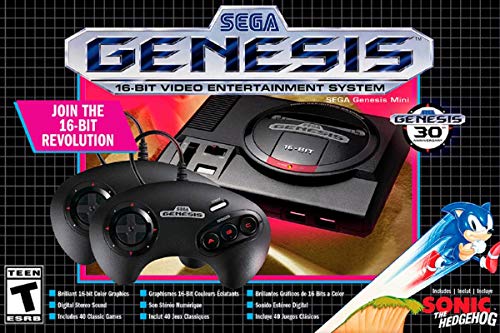
If you love Sega then you will want to check out this Sega Genesis Mini console. It comes with two controllers and even comes preloaded with 42 Games!
Enjoy these classic Sega Genesis games without having to purchase a single game cartridge!
History Of Sega Genesis
Designed by an R&D team supervised by Hideki Sato and Masami Ishikawa, the Genesis was adapted from Sega’s System 16 arcade board, centered on a Motorola 68000 processor as the CPU, a Zilog Z80 as a sound controller, and a video system supporting hardware sprites, tiles, and scrolling.
It plays a library of more than 900 games created by Sega and a wide array of third-party publishers delivered on ROM-based cartridges. Several add-ons were released, including a Power Base Converter to play Master System games. It was released in several different versions, some created by third parties. Sega created two network services to support Genesis: Sega Meganet and Sega Channel.
30.75 million first-party Genesis units were sold worldwide. In addition, Tec Toy sold an estimated three million licensed variants in Brazil. Majesco projected it would sell 1.5 million licensed variants of the system in the United States, and much smaller numbers were sold by Samsung in South Korea. By the mid-2010s, licensed third-party Genesis re-releases were still being sold by AtGames in North America and Europe. Many games have been re-released in compilations or on online services such as the Nintendo Virtual Console, Xbox Live Arcade, PlayStation Network, and Steam. The Genesis was succeeded in 1994 by the Sega Saturn.
Sega Controller
The standard controller features a rounded shape, a directional pad, three main buttons, and a “start” button. In 1993, Sega released a slightly smaller pad with three additional face buttons, similar to the design of buttons on some popular arcade fighting games such as Street Fighter II. Sega also released a wireless revision of the six-button controller, the Remote Arcade Pad.
Audio Output
The audio output on the Genesis systems is much better on some systems than others. Some people have traced exactly which Genesis systems have better audio and some people have even figured out how to “fix” the audio on most of those systems. That being said, it can be confusing to find which systems are the “good” ones to buy and sometimes the only way to really find out is buy it and try it yourself.
The reason the Genesis 1 described above seems to be the favorite, is that the audio is always perfect (unless, of course, the system is broken) and it’s really easy to find the right version just by looking at it.
As of 2014, there’s another option as well for fans of other Genesis models: You can install a circuit in any model Genesis that will have audio that’s just as good as the original.
Now, the Genesis 1 only outputs stereo through it’s headphone port. As a result of this, you need to make sure you get the correct RGB cable. You can even perform an audio mod to get better quality audio from your Genesis 1.
Sega Genesis 2
Pros
- More modern-looking and smaller than the Model 1
- Maintains compatibility with SEGA CD and 32X add-ons
Cons
- Sound quality not as good as Model 1 – specifically the “High Definition Graphics” version
Overview
The Model 2’s advantages mostly come down to aesthetics. The console is sleeker, smaller, and more modern-looking than its predecessor. The power slider was replaced with a simple button, several under-utilized ports were removed, and the entire unit was made smaller. Also, the console just pairs well with the SEGA 32X and SEGA CD add-ons – especially the second version of the SEGA CD which is generally cheaper and more reliable than the original.
Sega Genesis 3
Pros
- Smallest of the three models
Cons
- Does not connect to the SEGA 32X or SEGA CD
- Mono audio output
- The controller that comes with the Model 3 isn’t the best
Overview
The Model 3 was designed to be a budget option for consumers toward the end of the Genesis’ life cycle; the only problem is that it isn’t even the cheapest option today. In fact, due to limited quantities, it’s actually the most expensive model today on average.
Like the Model 2, the Model 3’s advantages mostly revolve around the fact that the unit takes up less space and looks nice. Unlike the Model 2, however, the final revision isn’t compatible with the SEGA CD or the SEGA 32X – meaning, there are a ton of games this model is missing out on. And there a handful of regular Genesis games – like Disney’s Gargoyles, for example – that won’t play on the Model 3.
Conclusion
There have been reports of those old Genesis systems wearing out: Their capacitors can dry out, which causes poor video. This makes buying one easy. All you need to do is to simply power it on and make sure it looks okay! If you already own one that’s broken, you can replace the capacitors by reading the information off the original caps and ordering the same ones online. That’s not an easy task though, so make sure you’re good at soldering and know where to get good quality replacement caps!
Again, although all of the Genesis systems are going to be similar, due to the audio output, the original Genesis 1 seems to be the general consensus for the best model. The only way to really know for sure is to check each system out and decide for yourself.
Because so many people like the original Genesis, sometimes it can be hard to find if you’re not sure where to look. If you are always around a thrift store, this may be the best place to look as sometimes you can pick them up there for extremely cheap.
This is either because the thrift store employees do not know the value of the system, or that they just want to get rid of it since they did not pay anything for it. No matter where you purchase the system from, you always want to make sure that it powers on and works properly before you purchase it. There is nothing more frustrating than purchasing a system that you were told works and then getting home and finding out that it does not work properly. This is why it is important to always check to make sure the system works before you purchase it.
If this is your first time playing on Sega or you grew up playing it, there is no denying that you enjoy the great games that were made for this system!