
*This post may contain affiliate links. As an Amazon Associate we earn from qualifying purchases.
With gaming being all the rage these days, more and more people are turning to gaming as a way to destress and relax after a long stressful day at work. Anyone who is new to the world of gaming would question how something like gaming can be so therapeutic to many; especially since most of the games are combative in nature.
Against the popular belief, recent research has indeed proved that gaming can be an extremely therapeutic experience for people because it takes a lot of concentration and focus and takes the mind off any other kind of stress and tension. Not only this, gaming has also been proven to increase hand eye coordination and greatly help in enhancing one’s cognitive abilities.
There are basically three main gaming companies that are still producing game consoles regularly with the most popular (at least by sales) being the Playstation. Playing on your game system can be loads of fun but what if you run into issues with the console shutting itself off? Why does that happen and what can you do about it?
There are basically six reasons why your Playstation might shut itself off. They are:
- Overheating
- Breakage
- Connector Issues
- Glitches
- Hackers
- Soundbar
We will discuss each of these six reasons in more detail in the rest of this article.
Since gaming has become such an important part of all our lives, the gaming industry has seen incredible development in recent years. Thanks to the recent wave of technology and the new found creativity of game creators, to the immense delight of video game lovers, more and more technologically advanced consoles are being produced all of the time.
But with the advancement in technology not just in consoles but also with other tech sometimes the technology can have issues with each other and cause something unusual to happen such as a console turning off by itself. These technical issues are not something that only happens with gaming consoles but they also happen with other devices as well.
For example, I have a Roku TV at home and a remote control tower fan. When I adjust the volume using my Roku TV remote the fan will also turn on or adjust it’s speed up or down! Obviously this shouldn’t happen but the tech in the fan is close enough to the tech in the TV remote that it picks up the TV remote’s signal and changes something on the fan.
Tech glitches are bound to happen but since they cause you to lose progress when playing on your Playstation it is much more of a headache than simply turning on your fan like my TV remote does!
The Playstation is an amazing console but we all know that nothing is entirely perfect. Like all electronic devices, even the PlayStation has its own drawbacks. It may malfunction and switch off due to many different reasons but the six reasons below are the most common.
We all know how maddening it can be when you are deep into a game and your system randomly gets unplugged or turns itself off. If a gamer had to list out the most annoying things that could happen when playing a game, their PlayStation turning off suddenly would definitely top the list.
Before proceeding, remember that these are only the six most common causes and there may be other things that could be causing your Playstation to turn itself off.
If you love PlayStation you need to check out this amazing game room light decor. It looks just like the buttons on the PlayStation controller and the light reacts to the music that you are playing as well! You can check it out by clicking here.
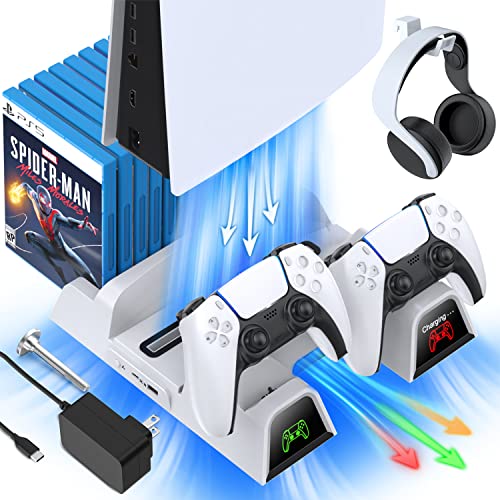
If you have a PlayStation console you should also have one of these stands. It makes it incredibly easy to organize your console and games as well as charge your controllers at the same time.
Plus it has a cooling fan to make sure your console doesn’t overheat when you have your weekend gaming marathons!
WHY IS YOUR PLAYSTATION TURNING OFF?
1. OVERHEATING
One of the major reasons why your PlayStation might be switching off by itself is overheating. This is a common drawback of all electronic devices. Like most electronic appliances, after a period of usage, your PlayStation may face overheating issues. It usually takes some time for overheating issues to arise but if you have indeed been using it for a long time, your PlayStation may be facing these overheating issues.
Overheating can be caused by a variety of things but most often it is because of dust, poor airflow or using the console for too long. Cleaning the console regularly with a microfiber cloth or using compressed air to spray out the fan should help with overheating issues.
2. BREAKAGE
This again, is among the most common and obvious reasons why your PlayStation might be malfunctioning and getting switched off suddenly. All electronic appliances as a rule of thumb need to be placed in such a way that they remain protected from any kind of physical damage. Try and remember the last time your PlayStation fell off the table. Did you place something heavy on your PlayStation recently? If you did, this may be the reason why your PlayStation is malfunctioning.
3. CONNECTOR PROBLEMS
Before sure of the fact that your PlayStation is the problem, make sure there’s no problem with your connectors. Try to plug in your PlayStation at a different place than your regular location and see if you face the same problems. If you do, then you can be sure the problem is with your PlayStation. Otherwise, there might be an issue with the power outlet, or even a surge protector.
Replacing the surge protector and seeing if the problem happens again is a good way to pinpoint if this is the issue.
4. Glitches
Since we are talking about common issues, another reason may be that the game that you are playing may be facing some glitches. This may be due to many reasons, a few of which may include you not downloading the game correctly, installing a pirated or malfunctioning application, or by simply not updating your game when patches were released.
The only way to deal with such a situation is to completely uninstall the game and install it again. If you are not sure about how to go about this, make sure you ask the help of someone who knows how to.
The system could also be glitching because it is in need of a software update. Most consoles will update automatically but if yours doesn’t and it has been needing an update for some time the software might become glitchy which could cause your console to shut itself off.
5. HACKERS
This problem is real even in the world of gaming. If your PlayStation is switching off by itself and you do not find any technical problems, there might be a possibility that your system has been hacked. If you ever come across a game hacker, they will hack into your system and make it malfunction so that they can use it to their advantage, it may sound petty but no matter how petty it sounds it is indeed one of the most common causes of malfunctions. Beware of hackers as once your system is hacked, it may cause irreversible damage and at minimum will be difficult to fix.
6. SOUNDBAR
Do you play with a sound bar connected to your PlayStation? For many people who faced this problem, they suggested that unplugging the sound bar from the PlayStation solved the problem. If you haven’t yet found any technical issues in your PlayStation nor have you found any hacker problem, this may be the reason why your PlayStation is malfunctioning.
Sometimes when the PlayStation is connected to a bunch of things at a time, it is unable to handle it and hence shuts down itself.
For additional tips and other things that might be causing this issue with your Playstation be sure and check out the video below.
Conclusion
The above are the six most common reasons why your PlayStation might be shutting itself off. At the end of the day it is important to always remember to be gentle with your PlayStation console. Like all other electronic devices these gaming devices are susceptible to damage if exposed to harsh conditions or if they are handled roughly.
If you are not sure how to fix the problem and none of the above tips help you out then it is a good idea to contact a qualified repair person if you aren’t willing to tinker with it yourself.
You can find many videos on Youtube on how they fixed their issue but those can certainly be technical and if you have never worked on your Playstation before they might be a bit over your head.