
*This post may contain affiliate links. As an Amazon Associate we earn from qualifying purchases.
You just bought a brand new record. You got it home and immediately opened it and put it on the player only to hear that it was popping!
Why does every new record seem to pop? Is there any way to fix this issue?
That is what this article is all about. We are here to help answer this question and to help you solve the problem.
Why do new records pop? New records will often pop because of dust or dirt that got on them during the manufacturing process. They also might have excess vinyl shavings in some of the grooves that can cause the popping noises. The easiest way to fix this on a new record is to brush it with a carbon fiber brush.
Having to clean or brush down a brand new record seems kind of silly to most people however records can often sit in a warehouse or a store for many months after they are produced. The one thing that never takes a day off is DUST!
It is always there looking for a place to go and the warehouse where the record was made might not have packaged the record up quickly so it might have had time to attract a good amount of dust or dirt before it was packaged.
Another possible reason for the pops in a brand new record might be a factory defect. Just because a record is brand new doesn’t mean it won’t be defective or have issues.
Manufacturers rarely check media when it is produced so if a machine malfunctions they might pump out hundreds of defective records before the issue is caught. If you cleaned your record and it still has the popping sound then there is nothing wrong with taking the record back to the store and exchanging it for a new one.
Do you love playing your vinyl records but your record player has seen better days? Well, you are in luck! There are tons of great record players that not only have great sound quality but also won’t break the bank. You can find them by clicking here.
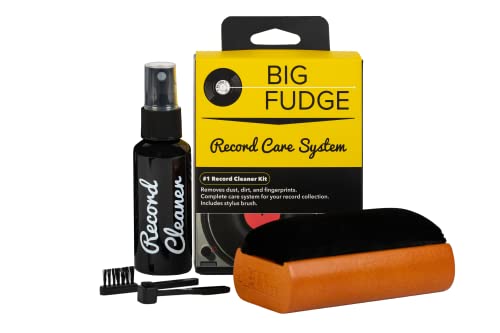
If you love records and record players, you must get a record-cleaning kit like this one. It is designed to ensure that your records stay in excellent condition to last you for decades.
Get this cleaning set and keep your vinyl records in perfect condition!
What are the major causes of pops?
The real reasons why new records click, pop or crackle include the following:
- Dusty records
- Dirty records
- Dusty needle (stylus)
- Stacking record collection
- Low quality cartridge
- Static electricity
- Factory defects
- Low record pressing
How do I deal with Dusty/Dirty Records
Dirt is certain in any environment and this will end up in the grooves of your records.If a record is not kept inside the sleeve, it will attract dust faster and this is very especially true if there is
static electricity.
At the same time, dirt and oil from our hands will get stuck on the records and this will
cause it to attract more dirt and dust. This means that records must be properly cleaned from dust and oily fingers so as to produce the best quality sound.
The best way to prevent this is to protect the records from dirt and dust in the first place. Of course if you just bought a brand new record then you have no control over what it was exposed to in the past, however you can control how much dust it is exposed to from now on.
To prevent dust and dirt from getting on your records it is important to always store them in their jackets and sleeves. Upgrading to poly bags or sleeves is also a good option to help protect them a little bit more.
Another way to keep your records from getting dusty is to never touch the surface of the record with your naked hands or even your fingers as this can affect the sound quality. The ideal way to hold a record is by its edge.
If you mistakenly forgot and touched it, clean it with a record cleaning brush immediately. A carbon fiber brush is the designed tool for removing dirt or dust particles from records.
The needle of the record player is also very sensitive and it can gather dust from simply playing a dusty record. There are specially designed brushes to help you clean off your needle regularly to keep it in as good as possible shape.
Incorrect tracking force
A turntable stylus is set up to work with a particular tracking force but this varies from
cartridge to cartridge. The average tonearm’s tracking force is about 2 grams. If you adjust the tracking force wrong or it is set wrong when you bought the player, it can make the cartridge move abnormally thus, causing unnecessary pops.
The alignment and anti-skate can cause pops if not set properly as well. The solution is to set the tracking force correctly by adjusting the cartridge as specified by the manufacturer. Also, set the alignment and anti-skate based on the required specification to eliminate pops and noises.
Factory defects/ low record pressing
Some records come with defects from the factory and thus, they lack the desired quality. Sadly, this happens far more often than we would prefer. Unfortunately the days are gone when manufacturers would check every single item before it left the warehouse to make sure that it works properly. It is much cheaper for them to produce large quantities with little to no quality control than it is to stop and check each item.
As much as we don’t like it you will have some items that are defective even though they are brand new.
The only thing you can do is make sure that you buy your records from a store or website with a good return policy and then take the time to check them once you receive the item. That way if it needs returned or replaced you can do so before the return policy expires.
What can I do about low quality cartridges?
Cartridge are of different qualities, some are expensive, some are reasonably priced while others come at a ridiculously cheap price. Normally the old adage of “you get what you pay for ” is true with cartridges. The more expensive your cartridge is the higher quality sound it will produce.
Some cartridges track better compared to others so the better cartridge should have less pops or none at all. Therefore, buying a high quality cartridge will help to eliminate pop from your vinyl records.
Static electricity
It is very possible for both new and old records to build static electricity thereby causing pops when they are played. Static electricity is caused simply by insufficient humidity in the air.
If static electricity is stored in the records, it causes pops and noise simply as a result of the electricity the cartridge has generated which gets amplified by the amplifier. In addition, static records are more likely to attract dust and dirt particles which will make the condition even worse.
If you live in a low humidity environment, there is little to nothing that you can do other than to get antistatic inner sleeves. This is better than the paper sleeves that always accompany standard records.
You can also get an antistatic record brush and use it before and after you play each record. This will not only help remove the static but will also keep your records cleaner.
Will wet playing a record stop the pops?
It is never a good idea to try and wet play your records to try and stop them from popping and crackling. All this will do is cause you a bunch of issues down the road.
Doing this will make the stylus pick up any dust of dirt (that is now sludge-like) and spread it all around the record. All this will do is spread the mess out onto other spots of the record.
Using water to clean the record isn’t a bad idea but it isn’t something that you should do while also trying to play the record.
If you want to clean your records using soap and water you can watch this quick tutorial in the video below.
Will using a towel to clean vinyl records eliminate the pop?
Using a towel to clean or wipe vinyl records is not ideal. A towel, shirt or other similar cloth can scratch the record and will normally spread the dirt around the record as well. Additional scratches or dirt that is spread out will increase the popping not make it better.
Always use an antistatic record brush to clean and wipe dirt and dust from your records. This is the best way to remove dirt without causing damage to the record.The best thing to use is a carbon fiber anti static brush so you can clean and remove the static at the same time.
Can you put down or pick up the record while the platter is moving?
Doing this will often scratch the lower side of the record. Allow the platter to stop completely before you pick up the record. Also ensure that the platter is clean and free of dirt and dust before you place the record on it.
Conclusion
Even when you buy a brand new record you are going to have some issue with it. Unfortunately that is just how life goes. Most of the time a simple brushing of the dust off can remove the majority of the pops and crackles but sometimes the record will be defective and have to be returned or exchanged.
Make sure to only buy records from stores or websites that have a good return policy so that way you have a way to return a record that is defective.
If your record gets pops or crackles soon after purchasing it might be worthwhile to take the time to give it a quick wipe down with an antistatic carbon fiber brush. Of course if this doesn’t work you can also just clean the record entirely to make sure it is in as good of condition as possible.
Sometimes the record popping has nothing to do with the record itself and is a sign that the needle or cartridge needs replaced. If you find that is the case, replacing both of those is quite an easy process as is shown in the video below.