
*This post may contain affiliate links. As an Amazon Associate we earn from qualifying purchases.
Have you ever wanted to play on a Nintendo console, but the design and just everything about them seemed to make you cringe? Maybe some of your friends own Nintendo products, but you could just not bring yourself to play them. Well, in this article we will talk about Nintendo and If they will ever make a good console.
So will Nintendo ever make a good console?
Although Nintendo has been making consoles for quite some time, and have made many consoles, it seems like they have yet to make a good console according to many people. This is not true though as the second highest selling console ever made was the Nintendo DS. So simply looking at sales, Nintendo has already made a good console.
If you want to know more about Nintendo and their consoles, you will want to keep reading this article.
Are you a huge Nintendo fan? Then you have to check out the Mario and Nintendo gear that you can get. Whether you want a Mario wallet, a Nintendo sweatshirt, or a classic NES hat there are plenty of choices to choose from. You can find them all by clicking here.
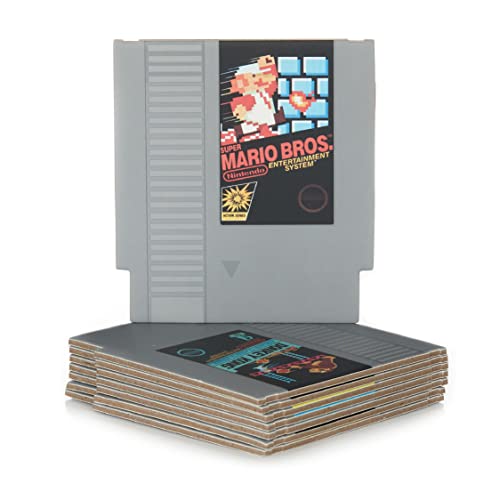
Do you love Nintendo? Then you have to check out this amazon NES cartridge drink coaster set!
This set includes 8 double sides drink coasters that look just like the classic NES cartridges.
This set is a perfect gift for the gamer in your life!
All about Nintendo Consoles
Nintendo is a video game console developing company, starting its functioning in 1977 with the release of its first console, Color TV-Game. It is a Japanese multinational company founded by Fusajiro Yamauchi in 1889 headquartered in Kyoto. They tried many niche businesses but didn’t have any success. Then it developed as a video game console developer from the year 1970. It is from there it’s carrier started.
Nintendo has released consoles which are categorized into home consoles, or handheld consoles.
They design home consoles to be used at home. It is to be kept and played within the house. Handheld consoles are designed to be portable from one place to another.
With continuous efforts from the company, it has become one of the most influential in the game industry and has a market value of more than $37 million by 2018.
It has created various consoles like NES, Nintendo 64, Wii, GameCube, Game Boy and much more. By the 1980s, it was crowned as king of the gaming market by sweeping back its competitor Sega. They kept their focus on the console market only, leaving PC gaming. They also released some of the most famous games of all time like Super Mario 64, The Legend of Zelda, Tetris and Pokemon. So discussing Nintendo, is it justified to question that Will Nintendo ever make a good console?
Top selling consoles ever made
The best-selling consoles of all time are listed below.
- PlayStation 2 (Sold 159 million units )
- Nintendo DS (Sold 154 million units)
- Gameboy (Sold 119 million units)
- PlayStation 4 (Sold 106 million units)
- PlayStation (Sold 103 million units)
- Nintendo Wii (Sold 102 million units)
- PlayStation 3 (Sold 88 million units)
- Xbox 360 (Sold 85 million units)
- Gameboy Advance (Sold 82 million units)
By having a look at the list, we can find that Nintendo’s consoles were among the best sellers. And being a best seller means that it had been a good console, only that’s why it could sell those units and remained in between the top 9. So discussing that Nintendo had never given a good console is unjust. Nintendo has been developing and releasing one of the best consoles in the market like Nintendo DS, Wii and other more.
Besides this, there are misconceptions or bad opinions of the people about Nintendo and its consoles. Some reasons for this are mentioned below.
- Nintendo likes to perform hardware stunts to make it stand out in the market. They focus on their hardware and develop their new consoles with great features that are never experienced before. Similarly, Wii doesn’t have pretty graphics besides that people purchased it due to its amazing motion-sensing controls. Same with Nintendo Switch, People purchased it because they liked the concept of convertibility. Nintendo developed its (Switch) hardware in such a way that we can convert it from the handheld console into a home console. Nintendo focuses on giving the consumer something special which they cannot get from somewhere else.
- Nintendo doesn’t focus on power. They knew that focusing on power and developing a console will become similar to PlayStation and Xbox, which will be useless. Both the companies, Microsoft and Sony, were already fighting based on a powerful console. So, to attract customers, Nintendo tried to focus on console design rather than power.
- Poor relationships with third-party developers also played an important role in making the opinion of consumers. It doesn’t create consoles according to the games. According to Nintendo, if the console sells well, then the third-party developer will bring games to that console, if not then Nintendo can make its original games.
- Nintendo doesn’t take graphics as a major need. It doesn’t work on graphics as others did. This caused a poor impression on consumers and led a childish image of Nintendo towards its consumers. That’s why they consider Nintendo as a manufacturer of bad consoles which are suitable only for kids.
What are the best selling Nintendo consoles?
Nintendo is developing good consoles, but it is doing it in its way which is different from other console developing companies. Some of the best-selling consoles of Nintendo are listed below.
- Nintendo DS
The Nintendo DS is a dual-screen handheld console. They released it in 2004. To make it unique, Nintendo introduced a new feature that was not seen before. They designed it with an inbuilt Stylus for its resistance touch screen, microphone and wireless support that allows other gamers over a network to connect and perform voice chat. This is the most famous console in the company. It was further redesigned with better features. It sold 154 million units worldwide. Its microphone was the unique feature that distinguishes it from others.
- Gameboy
Game Boy was the first handheld video game console by Nintendo. They released it in 1989 in Japan. It was a huge success. This classic console sold 119 million units. Its unique feature was that it uses an interchangeable cartridge for each game, unlike other consoles of that time in which you need to have a different system for each game.
- Nintendo Switch
Nintendo Switch is not among the best-selling consoles, but it is worth buying. It is one of the coolest consoles developed by Nintendo. It is a hybrid console released in 2017. This console was not much powerful in graphics, but still, it could sell 52 million units. It was because of its unique feature of convertibility from handheld console to home game console.
Nintendo focused upon presenting itself as different from others. It created a self-image of unique and cool console developers in the market. It knew that getting into power based competition will lead to a loss that why it continued to be different.
Conclusion
Nintendo has focused on providing something unique to its consumers rather than competing based on power only as other companies did. Nintendo has made many good consoles unique in their self, but because of such power (graphic) based competition in the market, it led to a false image of Nintendo being below the line console developer. It has made such unique consoles that the consumers love, but some people think that is simply not enough. Even though a couple of their consoles are decent, when compared to how long they have been in business, you would expect a much better console to be released by them than Sony or Microsoft.
No matter if you like the new consoles that they are producing or not, there is no denying that Nintendo loves its customers, and always seems to put their wants over what Nintendo wants to produce.