
*This post may contain affiliate links. As an Amazon Associate we earn from qualifying purchases.
There is nothing worse than getting a notification or email that says “this console is banned from the Xbox Network”. When you get an Xbox console ban it means that you can no longer access the Xbox Network and play online, purchase or download games, etc.
Essentially when your Xbox console is banned that means that your console can only be used to play your Xbox games locally on your console. But is there any way to fix an Xbox console that has been banned?
There are only four possible ways to fix an Xbox console that has been banned. Those are:
- Contact Microsoft support
- Alter the Xbox hardware
- Use a software fix
- Buy a new Xbox console
The middle two methods require a good amount of technical know-how and require you to know what you are doing so you don’t destroy the console altogether. For most people, the only possible solutions to fixing a banned Xbox are to either contact Microsoft customer support or buy a new one entirely.
An Xbox console is banned when the Microsoft enforcement team determines that the user was violating the community code of conduct or other community guidelines. Xbox users will receive temporary suspensions when they do something that isn’t too bad, however, continued violations of the terms of service can eventually result in a permanent suspension.
We will go into each of these methods on how to fix your console in more detail in the rest of this article.
Are you a huge Xbox fan? Then you have to check out this amazing Xbox gear and decor. Whether you want an Xbox-styled wallet, a sweatshirt, or a pair of Xbox socks there are plenty of choices to choose from. You can find them all by clicking here.
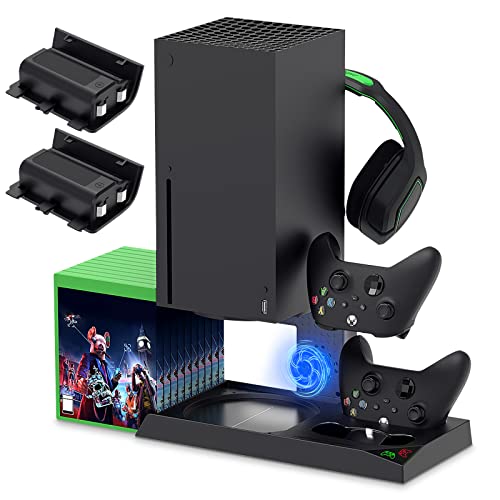
If you have an Xbox you need to get this cooling/charging stand for your console/controllers.
There is nothing worse than being ready for a long night of gaming only to realize your controllers are dead. With this stand that never has to happen again!
Types Of Xbox Suspensions And Bans
Before getting into the solutions for a banned Xbox console I want to give a quick overview of the different types of suspensions and bans that you can get on your Xbox. The following are some of the different types of bans that can be imposed by Microsoft if any violation happens.
Game-Specific Bans
These Xbox bans are related to specific games. If you are playing on Xbox and violating the rules of specific games then these games may ban you from playing.
This doesn’t correlate to any of the Xbox Live services and only applies to playing that game online so if you have a physical copy of the game you can still play it offline even if you are banned.
Profile Bans
This is one of the types of Xbox bans that is imposed on the user’s profile i.e. the gamer tag. If any type of ban is imposed on the profile then it results in no usage of the Xbox Live for that gamer tag anymore.
You can get around this by setting up a new account but you will lose all the progress or achievements on the original gamer tag that was banned.
Most of the time an Xbox profile ban can be fixed by changing the issue with your profile. Often your profile will be banned because of bad language in the gamer tag, a profile picture that is not appropriate, etc. By fixing these things you can get your profile unbanned.
Account Bans
If your Microsoft account gets banned it is normally for doing something far worse than just saying something wrong. It might be because you tried to scam someone using your account or it could be because you didn’t make your payment (or filed a chargeback).
Xbox account bans can also vary depending on your previous enforcement history. If you have never done anything wrong before you will be far less likely to get an account ban.
Often for your first offense, you will get an account suspension for a period of time. Once the suspension period is over your account will be usable like normal. However, if you get multiple account suspensions you can easily end up with an account ban.
Console Bans
If your Xbox console gets banned it means that your console cannot be connected to Xbox Live at all. It just becomes useful to play physical games that you own the discs for and can only be played locally.
It also means that you cannot access the online shop to download games from there either.
Communications Ban
This Xbox ban is more of a suspension as it normally only lasts a certain number of days. The communications ban just means you are not allowed to use any of the communication features on Xbox Live for a period of time.
This ban is earned when you use messaging or audio and break one of Microsoft’s code of conduct rules.
Windows Live Account Deletion Ban
This one is a particular kind of ban that is not very popular. This happens when your Windows Live account gets deleted. This leads to losing all of your access to your Xbox Live account.
Although this isn’t technically a “ban” you will not be able to get back into your Xbox Live account until the issue is fixed so it is almost a ban that you put on yourself!
These are some of the types of bans that can be caused by your regular violation of the Microsoft service agreement. Microsoft follows a firm policy for those who keep on violating the terms of use.
How To Fix An Xbox Console Ban
There are essentially four different ways that you can fix an Xbox console that has been banned. These four ways are:
1. Contact Microsoft
This is certainly the easiest way but also the least likely to work. Microsoft has a support team and if your console was banned and you actually didn’t do anything wrong then you can contact them and they should lift the ban.
Microsoft wants its customer to be able to play online simply because it makes Microsoft money when you do so. However, most of the time when your console has been banned there is a good reason why and contacting Microsoft support won’t get them to lift the ban in those cases.
2. Use a Hardware fix
This certainly requires a decent amount of technical expertise as taking apart your Xbox and replacing parts is not easy and for most people, it isn’t something that they should be trying. Assuming that you have some technical experience or are willing to give it a try then the part that you would need to replace would be the motherboard as that is the item on the console that needs to be replaced to get your console “unbanned”.
Taking apart your console and replacing the motherboard is no picnic and isn’t worth it most of the time but if you can get a cheap replacement motherboard then it might be worthwhile to try this fix.
To see how difficult it is to disassemble the Xbox One check out the video below.
3. Use a Software fix
This one is easier than the hardware fix mentioned above but isn’t available on all Xbox consoles and the degree to which a software fix can change as Xbox updates the software on their systems.
For an example of how to do the software fix on an Xbox 360 check out the video below.
4. Buy a different console
Ok I know this isn’t a possibility for everyone but for most people going out and buying a different console is the best way to deal with the console ban. You don’t have to buy a brand new console either as a good used one will save you some money while also allowing you to access Xbox Live again.
If you are buying a used console make sure that it isn’t banned and only purchase it from a reliable store with a good return policy or from someone you know as the last thing that you want is for the console you just bought off Craigslist to be banned as well!
Reasons Why Your Xbox Console Might Get Banned
There are a variety of reasons that your Xbox might get banned. We will mention a couple of the popular reasons why a console ban might take place but really you can be banned for anything that is against Microsoft’s terms of service
Following are some of the specific reasons why your console might get banned.
1. Physical tampering
This is one of the most often cited causes of the console ban as people often try to open the console to include something that allows them to “cheat” to get an advantage in the game. Modding your console through a variety of means can often get detected by Microsoft and will often earn you a console ban.
Many people will do something with their consoles to try and hack or mod a game to get advantages without realizing that this can cause suspensions or even bans. This is a wrong approach as it provides you with a wrong way of thinking that may lead you towards getting banned for a substantial period by Microsoft.
Microsoft can get information about any type of changes on the console due to the online service so if you are playing online with some modified hardware or software the servers can catch the new attachments or software and you can get suspended or banned quite easily.
While playing online games the feeling of competitiveness is evident. People often get competitive and opt for some cheating techniques or things you can install that will give you an advantage in the games.
There are different forums and many different discussions on the internet that vaguely claim that getting certain software can provide you with better and more competitive gameplay. With this information, people often try to install some of this unauthorized software that is not allowed by Microsoft as it isn’t secure.
Once you put this hackable software on your console Microsoft might ban your console for yours and other safety as unstable software can be used to access people’s information that is stored online. Just because someone online recommends installing a certain software to “help” you do something doesn’t mean that you should use that software.
There are certainly many other things that can get you banned but most of them will come with many suspensions prior to the ban. If you start getting suspensions because of the way you are acting or something that you have installed on the console then you will want to take the time to fix it before you get permanently banned.
Conclusion
Fixing an Xbox ban is difficult if not impossible to do in most cases. For most people, the best way to have a console that isn’t banned is to not get the ban in the first place. Take the time to learn what you can and can’t do while you are gaming online and then avoid breaking those rules.
I have been gaming online for many years and have never had a suspension or console ban because I am sure to follow the rules that Microsoft sets up and I treat everyone online the same that I do in real life, with kindness and respect. If you do the same then you won’t have to worry about console bans or suspension either.