
*This post may contain affiliate links. As an Amazon Associate we earn from qualifying purchases.
If you are thinking about buying an Atari, then you have to go with the 2600. The 2600 is one of the best Atari consoles ever made! Although I am getting ahead of myself, so let’s back up.
So should I buy an Atari 2600?
Although the Atari 2600 may not be the first gaming system everyone wants to buy, it is one that everyone should own! It is certainly a piece of history and something that could become valuable in the future.
The Atari 2600 is one remarkable game system, and when it was released, it was more advanced than any other system available! There are many reasons why someone should buy an Atari 2600, and below we will go into detail about what they are.
If you are an old-school Atari lover then you have to get a classic Atari T-Shirt to show it! To see the most popular Atari T-Shirt retro designs that will stay classics for years just click here.
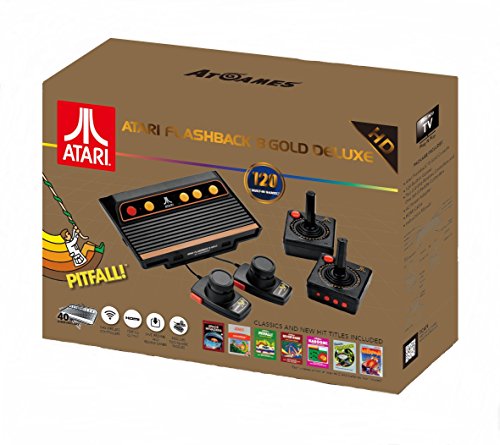
If you love all things Atari then you have to check out this awesome Atari Flashback console.
The Atari Flashback 8 comes with two wireless controllers (YES, WIRELESS!) two paddle controllers, and 120 authentic Atari games.
History of the Atari 2600
The Atari 2600 stands out as the best console game of the past era. This is because of remarkable improved gaming quality, ease of playing, simple functionality, and the vast option of games. This is why if you are looking to get into retro-tech and want to enjoy the nostalgic memories of childhood, you should start with Atari 2600.
The Atari 2600 was the first gaming console released by Atari. The Atari 2600 was released in 1977. Although a few low-quality console models of other brands were available in the market, they were considerably less game-oriented and they required more emphasis on the memory. This is why the Atari 2600 was, in most people’s minds, the first actual gaming console made.
The Atari 2600 was the first ever gaming console to have a digital touch, and allow exciting interactive games to be sold to the public.The Atari 2600 increased the charts of the market with new tech, and focused more on fun and less on management.
One important thing that made the Atari 2600 one of the best gaming consoles was the fact that it had an easy setup. The Atari set the bar high for any other gaming system coming after it, as most games that had been released before that time had a complicated setup.
The Atari 2600 has been a console of choice for a lot of people for many years. Even with the advanced technology and consoles, quite a few people still prefer to enjoy the retro vibe of the Atari 2600. It is because of the nostalgic age of gaming, the priority factor, and simple setup. That people choose this game over others that are available.
Atari 2600 – The Game Changer
The Atari 2600 was prior marketed as the Atari Video Computer System (AVCS). Before the Atari was developed and released, people had to purchase a separate console for every single game they wanted to play! This was probably the biggest issue with the other consoles that were released before the Atari. It made compatibility an impossibility, and also cost a lot of money to own more than one game.
When the Atari released, it changed the consumer market with its new perspective. Because it integrated all the games on the same platform, every single person no matter their income could now afford to play games, and not have to worry about it costing a fortune. Because of this, the Atari sold over 30 million Atari 2600 consoles! They used the number “2600” in the name as the version number so people could tell it apart from other consoles, and know that the 2600 was something futuristic.
Buying Guide
When the Atari 2600 was released, it was available at an expensive rate because it was the supreme gaming console at that time. However, today it has come down in price quite a bit and many people own them for this reason. If you are interested in one, here is a good place that normally has them for a good price.
Why was the Atari 2600 so popular?
Although there were many console setups before the Atari 2600, they had a separate mount for the microprocessor. This is what made the overall console setup very complex to operate.
The Atari 2600 changed this concept, as It focused on the modern impression in which the microprocessor was mounted as the hardware on the same console. Atari also made the games preinstalled on separate ROM cartridges instead of installing it on the original console.
This was a big breakthrough in the gaming industry. Because the Atari 2600 came up with this idea, there were many other companies that started to follow the same design, and came out with their own games and gaming consoles.
Only specific systems in this Atari era were given the name of the Atari 2600. Originally the Atari 2600 was only going to be released in the USA, but because of its popularity, they decided the rest of the world should get a chance to play as well, so they began selling it all over the world. Compared to today’s consoles, the Atari seems pretty weird, but when it was released, it was the best of the best and set the standard for all others gaming systems.
Although some people think the Atari 2600 is pretty big, its design is something that no one can argue with. It has a sleek wooden design with black side barrels. It comes in different models that were released as an improved version of the previous one. With multiple buttons on the front of the console, all the display and game settings can be adjusted right on the console.
Games and Other Components
The Atari 2600 box contained several components. It included two Joystick Controllers, a pair of paddles or foot controllers, and a game cartridge. The availability of two joysticks were made so people could enjoy multiplayer games, while the game paddles were included to make car racing games more interactive. Although other games were available, they had to be bought separately.
A total of nine games were launched with the box, but many others were released in the later phase. Initially, the one game that came with the box was Combat, but when the Pac-Man game released, Atari changed it to be Pac-Man.
Improved Graphics over former Technology
One thing that was special about the Atari 2600 was that it had many colors instead of just black and white. Depending upon the television you owned at that time, thr Atari could use up to 128 colors. With all of these colors, the Atari 2600 looked interactive and appealing when it was being played.
Atari 2600 40th anniversary
Since Atari 2600 dates back to 1977, it is a possibility that you might not be able to get it. If you are unable to buy the original Atari, they did come out with a 40th anniversary Atari flashback edition. Even though this console replicated the original 2600 looks and design, it comes preloaded with 120 games as well as wireless controllers and is able to connect to any tv via HDMI. With the cost of this console being decently cheap, most people opt to buy one of them here.
Still don’t know if you want to buy the Atari 2600? Check out the review of it below.
Conclusion
If we look at the Atari 2600 from the gamers perspective, it does not run high spec games, but it is still pretty good for all the historical games such as PACMAN, Space Invaders, Combat, and many more. If you want to go back down memory lane or if you want to enjoy these simple yet interesting games then you should definitely buy the Atari 2600.