
*This post may contain affiliate links. As an Amazon Associate we earn from qualifying purchases.
Do you want to know how to hack the Atari Breakout game? Maybe you just heard from a friend that said the game can be hacked. No matter why you are interested in the hack, we will take you through a step-by-step guide on how to hack Atari Breakout.
This post will go into depth about how you can hack the game and beat all of your friend’s high scores!
Gone are the days when we used to play the Atari Breakout game known as Pong. The game was initially released in April 1976 and got the attention of many young people. Today with the new release of Atari breakout, they are looking back to the time when everyone enjoyed the game on the original Atari.
37 years after the debut of Atari Breakout, it is still known as a challenging game and can be exceptionally addictive. If you are playing against another player, or if you are attempting to get a high score for the game, you should know how to hack it to give yourself an edge.
If you would prefer to watch a video about how to hack Atari breakout instead of reading it you can do that in the video below.
If you are an old-school Atari lover then you have to get a classic Atari T-Shirt to show it! To see the most popular Atari T-Shirt retro designs that will stay classics for years just click here.
The first thing you need to know before you can hack the game is to know how to play Atari Breakout.
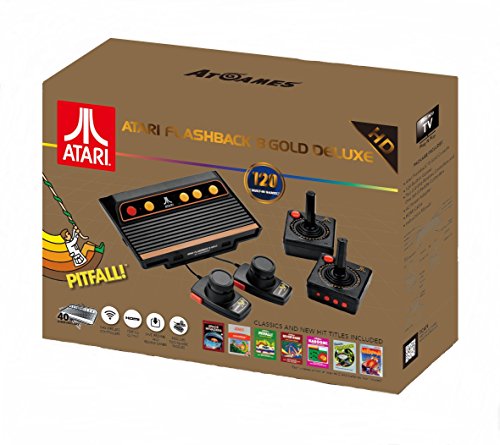
If you love all things Atari then you have to check out this awesome Atari Flashback console.
The Atari Flashback 8 comes with two wireless controllers (YES, WIRELESS!) two paddle controllers, and 120 authentic Atari games.
How do you play Atari Breakout?
To know everything about Google’s classic game Atari breakout follow these steps to get into the game.
How to gain access to the Atari Breakout game
1. Open Mozilla Firefox, Google Chrome, Safari, or any Web browser on either your desktop or laptop. (basically you just need the screen size to be large enough)
2. Go to the Google Search engine.
3. Type in Atari Breakout.
4. Click on Images.
5. When you click on the very 1st image, the Atari breakout game will be launched.
6. You are now ready to play the game.
Although the game doesn’t look like the old one anymore, you can still get some ideas from the old Atari Pong game. Although you will want to know that the game concept isn’t any different from the old one.
All you have to do is to move a square block to the bottom of your screen and then hit the ball. At that point, the ball will hit blocks at the top, crushing these square blocks and will add points to your scoreboard.
The more blocks you hit and crush, the more points you get. That is the strategy of this game. In the end, you will finish all the square blocks and then start a new game.
Tips On How To Beat Atari Breakout
So now you know how to play this addictive game on your device but what about some tips on how to play the game to get the most points? Of course, you could hack the game (which I will go into next) but what if you want to win the old-fashioned way?
Well here are some tips to help you beat Atari Breakout without cheating.
1. Get All Of The Power-Ups
The first thing that you will want to do if you want to get a high score on Atari Breakout is to make sure you get as many power-ups as possible. Some of the power-ups that you will come across in this game are:
- A speed multiplier
- Increase the size of the paddle
- Change the movement of the ball
- Increase the number of balls
Each of these power-ups will add some new tweaks to the game that will help you be more likely to pass a certain level.
2. Always Hit The Center Of The Paddle
When you hit the ball with the side of the paddle the ball can go off in a random direction which in turn can make it more difficult to catch it on the next bounce. Now if you are a hard core Atari Breakout enthusiast you can use this to your advantage.
But for most of us if the ball is careening wildly across the screen it will be a sure sign of disaster.
Although catching a wild ball is a cool problem to solve it won’t help you win long-term if you do the same thing over and over again. So by only hitting the ball with the center of your paddle you eliminate this single weakness from your gameplay and will ensure you get a higher score than normal.
3. Increase The Paddle’s Size
As mentioned earlier you can get power-ups that will help you be more likely to beat a level. One of these power-ups that you should always try to get is the one that increases the paddle’s size.
By having this simple goal of always increasing the size of your paddle you will be able to beat more and more levels. Of course, there is a maximum rate at that you can increase the paddle size but the larger your paddle the more likely you are to make sure you don’t miss your ball and lose the game.
4. Don’t Be Afraid To Change Strategy
If you find yourself struggling with a certain level it is a good idea to reverse course and try something new. Maybe your favorite features or power-ups are making it harder to beat that level for whatever reason. In that case, it might be a good idea to try something new.
When starting a level that you regularly struggle with it is also a good idea to take a new look at what might be making you struggle.
- Is it the design of the level?
- Is it the way that you normally play it?
- Are you struggling because of where you normally start the ball at?
Try to figure out which portion of the level has easier access that will allow the ball to bounce around without you needing to constantly hit it. Small adjustments like that can help you win in the scenario of the ball bouncing wildly which always seems to make you lose the level.
5. Try Again Tomorrow
Sometimes when you play the same game or level over and over again you can become frustrated and get further and further away from beating the level rather than closer to passing it. Just remember… it is a game!
Now I know playing a game that is challenging can be frustrating but how difficult a level is can be relative. Maybe you are just super stressed out currently and so taking some time away from the game will allow you to win more easily when you return to the game the next day instead of playing into the early hours of the night.
If the game had become more frustrating than fun then it is likely time to take a little break.

How Do I Hack Atari Breakout?
In the new game, Google likes to hide some features behind the walls, where only some experts can get to them. Although they are also visible to all internet users, no one will have the power to get through them.
Google added the 37-year-old mini Atari game to commemorate the 37th anniversary of the arcade video game. As we stated before, Atari Breakout is a remake of the original Atari game, Pong. It lets users move the paddle to keep the ball from going down the “bottom” and to hit the ball to break the blocks.
In this game, a user destroys multiple rows of blocks/bricks to get the highest score. However, you can hack the game with this cheat and conquer your dream of ranking at the top in this online game!
In the Atari Breakout classic gameplay, you are supposed to hit the blocks with your paddle below simply by bouncing the ball. If you miss a block, you miss an opportunity. Although the game seems pretty simple and straightforward, anything is possible in the world of imagination and computer generation.
While playing, you don’t want to waste your time on these normal blocks. Instead, you will want to use the Atari Breakout hack, to increase your score! You can hack the Atari Breakout game relatively easily if you follow the steps below.
Are you ready to get the highest score, and brag to all of your friends and family about your high score? Well, you better be, because below is the step-by-step method to hack the game.

How To Hack Atari Breakout In The Google Chrome Browser
1. Get into the Atari Breakout game page by following the above-mentioned method.
2. Now Pause the Game.
3. Press F12 on your keyboard
4. Click on the Console tab at the top of the new popout
5. Click on the empty space at the bottom.
6. Paste the code below and then press enter
function cheat() { var ball = document.getElementById(‘breakout-ball’); var paddle = document.getElementById(‘breakout-paddle’); var buffer = Math.floor((Math.random()*100)+1); var leftVal = parseInt(ball.style.left, 10); if (ball.style.left) { paddle.style.left = (leftVal – buffer) + ‘px’; } setTimeout(cheat, 100); } cheat();
7. Press the X in the top right corner to close out of the popout (not the one to close the whole browser)
8. The paddle will move automatically by itself and never let you die!

How To Hack Atari Breakout In Firefox
1. Get into the Atari Breakout game page by following the above-mentioned method.
2. Now Pause the Game.
3. Click on the 3 Lines Icon in the top right corner of your Firefox browser.
4. Now scroll down and click on the Web developer.
5. Then click on Scratchpad.
6. Now type:
7. ‘allow pasting’ (you cannot paste this is must actually be typed)
8. Paste the above-highlighted content and click on Run from the above toolbar.
function cheat() { var ball = document.getElementById(‘breakout-ball’); var paddle = document.getElementById(‘breakout-paddle’); var buffer = Math.floor((Math.random()*100)+1); var leftVal = parseInt(ball.style.left, 10); if (ball.style.left) { paddle.style.left = (leftVal – buffer) + ‘px’; } setTimeout(cheat, 100); } cheat();
10. Minimize the window and Play the game.
11. The Paddle will move automatically and won’t allow you to die!
*A common issue arises with the code above after typing allow pasting. If you have that error simply close out of the box and begin again with step 3. This time you won’t have to type “allow pasting” and you can paste the code directly into the box.

How Does Google Give Tribute To Its developers?
Every Developer of the Google Search engine is known to be a gaming geek. Because most of the developers are gamers, Google has made quite a few secret games for entertaining its developers. As work for them gets hectic with coding and editing, this is a way for them to take a short break and increase production as well as have a healthy work environment.
Google gives an Easter egg tribute to its users with games like StarCraft and Star fox. With this fresh classic Atari Breakout, the player can break a series of blocks with a ball guided by a paddle/bar.
We suggest you give this game a shot to get the best out of it. Score high with the hack mentioned above and make your friend’s jaw drop.
Conclusion
If you haven’t heard of this game before today, or even played this game, you will definitely want to give this game a shot! If you played Pong as a kid growing up or even as an adult, this game is definitely a must-have!
In order to play all you have to do is simply search for Atari Breakout and select the first image, and begin the game.
We are so happy to see that Google is paying tribute to their developers with these games, and showing how a light work environment is good for the employees as well.
No matter if you have never heard of Pong or Breakout before, they are not difficult games, and are great games to let your mind take a break from the everyday hustle and bustle of life.
We hope our article will help many people to explore this retro game from Google called Atari Breakout, and take a moment in their busy day to simply pause for a while and play this short fun game.