
*This post may contain affiliate links. As an Amazon Associate we earn from qualifying purchases.
Have you been playing your Xbox and recently got a message that said it was banned? Maybe one of your friends’ consoles was banned and they asked you for help. Well we are here to help you to know what options you have!
So if my Xbox is banned, what can I do?
The first thing that you need to do is to determine the reason why your Xbox live account has been banned. After knowing the reason for the ban on your account, you can contact the customer support service for help trying to lift the ban on your console. If your rule is minor, then you should not worry as the ban will be uplifted in a few hours or days. If the rule that was broken is major, then it may be lifted or may not be. As a user of Xbox lives, you are advised to follow the community guidelines so that you may remain safe from any bans.
If you want to know more about why you can be banned on the Xbox and what you can do now, you will want to keep reading.
Are you a huge Xbox fan? Then you have to check out this amazing Xbox gear and decor. Whether you want an Xbox-styled wallet, a sweatshirt, or a pair of Xbox socks there are plenty of choices to choose from. You can find them all by clicking here.
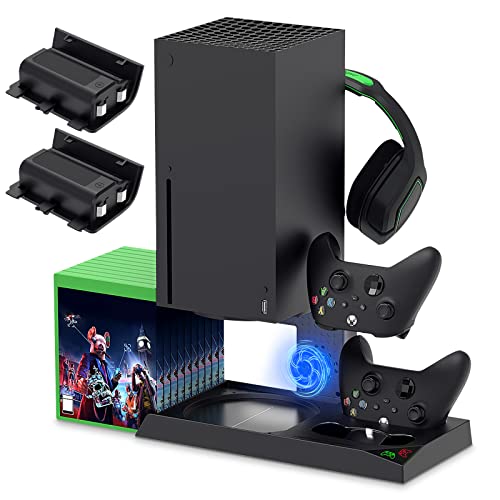
If you have an Xbox you need to get this cooling/charging stand for your console/controllers.
There is nothing worse than being ready for a long night of gaming only to realize your controllers are dead. With this stand that never has to happen again!
Why can Xbox ban my console?
Xbox is one of the leading brands of consoles developed and marketed by Microsoft. Xbox may decide to ban you console due to some of your irregular activity or if you have failed to abide by the community guidelines or code of conduct set by the company.
Here are some of the reasons for which you may get banned from Xbox live. As a user, you are supposed to know the reason why you have been banned. Here are certain reasons, which will tell you the reasons Xbox bans peoples accounts and consoles:
- The Xbox is banned mainly due to two reasons. First, if you have violated any code of conduct of the network. Second, the problem may be there due to the payment options.
- You can know the reason for your ban by making a call to the customer support center, where you can simply ask the reason behind your ban.
- The next problem may happen due to the payment option. You are supposed to check your credit card which you are using for making the payment to the company. If your card is not up-to-date, then there is a good chance that you have been banned due to payment reasons.
- The next thing you can do as a user of Xbox to know your ban is that you can check the email which you have provided the network. The email will contain some of the notification which will tell you the reasons behind the ban of your Xbox.
- You can also report to the Xbox support forums as the representatives there will help you in knowing the reasons behind the ban of your Xbox.
What to do if the Xbox account is banned?
If your Xbox live account has been banned, then you will not be able to enjoy the benefits of the network which you were enjoying before the ban. If a ban has been imposed on your Xbox network, then you should know that you have broken a major rule as the ban is imposed only for major rules.
If you have broken a small or minor rule, then the network will suspend you from the network and a suspension is temporary whereas a ban is permanent. One thing should be known by all the users of Xbox is that if they are banned for violating community standards, then they will not get the refund for their subscription. Xbox has issued some of the rules and regulations which should be followed by every user strictly. If you disrespect the community standards, then you may be banned from the network.
If your console is banned, and you want to buy a new one so you can keep playing online, this is the best place to buy one. You do not have to worry about them being banned as they are brand new, and even the used ones have been checked over.
What are the different types of the ban on Xbox live?
Microsoft can impose a ban on any of the accounts due to their irregular behavior or violating the code of conduct. The ban depends on the policy violation, and they are:
- Temporary bans
If the user has committed some minor mistakes, then he may be temporarily banned from the network of Xbox. After that, the user will be unable to use some of the specific features of the Xbox. They will not be able to establish contact or chat with the other players during the game. The entire account may be suspended if charges against the user are serious like harassment or cheating. The duration of the temporary ban can be anywhere from 24 hours to one week. It depends on the fault committed by the user.
- Gamertag bans
The user of Xbox live may face a gamertag ban if the user is using offensive language or if the user is a racist or sexist. Microsoft is very much serious and non-tolerant for all of these things. If the user is reported to be indulged in any of the above-mentioned activities, then this gamertag will be banned.
- Permanent ban on the device
The account of the user may get permanently banned if the user is not abiding by the community standards of the Xbox. If the user is involved in activities like online fraud, then he may be banned permanently from Xbox Live. The device of the user will not be able to access any of the Xbox live games if banned permanently.
What you should not do while playing on Xbox live
If the user is going to create an account on Xbox live, then he has to sign a solemn declaration where he is supposed to abide by all community standard guidelines. If the user is reported by any other user about any misconduct, then Microsoft will investigate the allegation and if it will be found to be true, then you may get banned from the network. Here are some of the things which you should not practice if you have an account on Xbox live;
- Racist or sexist comment
- Use of offensive language
- Harassment
- Solicitation
- Account theft
- Impersonation
- Uploading offensive contents
- Phishing
These are some of the things which you are not supposed to do while you are on Xbox live as a user. If you do any of these things, Xbox will suspend your account, or may even permanently ban you.
Conclusion
Now that you know what caused you to get banned and what to do next, you can make the decision about what option you want to take, Do you want to keep playing your Xbox offline and just with friends in your living room, or do you want to try and contact Microsoft to try and get your account unbanned.
Most people try and get their account unbanned, or try and contact Microsoft to see how long the ban is. This is because the online gaming platform of the Xbox is such a great place to play games and hang out virtually with people from all over the world. No matter what you choose, you have to admit that Microsoft takes the bans seriously, and does not just give them out unless they have proof that you have broken the rules of the platform. They do this to keep the gaming platform fun for everyone and user friendly.