
*This post may contain affiliate links. As an Amazon Associate we earn from qualifying purchases.
Xbox bundles started coming onto the market as early as 2001 as that is when the first Xbox was released. The Xbox One is the most recent Xbox bundle that you can purchase. Microsoft is responsible for coming up with the Xbox and the bundles for them while Flextronics and Foxconn manufactured the console.
The main reason Microsoft came up with this product was that such integrated products were not as prevalent on the market and so it helped them gain a marketing edge over their competitors as well as allowed them to get more money per purchase. For example if the console itself cost $400 and the games were $60 each, you could often get a bundle of the console and 3 games for $499. You saved money and Microsoft sold 3 extra games albeit at a slightly lower price.
Of course this isn’t always how the pricing breaks down and now with digital download games the bundles have changed a lot but that is the general idea.
The main reason that Xbox bundles are cheaper than buying the components individually is because Microsoft increases their profit per sale and are guaranteed a higher original selling price. Without the bundle someone might only buy used older games for cheap and Microsoft would see none of that money so by making a bundle they were assured to get at least a few new game sales out of the deal.
In recent years the bundles themselves will often be on sale around the holiday time and sometimes the Xbox bundles with a downloadable game will be even cheaper than an Xbox without any games at all! This of course makes no sense to some people but when you look at it from the store’s or Microsoft’s point of view it starts to.
Let’s say for example that there is an Xbox bundle that is sold with the console and Fifa 12. Obviously no one would buy that bundle for a good price as nobody wants a game that is almost a decade old! So when console bundles are created and the games either are not as popular as it was thought they would be or the games are starting to age quickly, the store’s and Microsoft will often discount those bundles to get rid of them before the games that come with the bundle are worthless.
Xbox bundles are great for both customers as well as the stores and Microsoft so ultimately everyone wins as long as the game or games in the bundle are those that the customer will actually want and play with.
Are you a huge Xbox fan? Then you have to check out this amazing Xbox gear and decor. Whether you want an Xbox-styled wallet, a sweatshirt, or a pair of Xbox socks there are plenty of choices to choose from. You can find them all by clicking here.
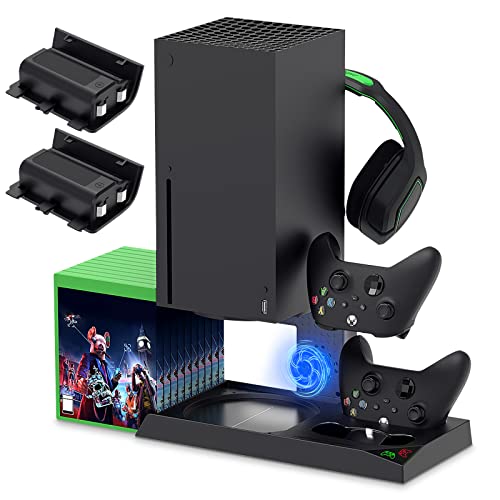
If you have an Xbox you need to get this cooling/charging stand for your console/controllers.
There is nothing worse than being ready for a long night of gaming only to realize your controllers are dead. With this stand that never has to happen again!
Play Digital with Xbox
When the users used to play video games on the Xbox console they used to do it with the help of physical discs. In recent years however many people have been going to digital downloads and so Microsoft now has Xbox bundles with download codes in the package. What that means is that the digital games cost Microsoft virtually no money to produce and they get to sell the console for more money! Since customers are going to buy new games anyway they like the bundle deal and often don’t care if it is a digital download or not!
This is an opportunity for Xbox to make more money from digital games as well as introduce or get people used to the idea of buying games digitally rather than having physical copies. Ultimately Microsoft makes more money on downloaded games so if they can push people to download a free game and get them used to always buying and downloading games that is a HUGE win for Microsoft.
Many things together is cheaper
Even when the bundles consisted of physical games it was still better for Microsoft to sell bundles. The games are already made and can easily be added to a bundle for a relatively cheap additional cost. That additional cost is covered by the increased cost of the bundle that the customers would pay.
It was cheaper for the customer and easier for the stores as well!
Sometimes Microsoft would put games that were not doing well into bundles as a way to get rid of excess inventory or to try and push a new game or new style of game onto the market. Since many people love to save money then buying an Xbox bundle that included games worked well even if the games were not the most popular or had not really been heard of before.
Even if the games that were included in the bundles were not the most popular ones the bundles were still often well received. That is because gamers just like to game!
Gamers love spending their time trying new games or learning new things and even games that are not the most popular are still often quite fun to play. Another upside for gamers was that you didn’t have to immediately shell out some additional money for new games. If an Xbox bundle came with a couple of games you could easily wait to play them and try and pass them while you were waiting for the newest releases to become cheaper.
Having a console and games included also made giving a console as a gift to kids a great option as well. They could play the few games that came with the console immediately when they got their present and then they could save up money towards the purchase of other games if they chose to!
Valuation of the product
The valuation of Xbox bundles can be done from the fact that several games are provided to the users. Since, economically we see that all these things are provided to the customer, we need to calculate the individual price of all the items separately. Since each item is more expensive to purchase separately then the value that these bundles offer to the customers is quite high.
The explanation is simple to understand. Suppose multiple vendors sell these games separately then the customer will have to pay the cost of each individual game on top of the console price. But if the customer is provided with several games and accessories together, then the total price that is to be paid by the customer is quite less as compared to purchasing each part separately.
Many companies use this brilliant logic of valuing their product (or a range of products) to provide maximum benefits to the customer and that too at lower prices. Coming to the case of Xbox bundles, it provides a console to the customer along with certain games. Other things provided to the customer can often include some accessories, additional media such as DVDs, game packs, extra maps, etc. All of these help enhance the value that the customer is getting at virtually no cost to Microsoft.
This helps the players to have a greater playing experience with the console which in turn makes them more likely to come back for an Xbox in the future rather than going to another console.
Purchasing from online retailers
Customers can also purchase the Xbox bundles from internet retailers as well as local stores. These online retailers occasionally come up with their own deals and special offers that provide their customers a great chance to save some additional money by purchasing from them. It is a good idea for customers to look for these offers regularly as offers at online stores can change rapidly especially around the holiday season.
These online retailers often provide such offers only for a specific period of time. There is also a possibility that some online retailers will provide the product at a lower price only for a limited number of sales or for a short period of time.
Some examples of this can be lightning deals on Amazon as well as Black Friday specials that are run at a variety of online and local retailers.
Conclusion
Xbox bundles are cheaper for a few different reasons but mainly it is because either Microsoft/stores are trying to get rid of that specific bundle or they are trying to increase their total profit by selling you extra games and accessories all in one bundle pack.
These bundles are often great deals for users as well as being good for the store’s and Microsoft’s profits so they really are a win win type of situation.
If you are looking to buy an Xbox then a bundle that includes games as well as other important accessories for a great price is always a good option for you to buy!