
*This post may contain affiliate links. As an Amazon Associate we earn from qualifying purchases.
Xbox is one of the best video game consoles on the market today. One of the most popular features of the Xbox is that they have Xbox Live which allows all online gamers with an Xbox console to interact and play online.
The most important aspect of playing Xbox games is interaction and this no longer means having to invite your friends over to your house to hunker around your console. You can play with any of your friends who have an Xbox no matter where they live!
When it comes to playing online games some of the players like to trash talk all of the time. Apart from these regular interactions some players even behave improperly by hacking accounts or even using software to cheat in games to give themselves a competitive edge!
All of this behavior and more is against Microsoft’s terms and conditions and Microsoft in recent years has been increasing the number of suspensions and bans that this issue for this type of behavior. They have even gone so far as to ban consoles from playing online entirely!
So, if you wake up one day and find out that your Xbox has been banned how do you know why this happened?
There are a variety of reasons why your Xbox could be banned but the easiest way to find out why is to check your email. When your account gets suspended or banned they will send an email to the account holder with the reason/reasons why. If that reason is too generic then you are down to just guessing. The two reasons most people get banned is because of what they say in messages or while playing and because of hacking/installing improper software or firmware.
The type of ban that you received will also help to narrow down the exact reason for the ban. If you got an account or console ban with no prior warning then it is a good bet that they caught you hacking, installing third party software, or installing custom firmware.
If the ban you received is a communications ban or an account ban after getting multiple communications ban then the issue is likely a problem with what you are saying or messaging people. It is your responsibility to control your language and not call names, use sexist/racist remarks, curse at people, etc. and if you don’t follow these rules you will eventually find your account and even your console banned.
Are you a huge Xbox fan? Then you have to check out this amazing Xbox gear and decor. Whether you want an Xbox-styled wallet, a sweatshirt, or a pair of Xbox socks there are plenty of choices to choose from. You can find them all by clicking here.
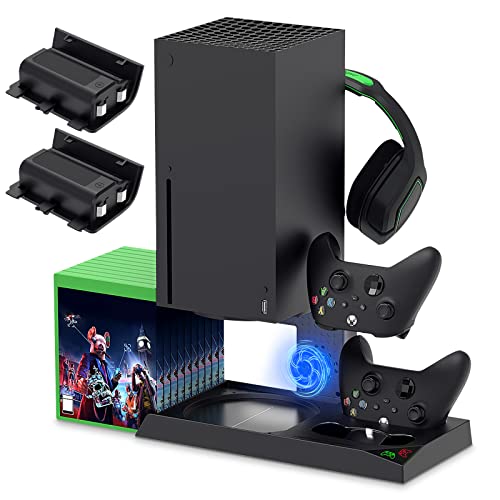
If you have an Xbox you need to get this cooling/charging stand for your console/controllers.
There is nothing worse than being ready for a long night of gaming only to realize your controllers are dead. With this stand that never has to happen again!
Reasons for an Xbox Live ban
When it comes to being banned on Xbox Live it all comes down to the users violating some of the essential rules that are put in place by Microsoft. Normally when a ban is put into place it is either for a serious issue or repeated smaller issues that were never addressed.
Following are some of the reasons why a user might get their Xbox Live account banned.
- One of the most prominent and popular reasons for Xbox live getting banned is the physical tampering on an Xbox console. People often try to manipulate their gaming style by altering the console’s software or hardware. This tampering will help the user be better at a specific game but will also end up with the account or console being banned! Obviously it isn’t worth it to cheat in a game when you will lose access to the account or console entirely.
The problem is that many people install software or hardware on their console because they read about it online or saw a youtube video about it and didn’t know it was against Microsoft’s terms. However, it is up to you to make sure that you follow the rules so not knowing that Microsoft would ban you because of the software or hardware is not an excuse and you will still end up with a ban.
- With the increase in hacking and different cybercrimes all over the world cybercrime has found its way into the gaming community as well. If anyone is caught committing online fraud, such as account theft, scamming, or phishing then they will get an immediate ban and if the action is illegal will likely find the police knocking on your door as well. There are numerous reports of an Xbox live ban due to different cybercrimes.
- Apart from the violations of the code of conduct and the terms and conditions if a person is found to be repeatedly violating the Microsoft Services Agreement, this will also cause an Xbox Live ban. Often people violate these service agreements due to their own negligence.
The only way to make sure that you are abiding by the terms and conditions or code of conduct is to read it and learn what it says so that way you can follow it!
What to do after you have an Xbox Live ban?
When you get banned from Xbox Live there are some things that you can do that will help you to either lift the ban or find an alternative to Xbox Live. Some of those are:
- If you have been suspended from playing Xbox online games and don’t feel like you did anything wrong then you should contact the enforcement team and ask them to look into your case. You then should just wait and watch for the investigation to get over. Once the investigation is over either you will have your ban lifted or your ban will be upheld. If it is lifted then you can go back to gaming like normal.
If the ban is upheld and it is for a certain number of days then you will have to not be able to access the online content for that period. If it is an account ban then the only thing that you can do is to create a new account and make sure that you abide by the rules in the future so the new account isn’t banned as well.
- If your console has been banned then you are left with only two main options, either sell the console and buy another one or only play offline via local games or multiplayer. There are some LAN groups that you can join to play online outside of Xbox Live as well but that is difficult to do and over the heads of most people.
For most people online gaming is an important aspect of their gaming life so the only good option is to sell the banned console and buy a new one.
Conclusion
When it comes to live gaming sessions, Microsoft has strict policies against those who repeatedly violate the code of conduct or term of service. Microsoft’s online servers constantly check for consoles that have been tampered with to ensure that no one is violating those terms. When they find people who have added software or hardware to their console Microsoft is quick to issue a ban or suspension depending on the severity of the rule that was broken.
Harassing people and making sexist, racist, or other offensive comments can get you banned easily as well although normally that will be a communications ban that is temporary. As long as you don’t commit those sorts of things repeatedly you shouldn’t ever have to deal with an all out account or console ban.
Microsoft wants to make sure that everyone who is on their platform has fun so they are quick about issuing these types of bans for people who are just plain rude or malicious.
When it comes to getting their Xbox Live service banned many people don’t realize that they are breaking the rules but unfortunately lack of knowledge won’t work as an excuse and your account or console will still be banned. If you do find yourself with an entirely banned account or console it is worth contacting the enforcement team and seeing if there is anything that they can do. Sometimes they will lift bans for people if you explain what you did wrong, that you realize it was wrong but didn’t know at the time, and promise not to do it ever again.
This doesn’t always work but it is certainly worth trying before you go out and buy a new console.