
*This post may contain affiliate links. As an Amazon Associate we earn from qualifying purchases.
Do you own a Sega Genesis and wonder about saving your games? Maybe one of your friends told you he played a game he could save and you want to know how to do it. Even if you are just settling a bet to see who is right, we have the answer for you.
So do Sega Genesis’ games save?
Although some games had memory built in and could save your game, most of the games made for the Sega Genesis did not have the save option, and the Genesis itself did not save any games.
Do you want to know more about the cartridges that saved games, or learn more about the Sega Genesis? If so you will want to keep reading. You can also check out this video to learn all about the Sega Genesis.
Are you a huge Sega fan? Then you have to check out the amazing Sonic and Sega gear that you can get. Whether you want a Sonic wallet, a Sega sweatshirt, or a classic hat there are plenty of choices to choose from. You can find them all by clicking here.
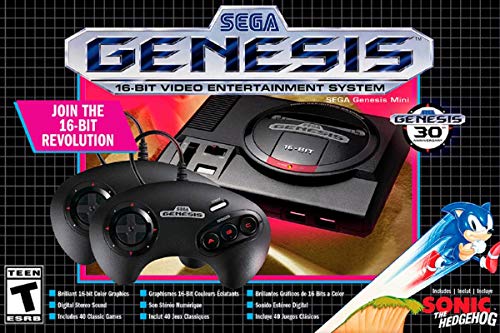
If you love Sega then you will want to check out this Sega Genesis Mini console. It comes with two controllers and even comes preloaded with 42 Games!
Enjoy these classic Sega Genesis games without having to purchase a single game cartridge!
Sega Genesis Games With Save Features
A few games for the Sega Genesis did have the option for you to save your games. This option was built into the game cartridge, and not on the Genesis itself. Some of these games required a password to access the saved content while others did not.
No matter if the game required a password or not, the cartridges that allowed you to save on them all had an internal battery. If that battery ever died, you would no longer have access to the saved data on the game. Because of this, many people kept the necessary battery and screwdriver to open the game with their console.
Here is a video showing you how to change the battery in your game cartridge.
Although the games with the memory save option were more expensive people often opted to buy them as it made the games easier to pass. Because more people were opting to buy the game save cartridges, most of the next generation gaming consoles began to have built in memory or a memory slot where storage could be added to save games.
In today’s consoles, they all have internal memory, and most of the time is anywhere from 500gb to 1 tb! To put this into perspective, the original NES games ranged from 1kb to 8kb. That meant to simply fill 1gb on the new consoles, it would take one million kilobytes!
This is just one representation of how far gaming has come in the last few decades.
Is The Sega Genesis Mini Worth It?
Sega recently released the Sega Genesis Mini. This mini console is something that brought many people back to their childhood. This console came preloaded with 40 games and hooked directly to modern tvs with HDMI. Although there were some people that did not like the original Genesis, there were only good things said about the mini.
The Genesis Mini was a hit from the day it released, and allowed thousands of gamers to play games that they had not played in years! This was a game changer for Sega, and began to work on a second Genesis mini console.
The second Sega Genesis mini was far better than the first, and came preloaded with 81 games for the exact same price! This was a major hit as the console came with extremely popular games such as Sonic the Hedgehog, Mortal Kombat, and many many more.
The game system comes with two wired controllers, and the ports for them are even the original controller ports! Sega spared no expense making this new console look original while packing the punch of the new gaming technology available today!
The console is still available for sale today, and can be found at many retailers online.
Is Buying A Sega Genesis Worth It Today?
If you are considering buying an original Sega Genesis, you may want to know if it is worth it. There is a lot of debate on whether or not the Genesis is even worth buying today as it is expensive, and the games are not necessarily cheap either.
When you look at the console, you need to ask yourself why you are choosing this console.
- Is it just because you like the feel of the controllers?
- Is it because the games of the Genesis are great games that you love to play?
- Is it because the console made history and you want to hold a part of history?
- Maybe it is because you just like to collect gaming systems and you are missing the Genesis.
If you are looking to buy the system for most of the reasons above, you may be better off choosing the Sega Genesis Mini released by Atgames. This console comes with over 80 games and is under $100 for everything you need to start playing tomorrow!
If you do choose to go the retro route and purchase the original Sega Genesis, you will need to start your library of games. Although there are many games that were made for the Genesis, there are not that many that are the best of the best.
Here is a short video that goes over the top 10 Sega Genesis games! Believe us when we say these games are worth anything to play!
Sega Genesis History
The Sega Genesis also has the names of Mega Drive or Sega Mega Drive. The Genesis was Sega’s successful console in North America.The Genesis was designed for people to play at home, and was 16 bits. Sega had two major additions to the console, and they are:
- The first one is called sage management.
Sega bought Sage as they were one of the rivals of Sega in production of chips used in the Sega. This meant that Sega could produce their own chips and be a lot cheaper than the Super Nintendo.
- The second is the Sega Channel.
The Sega Channel was released in December 1994 and was designed for gamers to pay a monthly fee to play as many games as they want. It was also supposed to be a place for gamers to try new games and download cheat codes for games they already owned. The Sega Channel only lasted until July 1998, as some people did not like the high price of the subscription fee.
Conclusion
Although the Sega Genesis did not have the capability to save games, there were a few games for the system that did. Those games were very popular, and loved by gamers everywhere.
Even though the Genesis did not have the capabilities to save games, It was still one of the most advanced gaming systems of its time, and even took the top powerhouse spot away from Nintendo when it was released.
That is something that you do not see very often in any business, let alone the gaming community. This is because most gaming systems are popular because users have been playing with them and are familiar with the setup and how the games operate and so on.
That is why what Sega did by taking down Nintendo was such an accomplishment.
They not only took the number one spot away from Nintendo, but also managed to continue to take sales from Nintendo throughout the years.