
*This post may contain affiliate links. As an Amazon Associate we earn from qualifying purchases.
Since SEGA genesis was such a success in North America and Europe, Sega decided to create the SEGA 32X. The Sega 32X was an add on made specifically for the SEGA Genesis video game console.
Gamers have tried to use the consoles to play games from another gaming console library. A question frequently asked is Can SEGA 32 X play Genesis games? Even if you did not ask this question I bet now you are curious.
Yes, Sega 32X can play Sega Genesis games. If you check the original 32X manual, it shows that you can directly plug in Genesis games to the 32X and they will work, with the exception of Virtua Racing.
SEGA is a well-known video game developer that dominated the gaming market in the 1980s. If you are a true gamer, I am sure you already know this.
In SEGA’s glory days they released a gaming console called the SEGA Genesis also known as Mega Drive in 1989. The SEGA Genesis is a 16-bit video game console. Its library is considered rather extensive with well over 600 games created both by SEGA and a wide array of third-party publishers. The top sellers of genesis included Sonic the Hedgehog, its sequel Sonic the Hedgehog 2, and Disney’s Aladdin.
The Genesis library started quite small but then grew to eventually attract gamers from all different walks of life.
Are you a huge Sega fan? Then you have to check out the amazing Sonic and Sega gear that you can get. Whether you want a Sonic wallet, a Sega sweatshirt, or a classic hat there are plenty of choices to choose from. You can find them all by clicking here.
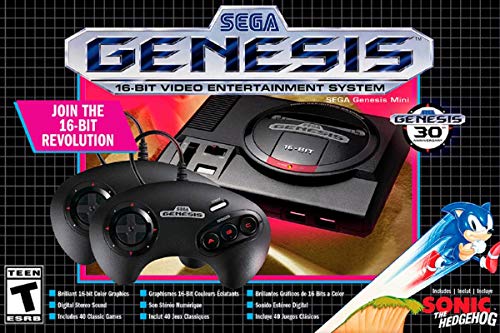
If you love Sega then you will want to check out this Sega Genesis Mini console. It comes with two controllers and even comes preloaded with 42 Games!
Enjoy these classic Sega Genesis games without having to purchase a single game cartridge!
Reasons to play genesis games on your SEGA 32x
SEGA 32x offers a wide array of games that come with its gaming console. five of those games are:
- After Burner Complete (1995)
- BC Racers (1995)
- Blackthorne (1995)
- Brutal Unleashed: Above the Claw (1995)
- Corpse Killer (1995)
Even though SEGA 32x comes with its own games and the genesis console comes with its own games, there are a lot of benefits to playing your SEGA genesis games on your 32x. Although the biggest benefit in my opinion is the fact that the graphics are upgraded from 16 bit to 32 bit, here are the main two reasons according to all the gamers I have talked to.
- There is a notable difference in the display image of the SEGA 32X system
When gaming using the 32x console the gamer will notice that the image is a bit clearer than on the Genesis console. This is a big plus for any gamer. The better display image is because the SEGA 32X has a higher build quality in its video encoder than that of the SEGA Genesis. While it isn’t a significant difference it definitely improves the gaming experience.
- The SEGA 32X has better audio capabilities
The Sega 32X also has improved audio over the Sega Genesis. The capabilities of the audio system are extra sound channels, and enabling multidimensional sounds. This essentially allows for you to hear 3D sounds in the game which is approximated based on the sounds heard in everyday life, even with a regular stereo. Also, another capability of the 32x audio is that it has Q sound technology.
How to install and play your SEGA Genesis games on your SEGA 32x Console
Now that you are aware that you can play your genesis games on your 32x console and also the benefits. Here is how you can do it. As established earlier the SEGA 32x is an add on for the SEGA Genesis console. As a result, the SEGA 32X has to be attached to the Genesis console. Following this, you will be able to then play your favorite Genesis or 32X game cartridges through the SEGA 32x
Here are 9 simple steps to connect the 32x system. If you are like me though and you learn visually, here is a video that explains how to connect it as well.
- There is a cartridge slot on top of the SEGA genesis game console, after spotting it take the SEGA 32X System and plug it into this specific SEGA Genesis cartridge slot. This step is not so difficult.
- This step involves properly connecting the two games via its cables. You should have 5 cables:
- SEGA 32x a/v out
- SEGA 32x a/v in
- SEGA 32x ac adaptor
- SEGA genesis ac adaptor
- 1/8 headphone Jack to stereo RCA cable
- This is optional and available here
- Using the 32x crossover tables plug them together in no particular way. After which you will place the larger end of the attached 32x crossover cables and plug it into the A/V out port on the SEGA Genesis Console and then proceed to plug the other end into the A/V in port on the 32x
- Attach the SEGA Genesis Model 2 RCA AV cable into your SEGA #2x console. The other end of this cable should be plugged into the tv. Any slot can be used. However, the yellow cord should be plugged into the yellow port on the tv. The red and white cords do not necessarily need to be plugged in.
- Now to attach the power source. Just plug the SEGA MK-2103 AC Power Supply into the SEGA 32X console. Then plug into the wall.
- To also provide a power source for the genesis. Plug the SEGA MK-1602 AC Power Supply into the SEGA Genesis system. Plug into the wall as well.
- After doing these steps you will be unable to get sound from the SEGA Genesis and as a result, the sound will only be transmitted through the 32x. However, if you want to hear sound from both consoles you will have to attach a headphone jack to the front of the SEGA Genesis to the stereo. Use your 1/8 headphone jack to RCA cable. Use the yellow cable from the back of the 32x and leave the other audio cables unplugged. You will then be able to hear sound through the headphone jack on the stereo.
- Turn on the game system and find the tv settings. Just a tip, it is easier to find the respective tv settings if a game is in the console that way you will be able to see the game and select it. When the game console is on you should be able to see a power light on the genesis. The game you insert can either be from the genesis game library or 32x game library.
- Ensure that your tv is on the correct video source.
Conclusion
SEGA games are well-loved and have a ton of classics that even now some gamers just cannot get enough of. If you still have an interest in playing the same game systems and have access to one you should dust it off and have some fun.
There is still a lot to learn about these retro home video gaming consoles. One of which being can SEGA 32x play SEGA genesis games. If you are interested in playing your SEGA Genesis games on your SEGA 32x systems and wondering if it can be done. The answer is yes you most definitely can and it is not complicated at all to do so.
There are two benefits to playing Genesis games on your 32x system. One, the difference is the quality of the image. It is quite evident, also the audio quality is better than that of the Genesis system.
Now that you know that not only can this be done but the gaming quality has a better pay off, you can jump right into playing. There are 9 simple steps to follow and before you realize it you are playing your favorite SEGA Genesis game on your SEGA 32x gaming system.