
*This post may contain affiliate links. As an Amazon Associate we earn from qualifying purchases.
This is a very common complaint that people have when using Nintendo’s online service, that their account is banned. Getting banned on Nintendo happens far less often than you would think as many times what people call a ban is simply a temporary suspension.
For your Nintendo account to be banned you have to do some pretty severe things such as download pirated software, steal customer’s information, hack your console or games, etc.
Very rarely will you find yourself with a complete console ban without doing something like that.
The easiest way to tell if your Nintendo account has been banned is to attempt to login to the eShop. If you are unable to then either your account or console has been suspended or banned.
Many people get confused when they have problems accessing their account and can’t decide or don’t know what is going on. Nintendo has a habit of banning accounts or even consoles quite quickly when a severe issue is found and the ban can take place without any prior warning too!
Are you a huge Nintendo fan? Then you have to check out the Mario and Nintendo gear that you can get. Whether you want a Mario wallet, a Nintendo sweatshirt, or a classic NES hat there are plenty of choices to choose from. You can find them all by clicking here.
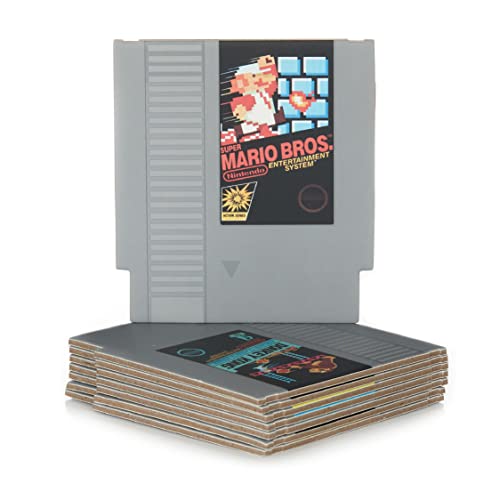
Do you love Nintendo? Then you have to check out this amazon NES cartridge drink coaster set!
This set includes 8 double sides drink coasters that look just like the classic NES cartridges.
This set is a perfect gift for the gamer in your life!
What to check if you think your Nintendo account is banned
There are a few basic things that you can do to check if your Nintendo account has been banned or things you should do once you know it has been. Those things are:
Account Access
If you can’t access your account at all on your device or even using a computer then it is safe to assume that your account has been suspended or banned. There is no other reason why you would not be able to access your account.
After all, all your games are stored in the account so if you can’t access it then it must be due to a suspension or ban that you have received.
Check Your Email
Even if you are confused about what’s going on and can’t decide if you have been banned or not checking your email will help you to know exactly what is going on.
Nintendo will normally send an email at the same time they issue a ban or suspension and the email will give you specifics such as how long the ban or suspension is for and will normally direct you to the section of the terms and conditions that you violated.
Contact Customer Service
If somehow you haven’t received any email and aren’t sure if not being able to access your account automatically means that it was banned then just contact Nintendo’s support.
Generally, they do help in clearing any kind of problems up. If you think you have been unjustly banned then you can appeal to the representatives as well.
Go To The Forums
A good way to get some solid opinions about what’s going on with your account is to go to some of the Nintendo forums. There are a lot of different forums about Nintendo available where you can make a post and ask your question or even read about other people who have had similar issues.
On top of this, there are a lot of Reddit groups for Nintendo discussions and you can make a post there as well or read other people’s posts.
Error code
If you didn’t get any kind of information about why you were banned but got an error code then you can use that code to get more information. Just go to Nintendo’s Support page and then enter the error code into the search bar there to see if any kind of results turn up.
Jog Your Memory
Carrying out the above steps will inform you in some way or another about what you could have possibly done to get yourself banned. But sometimes no amount of digging can turn up anything concrete or give you any solid leads.
This is where you need to dig deep into your memory and remember purchases and other relevant transactions that may have gotten you banned.
Contact Other Facilities
Sometimes you will get a very vague reason from Nintendo for banning your account. In such situations, the only way to get to the root of the issue is by contacting other facilities. This will sometimes include your bank and credit card company.
For example, if the reason for the ban is being stated to be something credit card related then contact your credit card company and try to figure out what has been done from their side to garner a ban. Sometimes credit card fraud is stated as the reason for a ban even though it’s not so.
But here is a little tip: In future when carrying out any payments, try to do it through PayPal. It adds an extra layer of security to your transactions.
What to do if your Nintendo account gets banned?
There are a lot of reasons for your account to get banned. No matter the reason it’s a terrible situation to be in because you won’t be able to play the games you purchased. If you are in this predicament then you can try following these steps:
- If you find yourself in a position where you think that your ban has not been earned then you should get in touch with Nintendo for help. Generally, Nintendo has one of the most understanding and friendly support teams. Contact Nintendo by calling or emailing them.
If you are indeed calling them up then use your friendly voice and try not to be rude. A little politeness can go a long way especially because it’s your account and purchased games on the line. So be patient and explain your issues as clearly as you can.
Customer service reps are way more likely to try and fix the issue if you are nice to them than if you are screaming in their ear the entire time.
- If you find that you aren’t getting any answers from the support team then don’t be afraid to ask for someone above them who can answer your questions. After all, you are paying for a service and they can’t just cut off your entire account without giving you a solid reason. If nothing else try to find out how many days your account will remain banned or suspended.
- After doing all this, you should get some sort of reply regarding the ban. From then on all you have to do is wait the ban period out till you get access again. If you are facing a permanent ban then chances are that the digital library you had before will get deleted in the process. In such cases as well you should try to contact all the above-mentioned authorities to clarify if you need to make another account or do you have to follow any other steps as well.
To see some people who received a ban immediately for their actions, be sure and check out the video below (afterall misery loves company right?)
Conclusion
Hopefully this article has been helpful in figuring out if your Nintendo account has been banned or if there was another issue. Contacting Nintendo’s support will often get you a quick answer on whether the ban is temporary or permanent and what exactly the ban is for.
Often with account bans there will be an email sent to the account holder that will specify the exact details so be sure and check your email before you waste time contacting the support team.
Overall, even if sometimes you don’t get the entire reason for getting a ban from Nintendo, you should dig deep and try to uncover the reason if at all possible. Contact the official support page, post in forums and such to get to the bottom of the issue.
After all, you will want to have your account back so that you can play again.