
*This post may contain affiliate links. As an Amazon Associate we earn from qualifying purchases.
Do you own an original Nintendo, but have yet to find the sd slot, or a place to save a game? Maybe you are wondering why some games you can save your progress on and others you cannot. Did your console get full already? Well we will answer all of these questions and more in this article.
So did he original Nintendo save games?
Although the Original Nintendo did not have an internal memory to save games like modern consoles do, some games did have built in memory into the cartridge of the game itself.
If you want to know more about the original Nintendo, you will want to keep reading. You can also watch this short video which will go over the original nintendo in depth.
Are you a huge Nintendo fan? Then you have to check out the Mario and Nintendo gear that you can get. Whether you want a Mario wallet, a Nintendo sweatshirt, or a classic NES hat there are plenty of choices to choose from. You can find them all by clicking here.
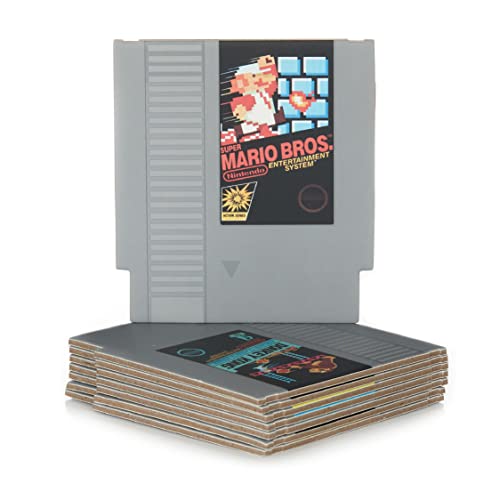
Do you love Nintendo? Then you have to check out this amazon NES cartridge drink coaster set!
This set includes 8 double sides drink coasters that look just like the classic NES cartridges.
This set is a perfect gift for the gamer in your life!
Top-games produced for the Original Nintendo
There are thousands of games that we can write down, but giving a small brief to every game isn’t possible. So, we have decided to choose the best ones and write on them instead. This will allow you to buy the game directly and enjoy the best games ever produced.
Vice: Project Doom
The game was first debuted in 1991 and even Nintendo was not expecting the game to be a “Super Hit.” The storyline of the game was interesting, original, focusing on the detective, and the investigation of a secret alien corporation.
The game was multi-genre where you had to use your creativity in order to reach out to the next level and on the other hand, you’ve to deal with the enemies as well.
Although the game is fairly expensive today, it is a classic that is highly sought after! If you do not already own it, you may purchase it here!
Contra
We have never seen a game so popular like “Contra” in the 1980s and 1990s where an action hero uses all the weapons and karate skills in order to kill the enemies.
The game wasn’t based on any strategy; you just have to hold the fire button and run like “your life depended on it.” All you need to do is to kill the enemies that come in your way and you’ll end up getting to the next level.
The game is fun, but if you don’t want any game that has “No Strategy” in it, then this game isn’t for you. But, if you want a game to kill some enemies and have some fun, you should check out this game. The game is still being sold today right here if you are interested in purchasing it.
Jackal
The game was a “Super Pack” and was released in America three years after the Rambo-II series. The game was based on “Saving yourself from the bombs sprayed towards you and keep. on moving.” If you somehow managed to miss all the missiles, you’ll be promoted to the next level.
Every level in the game will come up with new difficulty, and in order to reach the last level of the game, you need to be an expert.
The game is available here, and if you want to know how to play it, you can just watch this short video.
Rygar
This game was compared with the best fighting games in the 1990s and the only reason why this game didn’t get the hype is “Lack of a save function.”
If this game had a save function,it would have easily been the most loved fighting game of all time! The game was pretty simple where all you had to do was to fight all the enemies coming your way. You also have to deal with the obstacle in the form of “stones, bushes and other elements.”
There were more than 50 levels that this game that if you were good enough you could play! All of the levels were super exciting and fun to play. The reason not many people liked this game was because there was no save option for this game, which meant people would spend hours playing only to have to start back at the beginning the next time they wanted to play.
This game is decently priced, and can still be purchased here today!
You can also watch this video to learn how to play!
Maniac Mansion
If you’re a true gamer, then you might have heard about “Maniac Mansion” because the game is so famous that people still love to play it in the 21st century.
While playing the game, you’ll be awarded your followers. You can ask the follower to do certain tasks and your characters can die in the process. On completing everything perfectly, you’ll be promoted to the next mission!
The game can be purchased right here for a decent price. This is definitely a game that will not disappoint! No matter what age you are this game will keep you on your toes and entertained for hours!
Castlevania
This game comes under the “Action-Adventure” genre and the game is about “fighting with the mummies and Frankenstein’s monster.”
The main character of the game “Simon” can collect knives and water found on the enemies. The primary weapon on the hero character is his “Trusty Whip.” The longer you play, the great scores you get. The game is pretty simple, and yet is fun and loved by children and adults of all ages! The game is still for sale in the United States, and can be purchased right here!
Super Mario Brothers
While this game is probably the most iconic game of the NES, some people are just now playing it for the first time. This game is full of crazy adventures, hidden blocks, secret pipes, hidden mushrooms, and best of all even hidden levels! This game will definitely not disappoint anyone! While the game can be challenging, it is probably the best game ever created. If you have never seen someone play before, and you have never played, you can watch someone play with this video.
While the game is sold out and hard to find, it is still available here!
The game also comes with a special secondary game called Duck Hunt. This game is where you use your special controller that is shaped like a gun, and you pull the trigger to shoot the ducks as they fly across the screen.
This was the first time in history that a shooting game was released into the gaming world! While Nintendo was pushing the limits with their consoles, they were also pushing their limits with the games and how they had built in memory for saving where you were in the game right on the cartridge!
Conclusion
Even though not every game was able to be saved, there were quite a few popular ones that did have save points throughout. Even if you were not able to save your games, there were still quite a few gamers who loved the games so much that they were willing to not have a save point as this made the game just that much more challenging.