
*This post may contain affiliate links. As an Amazon Associate we earn from qualifying purchases.
Have you recently been banned by PlayStation and you aren’t sure why? Maybe you were just playing a game and got kicked from playing and you didn’t do anything?
No matter what question you have, we will have the answer for you in this article.
So can anything be done because my PlayStation account was banned for no reason?
Although quite a few people are placed under a ban, most of the time they are actually 24-48 hour suspensions for small things. Because of this, most people just wait out the suspension, or look at the email PlayStation sends them with the reason behind the suspension or ban.
If you are still not sure why you are banned, you can also try emailing or calling PlayStation about the issue.
If you want to know more about knowing why your account was banned and how to fix it, you will want to keep reading. You can also check out this video to see why PlayStation bans people’s accounts.
If you love PlayStation you need to check out this amazing game room light decor. It looks just like the buttons on the PlayStation controller and the light reacts to the music that you are playing as well! You can check it out by clicking here.
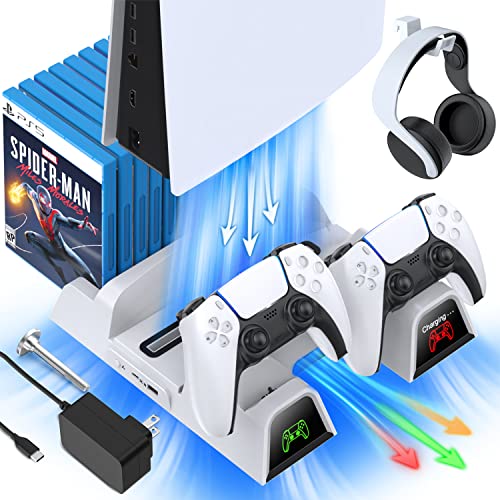
If you have a PlayStation console you should also have one of these stands. It makes it incredibly easy to organize your console and games as well as charge your controllers at the same time.
Plus it has a cooling fan to make sure your console doesn’t overheat when you have your weekend gaming marathons!
Why Do Playstation Accounts Get Banned?
Of course, when you first get a ban on your Playstation account you are likely to think that there was no reason for it to happen. Obviously, you are a good person but even good people mess up sometimes.
But if you are racking your brain and truly can’t think of what you could have possibly done wrong that could have resulted in a ban then this list might job your memory. Although this is far from an exhaustive list of all of the things that you can do wrong that would result in your account being banned these are certainly the most common.
Many Playstation accounts get banned because:
- Use of hate speech (this could be a variety of things including name-calling or cursing directly at someone)
- Cursing/Swearing (normally cursing will only result in a suspension but repeat offenders can get banned)
- Sharing an account’s payment details (if you share your payment details or the payment details for someone else’s account you can be banned)
- Harassment (as with hate speech this is broad but could be because of constantly messaging someone, bullying, etc.)
- Discrimination (this one is pretty straightforward, you cannot discriminate against anyone)
One thing to keep in mind is an account ban could be applied to anyone who is playing on your Playstation account. If you recently had some friends or family members over and they played on your Playstation could they have broken some of these rules?
Do you share a PSN account with a roommate or family/friends? Could one of them have done some of these things?
If you think someone used your PSN account and broke one of these rules (and you know it wasn’t you) then it’s a good idea to contact Sony’s support team. Although the company’s decision is rarely overturned if you can prove it was someone else who was using your account you might be able to get them to turn it into a suspension instead of a permanent ban.
What Kinds Of Playstation Bans Are There?
PlayStation bans are indeed the most annoying thing ever. It can probably be the worst thing to happen to a gamer. Before we get into more details about bans, let us first know about the different kinds of bans:
There are three kinds of bans PlayStation may impose on you:
- A PSN account ban is when you can’t access any of your local accounts on your PlayStation. There may be many reasons for this ban. Some of them are non-payment for subscriptions and behaving recklessly while gaming. If you find that all your bills have been paid, then you might have been caught bullying or using obscene language on the network which could have gotten you banned.
- A system ban means that your system is banned. In this case, you may be able to access your account from another system, but not do anything online with the PlayStation console.
- A suspension on the other hand will just deactivate your account for a short period of time.
All of these suspensions or bans (whether temporary ban or permanent ban) will likely be caused by violating the community code of conduct or the Playstation Network terms of service. If you are unsure why you have received a temporary suspension or are unable to access the Playstation website with your console then the first step is to read through those documents to see what you might have done.
Although Playstation support might have banned or suspended you on accident that is rare. After reading through both of those documents if you still feel that you didn’t do anything wrong then you will want to contact Playstation customer support.
They will be able to look at your Playstation Network account and see exactly why it was banned and what proof was submitted. Although the person you contact at the Playstation support center might not tell you exactly what you did wrong, they will likely be able to point you in the right direction.
Can You Unban Your PSN Account?
If you find yourself with a PSN suspension or ban you will want to know if there is anything that can be done. After all, you likely spent a lot of time and money on your account so having it banned because of some violations that you aren’t even sure happened can be quite frustrating.
The only way to possibly get your PSN account unbanned is by contacting Playstation customer service. A Sony support agent will talk to you and they will be able to help you if you didn’t actually do anything wrong.
Unfortunately, Playstation is typically very careful about banning accounts and will rarely lift a ban or account suspension. They make very sure that they investigate any potential suspicious activity so your account has been suspended or banned getting such suspensions lifted is virtually impossible.
So unless you get lucky with the person that you talk with at the Sony support team, you are very unlikely to get your Sony Playstation account unbanned.
How To Know What Playstation Ban You Have
Before you take any step make sure you know whether it is a system/account ban or suspension. Here are what the block notifications on your screen mean:
- 8002A227: You can’t use PSN with this account.
- WS-37397-9: Connection Error.
- WS-37368-7: This account is banned.
- WS-37337-3: This account is temporarily suspended.
- 8002A231: Your PSN account is suspended.
- WS-37338-4: This PS4 console is permanently banned.
Account bans are barely imposed on anyone until and unless there are some serious issues. PlayStation is very strict with its rules and regulations although it barely imposes bans on people unnecessarily.
It is only under very serious circumstances that PlayStation will actually impose a ban on you.
However, if you remember when you logged in to your PlayStation you agreed to a set of terms and conditions. We all know how you clicked on ‘I Agree’ without reading any terms and conditions. Very often than not this haste proves to cause many inconveniences.
Go back to the official website of PlayStation and try to go through all the terms and conditions once again. We know, that’s indeed a very boring thing to do. However, this step is integral to knowing why your account is banned.
If you find that you have indeed made some mistake and breached a term or condition then there is barely a chance that you will be able to reactivate your account. Sony has a reputation for only banning the accounts that have been severely messing up.
These bans can barely ever be lifted and will require you to make another account and make new subscriptions and your progress will also be lost.
How To Know If It’s My Playstation Account Or Console That Is Banned
Before making any serious steps to try and figure out the answer, you will want to try logging into your PlayStation Network on someone else’s system. There may be a huge possibility that your system is facing some issues and hence you are not being able to log into your account.
If you have tried all the above and yet find that there’s no valid reason for you not being able to access your account, you can contact PlayStation at 1-800-345-7669. They will try their best to solve your problem.
The worst-case scenario would require you to hire a representative. This option is barely taken by anyone as it is not cost-effective. When compared to this alternative action, buying another PlayStation and making another account is way cheaper.
Filing a lawsuit would require you to hire a lawyer and try and fight PlayStation lawyers.
This is why you should assess your options and choose wisely.
What Happens When You Close Your PSN Account?
Playing games on the PlayStation is so much fun, and is done all around the world every single day. The PlayStation is one of the most popular gaming consoles ever created.
Not only was the PlayStation popular when it was released, but even today it is extremely popular. It has continued to evolve as time has moved on and become better and even gives the player a better experience.
If you are playing the new PlayStation, and you have owned one of the previous models, you know exactly what I am talking about. Sony did not just keep the same PlayStation and change the name when they released a new one.
Whenever a new PlayStation releases people run to buy one no matter how long the line is because they know that the features on the new one will be far better than those on the older model. Not only that, but the new ones also have better games, and give the user a better gaming experience.
If you have ever played online with a PlayStation and ended up going a different direction you may have ended up closing your PSN account. But what happens to your account when you close it?
When you close your PSN account you will not have access to the PlayStation network, and you will no longer be able to play any content purchased with that account. You will also not be able to transfer your games or content to someone else who still uses their PSN account.
Another downside to closing your PSN account is the fact that you will not receive a refund for any of the games or content that you purchased while you owned that account. This is why many people will stick with their gaming system rather than jump from one to the other.
There is nothing more frustrating than changing your gaming system and having to buy all of the games you have already purchased just because they are on a different gaming system. Also not having the ability to transfer your account to one of your friends feels like PlayStation is taking advantage of its users.
While buying games for your PlayStation online is convenient, you will quickly realize that PlayStation holds actual ownership of that game and you can never sell it to recuperate any of the money you paid to buy it. This is one of the main reasons that people will continue to purchase physical copies of games even though we live in a digital world.
People like the fact that they can recuperate some of their costs when they no longer want to play the PlayStation. They can sell their physical copies of games as well as their controllers and gaming system if they purchase everything physically.
How Do You Find Out Why You Got Banned From PSN?
Playing games on your PlayStation is so much fun, but sometimes the fun can become a little too much. This is true for many people who will end up breaking the rules in order to appear better while playing, or to get free items while playing.
While originally you could cheat and get away with it, for the most part, today is a different story. PlayStation takes cheating very seriously and will ban your PSN account if you break the rules.
If you do not think you are breaking the rules and your PSN account gets banned, what was it for, and how do you find out?
If Sony bans your PSN account or your console, you will see an error code when attempting to sign in. They will also send you an email telling you exactly why you were banned and how long the ban will last.
No one wants to ever get banned from playing games or playing online, but sometimes it happens. Thankfully Sony is really good about helping you get out of a ban if you did not do anything wrong.
If you did break the rules, you can expect to get banned by Sony for a certain period of time. While it may be only a few days, those days will seem like an eternity when you cannot play games or use your PlayStation.
How Do I Pay Off PSN Debt?
While playing games on your PlayStation, you may have forgotten to pay your bill or filed a chargeback because of a Playstation charge you didn’t recognize. This can actually happen quite often as people’s credit cards expire, they do not have enough money in their account to pay for the membership, or they didn’t remember making a charge.
If you contacted your credit card company and told them that you didn’t authorize a charge to Playstation but Sony knows differently (because they know which console the purchase was made on) then you will likely have a debt on your Playstation account.
If you owe money to Sony and have a debt on your PSN account, you may no longer be able to play games online. So if you want to play again you will need to pay off this debt. So how do you pay off your PSN debt?
You can pay off your PSN debt by calling or emailing customer support, or by chatting live with a representative to make a payment for your account. No matter how you reach them, a representative will be able to help you and resolve your debt.
If you are expecting to just contact them and for them to remove the debt on your account for free you will not be happy. After all, you made the debt, and they expect you to pay it off before they unlock your account.
You may not have to pay the full amount up front though as they know people go through tough times. They will either set you up with a payment plan or request a large upfront payment depending upon how much you owe.
PlayStation wants you to continue to play online, and they know that you are not going to pay any money if they will not let you play online. This is why they will normally do a payment plan to get you caught up and get your account reinstated.
Once you make a payment for your PSN debt, PlayStation will allow you to go back to playing games online. This will continue as long as you stick to the payment agreement that you make with them.
How To Know If You Should Buy A New PlayStation
If in the end, you still fail to unblock your account or system, it’s time to buy a new PlayStation. Whether your account is blocked or not, if you are looking to purchase a new PlayStation, then these are a few things you should keep in mind.
Good Hard Drive
A proper hard drive is essential for online gaming, especially on the PlayStation. Thanks to the high quality of the games, whether it be in respect of the sound quality or in respect of the amazing graphics, they will take up huge space on your hard drive. In some cases, you may need to purchase additional storage.
You may need additional media devices
The PlayStation alone won’t give you the best gaming experience ever. Along with the PlayStation, you would need quality headphones or speakers which would require you to make an additional investment.
A good internet connection is a must
Needless to say, any kind of online game would require you to have a fast internet connection. PlayStation has multiplayer games and if you want to win any of those games, you will have to have a proper internet connection.
If you are looking for the best place to purchase a new system, this place has the best prices and is guaranteed to work properly.
Why Should You Purchase A PlayStation?
If you haven’t purchased a PlayStation already, here’s why you should purchase one.
A plethora of games
There are a plethora of games you can choose from. There are games from different genres from which you can select. These games have high-quality sounds and graphics which provide you with the best gaming experience ever.
A Great Way to Bond with Friends and Family
A PlayStation has many multiplayer games which you can easily select from. This is perfect for an evening with friends and family to play and help your family to become stronger.
Use Your Brain Power:
Many recent studies have shown how video games are beneficial to improve and enhancing one’s cognitive abilities. The PlayStation has many such games which tickle your brain and would require you to strategize, analyze and implement promptly. This in turn helps immensely with coping with problems in real life.
Conclusion
Now that you know about your account being banned and why PlayStation may have done it, you can admit if you were wrong and move forward once your ban is lifted.
The best thing to do is to show PlayStation that you are sorry and to not get banned again as every ban you get from PlayStation only gets worse in how long they ban you or suspend you.
No matter what ban or suspension you had placed on your account, there is no denying that the games of the PlayStation are incredible and fun to play for people of all ages.