
*This post may contain affiliate links. As an Amazon Associate we earn from qualifying purchases.
Video game consoles nowadays come down to two main players, Xbox and Playstation. Both of these are quite popular but there are some people that have difficulty deciding between the two and want to know which console is easier to use and play on. In this article we will try to answer that question.
If you’re an avid and regular gamer, it will probably come as no surprise to you that the entire gaming world is full of some stiff competition. Whether that competition is amongst the gamers or the providers of the games themselves, it is a race to victory.
From smaller gaming companies to the huge behemoths, every gaming console or model is designed in its best form to give the users exactly the interface that they need and want to enjoy and win. The competition is even fierce for companies like Sony or Microsoft despite the fact they are the two most popular systems in the world! Each company is always trying to outdo each other and they both want to be on the top of the heap.
Being the top gaming company means that every move must be made very carefully, every feature must be carefully integrated only if it is in the best interests of the users. Between Sony and Xbox, specialization and exclusivity are common attributes that both the companies try to capitalize on.
As a result of this, each company has built for itself a strong fan base that is a loyal user of either Sony’s PlayStation 4 or Microsoft’s Xbox One.
If you’re a regular gamer, it’s probably not very uncommon to find proud PlayStation users on online forums bragging about how much better the PlayStation has proved itself to be. You probably rolled your eyes- but we’re here to answer the question lingering at the back of your mind- Is the PS4 easier than the Xbox One?
Video game consoles are all about preference and most people prefer the Playstation over the Xbox as evidenced by the Playstation 4 selling more than DOUBLE the number of consoles that the Xbox One did. Many people find that the controller, dashboard, and other items are much easier to use and navigate on the Playstation console.
Undoubtedly, there are a lot of factors at play here. From speed and efficiency, to design- everything determines how easy the PlayStation 4 is for its users, or how difficult the Xbox One is to work with.
This is why we have done a more in depth analysis of some of the features to show you exactly why the answer to your question is YES the Playstation 4 is easier to use than the Xbox One (If you’re an Xbox One fanatic, we’re sorry for letting you down).
The first red flag for the Xbox One began right at the start, with its unsuccessful launch. Its launch helped push the market towards the opposite direction that Microsoft was hoping, towards the Sony PlayStation.
While Xbox One users nonetheless boasted superior features, they were instantly put in their place by PlayStation users. So, is the PlayStation easier and more worth it than the Xbox One?
There are some things about each console that you should consider.
If you love PlayStation you need to check out this amazing game room light decor. It looks just like the buttons on the PlayStation controller and the light reacts to the music that you are playing as well! You can check it out by clicking here.
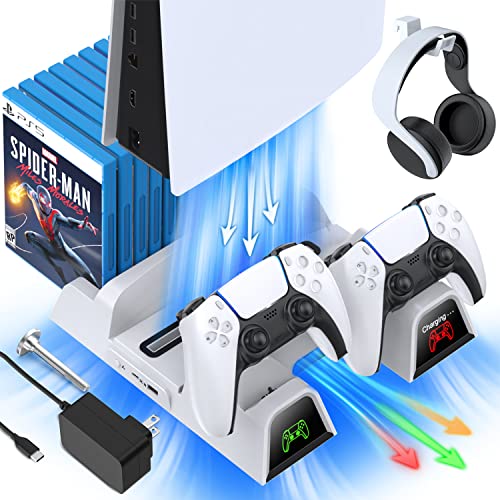
If you have a PlayStation console you should also have one of these stands. It makes it incredibly easy to organize your console and games as well as charge your controllers at the same time.
Plus it has a cooling fan to make sure your console doesn’t overheat when you have your weekend gaming marathons!
Console Speed
To begin with, the PlayStation 4 is quite a bit faster. Anyone who switches from an Xbox One to a PlayStation 4 is going to be pleasantly surprised at the speed the PS4 exhibits in its functioning. The PlayStation 4 is simply better and quicker at executing tasks and functions than the Xbox One has ever been.
With the PlayStation 4, gamers can always be ready and on the go. An Xbox user admittedly knows that even basic tasks can take unbearingly long because of the slow window snapping feature highlighted within the console.
Despite being very similar to the same feature in Windows 8, its quality within the Xbox One delivers frustratingly slow and excruciating performance. This can be observed easily if you’ve ever tried to do something as basic as adding people to your multiplayer game, or checking the leader boards. Every task seems to move at a snail’s pace and that is something that gamers cannot generally afford and certainty don’t like.
Games are generally action-packed, and that means that gaming consoles need to be able to catch up, but if the Xbox One fails to deliver even that, it has been ineffective in implementing the very first step of easy gaming.
You can see a side by side speed comparison in the video below.
Console Wait Time
This waiting time consists not only between opening apps but also includes accessing their internal features. For instance, opening a loaded app itself could take you a while, but that is prolonged further when you try to open an in-app menu or other features.
This can be not only tiring but also so time-consuming that you’re bound to fall behind on your progress when compared to all your better-console-owner friends, whether it’s to unlock achievements and trophies or check your scores.
All you want to do is game, but if your console, whose purpose is to facilitate the process, is standing between that, it’s neither better nor easier.
The PlayStation 4 is much easier and faster functioning. It has smooth menus and quick task execution language by which apps open fast with negligible interference and lag.
This console puts the focus on the gamers and their smooth victories rather than performance. Undoubtedly, Sony has managed to create a highly usable console for gamers.
Console Interface
Another mentionable trait of the PlayStation 4 that trumps over the Xbox One is its simple-graded and interactive interface. Where tasks can become a complicated process within the Xbox One, the PlayStation offers instant access task execution by providing shortcut buttons or macro keys.
For instance, the entire process of adding friends in the Xbox would take you through a tiring five-step process, while the PlayStation has one button on its controller, and all you have to do is press it to be immediately directed to the action.
There is also the fact that the PlayStation 4 automatically identifies and registers your best moments in-game by taking a screenshot that is displayed at the end of the day.
This feature has unbeatable leverage over the Xbox One, where not only do you have to manually take screenshots, but the process itself can be long and delayed because of, again, the time inefficiency displayed by the console.
Console Dashboard
In terms of the dashboard, the PlayStation exceeds in both quality and quantity. The apps, games, and features available on the dashboard are abundant, but the dashboard itself is just right in satisfying its gamers as well.
It is more functional than the Xbox One dashboard, which has a fancy layout, yet it shows more but does less. The Playstation dashboard is full of drop-down menus and game overview options where you can instantly find updates, guides, scores, and achievements of your game.
Moreover, the PS4 dashboard is structured such that all the apps and games you’ve used are displayed starting with the most recently used. This makes the PS4 a more lively console that is constantly working to ensure that it’s as easy as it gets.
The Controllers
While the Xbox One controller is more aesthetically pleasing in terms of visually, the PS4’s gaming controller is certainly the most convenient and manageable controller the gaming world has ever experienced.
The PS4 controller is smaller and more comfortable- so a user can use it for longer periods of time without feeling the strain on their hands. Additionally, the PlayStation 4 controller also has an easy “share” button so you can take screenshots, record videos, or go live right from the controller!
Conclusion
If you’ve been hesitant before about the performance of the PS4, we can now guarantee that the PS4 console will be the easiest console you’ll ever play on by far!
While Xbox does have some remarkable features, we feel that Microsoft concerns its console development with appearance rather than ease of use. This results in a huge strike for Xbox One, but a winning game point for the PlayStation 4 console.