
*This post may contain affiliate links. As an Amazon Associate we earn from qualifying purchases.
Have you ever played Super Mario Brothers on your Wii but didn’t like the controllers? Maybe you normally love the Wii, but the controls in this game are just not what you like.
So can you play Super Mario Bros Wii with a Gamecube controller?
Although you can play quite a few games with the Gamecube controller on the Wii, this game does not work with the Gamecube controller. Although there are reports of some people using the Gamecube controller, by unplugging the nunchucks, we have found that this does not work.
If you want to know more about the Gamecube controller and using it to play games on the Wii, you will want to keep reading.
You can also watch this video below if you prefer to learn more that way.
Are you a huge Nintendo fan? Then you have to check out the Mario and Nintendo gear that you can get. Whether you want a Mario wallet, a Nintendo sweatshirt, or a classic NES hat there are plenty of choices to choose from. You can find them all by clicking here.
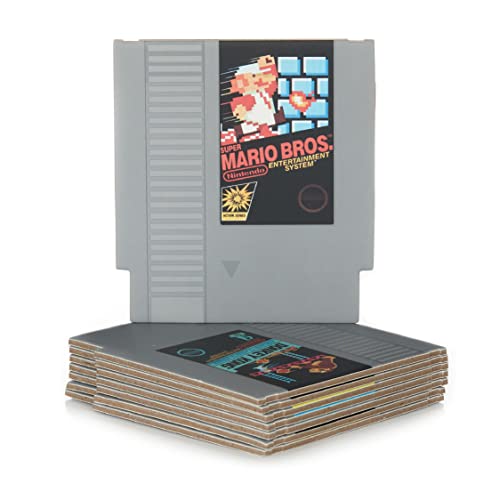
Do you love Nintendo? Then you have to check out this amazon NES cartridge drink coaster set!
This set includes 8 double sides drink coasters that look just like the classic NES cartridges.
This set is a perfect gift for the gamer in your life!
Can you use the Gamecube controller on any Wii games?
Although both Super Mario Bros Wii and Gamecube are products of Nintendo, they do not support each other. Some of the Wii games do not work with the Gamecube controller because they cannot match each other’s compatibility. This happens because one is a part of the old series of consoles, while one is the newer one.
Most of the time the newer games designed for the Wii have different controls that only work with the Wii remote, and not the Gamecube controller. However, some games such as Mario Kart do allow you to use the Gamecube controller to play the game. This is why it is always best to test the games with the Gamecube controller to see if it works.
You can also check the compatibility of a Wii game by checking out the back of the gaming package. You can see all the consoles that are compatible with it directly on the back of the package.
What technology is different between the Wii and the Gamecube?
If you have played the Nintendo Wii or Super Mario Bros Wii before, you must have seen its compatibility with other remote controllers. This is because all of these controllers work under the same platform, which is Nintendo.
Although the Gamecube is created by Nintendo, the Gamecube controller does not have the same technology in it that most Wii games need to operate.
This is where Mario Bros Wii and Gamecube controller differentiate. As stated above, these two products are a part of Nintendo, but they do not follow the same technology, specifications, and gaming styles.
The Nintendo Gamecube controller does not have the shake technology, which is an advanced part of a Super Mario Bros Wii game.
What to do when your controller stops working?
There are many occasions when you will have needed to connect some other controller to another console to try and continue playing when your controller broke. There is nothing more annoying than being in the middle of playing a game and something happens to your controller, and it suddenly stops working.
Since you are probably at home and have no way of going and getting another one right away, you beg and hope that a different controller will actually plug into the console and play. We have all been at this exact point in our life at one time or another.
The reason the Gamecube controllers work with a lot of the Wii games, is because the creators of the game mapped the old technology with the working of the newer game.
Is the Nintendo Wii backwards compatible?
Although Nintendo has been big on its consoles being compatible, most of the time the controllers are not compatible. This is because Nintendo wants you to purchase the controllers that come with the new console instead of just reusing the ones you purchased with your old console.
Working under the same process, Nintendo created the Wiimotes, which are compatible with the new Nintendo Wii consoles.
Since Wii Nunchucks are also a part of the latest release, these nunchuck remotes are also compatible with the Wii games.
What makes the Super Mario Brothers for the Wii different?
Super Mario Bros Wii has a distinctive feature of the shake button in its controller. This is the main selling point that differentiates it from other older Nintendo consoles. When you buy a full package of this Nintendo console, you get two remotes controllers along with the console.
However, if your remote controller gets damaged, you can replace it with a similar one that works with the Wii.
These similar controllers like the nunchuck will support the game but not in all of the cases. You will no longer have the shake functionality button with other supporting controllers. Therefore, you have to make some particular changes when you play.
Other console’s controllers will not have the feature of the correct motion controls, which means that you will have to replace the movement buttons, tilting, and shaking feature with other switches on the controller. This can be done by going to the menu and changing the controller settings.
Nintendo Gamecube is a part of the classic series of consoles. Although it is a pretty good console that was very popular and in-demand when it came out, it does not support the technology of the Super Mario Bros Wii game.
This is because of the way the game is set up with all of the different movements you will need to be doing during the game.
Is it ok to use a Nintendo controller on a different console?
Although it is also not recommended to play one console using the equipment of a different one, Nintendo did make it possible for the Gamecube controllers to work on the Nintendo Wii in many cases.
You can usually get things done using the Gamecube controller, but the experience of the games on the Wii, will not be the same, or as the creators intended it.
Gamecube vs the Wii controllers
Since there are many games available for the Wii, as well as for the Gamecube, many people are happy that Nintendo made the Wii backwards compatible with the Gamecube. The only problem is that not every game for the Wii is backwards compatible which makes quite a few people frustrated.
Gamers were not 100% ready for the movement of gaming yet when the Wii was released which is why many people wanted to use the Gamecube controllers. Although at the beginning things appeared to be great as the Gamecube controllers hooked right up, many gamers quickly realized that many Wii games were not compatible with the Gamecube controller.
One of the top games that people all over the world loved to play on the Wii was Super Smash Brothers. Although on the back of this game for the Wii says it is not compatible with the Gamecube controller, it does in fact work.
This is another thing that frustrated gamers about the Wii and the Gamecube controllers. It almost seemed like the gamer makers didn’t actually know what the console was capable of when they created the game.
Conclusion
Now that you know the Gamecube controllers work on the Wii, but not with this specific game, you can go and tell all of your friends what you have learned in this article. You can also use this information to play some games with the Gamecube controller that you probably previously thought you had to use the Wii controller for.
No matter what controller you use when you play, you have to admit that Nintendo did it again, and made another great console for all the gamers around the world to play and enjoy.