
*This post may contain affiliate links. As an Amazon Associate we earn from qualifying purchases.
Did you just get a notice from Sony that your account has been banned or suspended? Maybe you don’t have access to either some games, or when you play games you cannot hear anything. Well, we have all of the information you need to know about your PSN account in this article.
So how do you know if your PSN account is banned or suspended?
The first way to know if your account is banned or suspended is the notification you will receive when you first log into your account. If you cannot log into your account, you will want to check your email for a similar notification. The email will state what policy you violated, as well as when you can return to playing if ever. If you cannot locate either of these, you will need to call Sony to find out why you do not have access to your account.
If you want to know more about why you can be banned and suspended on the PSN, you will want to keep reading. You can also watch this short video that will explain why you can get banned on the PlayStation even if you think you never broke the rules.
If you love PlayStation you need to check out this amazing game room light decor. It looks just like the buttons on the PlayStation controller and the light reacts to the music that you are playing as well! You can check it out by clicking here.
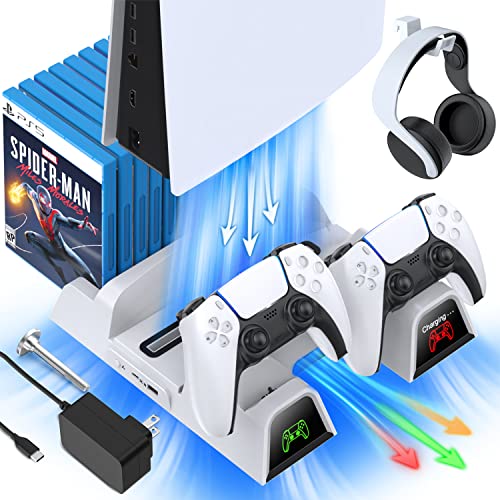
If you have a PlayStation console you should also have one of these stands. It makes it incredibly easy to organize your console and games as well as charge your controllers at the same time.
Plus it has a cooling fan to make sure your console doesn’t overheat when you have your weekend gaming marathons!
What is PSN and how does it work?
PSN stands for PlayStation network, which is a type of online gaming service as well as media content distribution service. The PlayStation network (PSN) is owned and governed by Sony under the name Sony network entertainment International (SNEI).
The company, Sony corporation originally created the PlayStation networking for supporting the PS3 game console but later modified and upgraded their system to support the PS4 game console as well as other Sony devices. With the recent modifications, their services are now no longer limited to video gaming, but it has expanded to streaming music and various video content as well.
How can I reach Playstation when needed?
- It is possible through logging in the console of a compatible Sony device such as PS4 or PS3 and others.
- You can also gain access through a web browser that is pointed to any one of the PlayStation network websites.
The first and foremost basic step for handling a PSN is creating an online account for it.You can either opt for a free or paid subscription as per your choice and set up a unique online identity as a subscriber of PSN. After logging in, a subscriber can enjoy multiple benefits and get a chance to play online multiplayer battles and keep a track of your statistics.
Online gaming: A major factor for the growing popularity of PSN
Online gaming has gained millions of users interacting and befriending each other on a virtual platform through their shared love for video gaming. Not only online video games have become a favourite leisure time activity but it is also reported to help increase brain functioning and sensitivity towards hostile situations.
The gaming industry has had a major boost due to the increasing number of players that are just now trying themselves in the world of online gaming. The growing revenues converting from millions to billions speak volumes about the upsurge this industry has had over the past few years.
With the advancements in technology and the invention of new gaming devices, the method of playing has become much more enthralling and fun for all the gaming devotees.
The popular PlayStation devices have revolutionized online gaming by bringing in bigger and better gaming opportunities and exciting features that attract more people to try their hand at gaming. Anyone can buy a PlayStation and create their own PlayStation networking account to enjoy the unlimited benefits.
Sometimes though accounts are suspended or banned due to violation of rules or inappropriate behaviour.
How to check if your Playstation account is banned or suspended?
The suspension and banning policies of PlayStation are handled very seriously as any kind of nuisance or inappropriate content can get your account suspended. What is even worse is that it can be banned. The first sign of a banned or suspended account is you will not be able to log into your account.
Apart from that mostly one receives a mail regarding the reason and duration of suspension or if the account is banned. There can be multiple reasons for your PSN account being banned or suspended, some of them are listed below:
- Creating nuisance during an online video game battle or provoking other individuals.
- Using inappropriate language or comments regarding other online players.
- Hacking or trying to breach the policies of a PSN account, breaking the rules and policies.
- Hacking other online players’ accounts.
While it can be tough,the best way to avoid such situations is to maintain decorum and follow the policies without harming other online players in any way possible. PlayStation is a healthy competitive space for all the video gaming enthusiasts and it is the responsibility of the players that it should be maintained in that way.
What to do after your Playstation account is hacked or banned?
You do receive an email regarding every information related to suspension or banning of your PSN account, but you can further mail your query requesting the reason for your PlayStation networking account being banned or suspended and other related information. Things are relatively easier if the PSN account is suspended and not banned as you can be allowed to continue using your account after a warning as well.
The first warning includes the account to be suspended for a time span of 1-7 days. The next time it is for 30 days and again 30 days warning which then turns into 3 months and finally concludes as a permanent ban of your PlayStation networking account may come.
Why is playing online so fun?
Conclusion
Now that you know your account is either banned or suspended, you can decide what steps you want to take next. If you are simply suspended, you will more likely than not just try and wait out the suspension, but if you are banned, then you may want to consider buying a new console,
No matter why you are or were banned or suspended, It is important to remember that Sony does not like banning people. They only ban and suspend people because they are trying to keep the PSN a user friendly and kid friendly action.
So if you are wrongfully banned or suspended please be patient with Sony as they are working to correct the situation.