
*This post may contain affiliate links. As an Amazon Associate we earn from qualifying purchases.
Do you own a Gameboy Color and have a feeling like it is dying, but you aren’t sure? Maybe it just isn’t working right and you aren’t sure if it’s dying, or if something is just wrong with it. Well, in this article we will go over everything you need to know about your Gameboy Color.
So how do you know if your Gameboy Color is dying?
One common issue that many people will start to see going wrong on their Gameboy Color is that the screen will start flickering while they are playing it. Beyond that you normally won’t know that it is dying until it actually stops working.
Normally A Gameboy Color will stop working because of a short in the system. Unfortunately this can happen at any time with no warning.
There are many different things that can make you think that your Gameboy Color is dying, from a game not turning on, or that your battery doesn’t seem to charge. You may even experience games that seem to be loading extremely slow.
Although you might think that these things mean that your Gameboy Color is dying, it does not necessarily mean it is.
If you want to know more about the Gameboy Color and possible issues that make it die, you will want to keep reading. You can also watch this short video to learn everything about the Gameboy Color!
Are you a huge Nintendo fan? Then you have to check out the Mario and Nintendo gear that you can get. Whether you want a Mario wallet, a Nintendo sweatshirt, or a classic NES hat there are plenty of choices to choose from. You can find them all by clicking here.
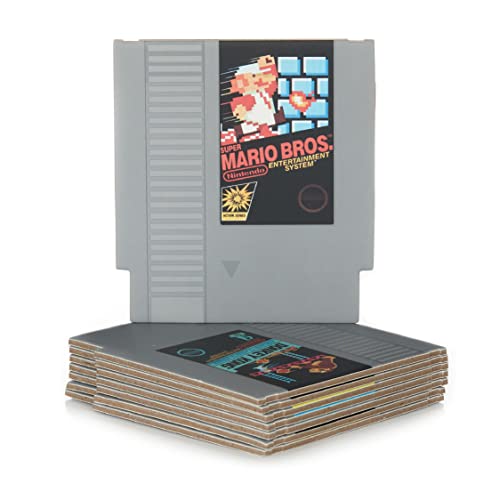
Do you love Nintendo? Then you have to check out this amazon NES cartridge drink coaster set!
This set includes 8 double sides drink coasters that look just like the classic NES cartridges.
This set is a perfect gift for the gamer in your life!
Why Would I Think My Gameboy Color Is Dying?
There are several reasons with which you can assume that your Gameboy Color is dying. The first reason might be the battery. Your Gameboy’s battery might be drained.
If it was working completely fine but won’t turn on, there’s a possibility that the batteries might just need replaced.
It could also be the fact that maybe the batteries were put in wrong, or they are not in tight and making a good connection. If the LED on your Gameboy doesn’t light up, it means your batteries are dead or that something has gone wrong with the screen.
Another reason you might think that it is dying is because of the buttons. Sometimes the buttons don’t seem to work properly. If you are thinking that you are playing, but the buttons won’t function, it isn’t because it is dying, but simply because with the usage of the Gameboy, the buttons don’t respond or perform in the correct way anymore.
This makes many people think that they need to replace their entire system when all they need to do is fix the buttons.
Although the original Gameboy had a contrast button on it that would allow you to adjust the screen brightness, the Gameboy Color does not. So if you are playing in a bright room, you might have a feeling like the Gameboy Color is dying because the screen is not bright.
This is not the case though. It is just like this because Nintendo did not backlight the Gameboy Color.
Another reason that you might think that your Gameboy Color is dying is because the game you are loading is not working properly, or it is not loading quickly like other games. Although you would hope that all games are made with good quality, sadly that is not the case.
Gameboy cartridges were originally made with poor design and strategy as compared to the latest ones. The newer ones were good if we compared them with the original ones.
However, Depending upon which games you prefer will depend upon which ones you play most often.
There’s not one single reliable way to know if your Gameboy color is dying. Different versions of Gameboy Colors load differently. The efficiency of both games will be likely to drop if they are not loading well.
They may even end up being stuck in the middle of the game and killing the battery of the Gameboy Color which will cause you to think it is dying.
Were There Fakes Of The Gameboy Color?
Many manufacturing companies replicate this incredible game in an efficient way. But these manufacturers also played a negative role in cutting off the Gameboy Color audience. People spend money on purchasing these games in urban countries, but all they have is the replica Gameboy Color which usually dies after one month.
The actual Gameboy Color has an extended battery life. If you take good care of its battery life, its color will not fade away and can live longer than usual.
Back in 2000, a Japanese lady’s Gameboy died. She remained sick because she used to play games on her Gameboy Color then, her grandson wrote a letter to the Nintendo games telling them about the health of her Grandmother, Nintendo sent a new Gameboy Color to her Grandmother with a note that said, we want your Grandmother to live longer.
This is how a company makes a mark in the world and leaves a mark on people’s heart.
Do People Still Play The Gameboy Color Today?
People still want to dig in the cartridge and play games in the same way they used to play on the Gameboy Color. Today there are many people who still own the Gameboy Colors as well as many many Gameboy Color games.
People still want to play games on actual devices as compared to just being on your phone.
Nintendo has always encouraged its customers and has kept a keen eye on exactly what the customers want. Today, Nintendo is still producing the latest content for the people, but somehow at one point, the company lost its strategies and faced loss.
Nintendo’s revival has focused mostly on the classic boxes because of the people that used to hook to the TV for longer.
There are still rumors about the rival of this incredible device. Unfortunately, as it died a while ago, there’s no chance of this game having a comeback and becoming America’s top gaming game. Because of the latest technologies and WI FI power, people spend much time on their smartphones and laptops instead of on handheld games like the Gameboy Color
Will There Be A Gameboy Color Classic?
Rumors about a Gameboy Classic Edition suggest that people still have this hope that they will be able to relive their long childhood car trips and games. Sadly, it is just a few fans of the game, and not the entire world.
Although this game was extremely popular in the 90’s, today it just simply would not be that popular even as a rerelease so it’s not likely to see a comeback as a classic version like the NES & SNES. The next classic console that will likely be released is the N64 as it had all kinds of classic Nintendo games that people love.
Conclusion
Now that you know that your Gameboy Color is not dying, you do not have to worry about playing it and it dying tomorrow. Even though most people may think that their Gameboy Color is dying today, it will run for many more years as it is simply one of the other mentioned problems.
No matter if you grew up playing the Gameboy Color or if you grew up with a smartphone, if you own a Gameboy Color today, you are bound to have a blast playing all the games.
This handheld device has some of the best Nintendo games ever released, and it is one of the only remade devices that had over 100 games made specifically for it! Most other remade consoles such as the PlayStation Pro instead of the PlayStation do not have their own games, but the Gameboy Color did.
This is just one more reason that the Gameboy Color is extra special in a world of bland games.