
*This post may contain affiliate links. As an Amazon Associate we earn from qualifying purchases.
If you have a vinyl record collection or are just starting yours taking care of your records is the best way to help them last for decades. It is important to learn how to properly clean and care for your records so you can enjoy them for a lifetime.
What are the best ways to keep vinyl records clean? There are a few different ways to keep your records clean. They are:
- Proper storage
- Proper handling
- Use a record brush
- Use a stylus brush
- Use a static remover
- Use a sticky roller
- Use a cleaning solution
- Use sleeves
We will discuss each of these in more detail in the rest of this article.
Nobody likes a crackling noise when they go to play their vinyl records, this unpleasant noise comes as a result of dust or dirt which has settled on the grooves of your vinyl record.
However, this can be avoided by taking good care of your vinyl records. The best ways to clean your vinyl records to ensure a perfect sound quality and preserve them for a long period of time includes will be discussed below.
Do you love playing your vinyl records but your record player has seen better days? Well, you are in luck! There are tons of great record players that not only have great sound quality but also won’t break the bank. You can find them by clicking here.
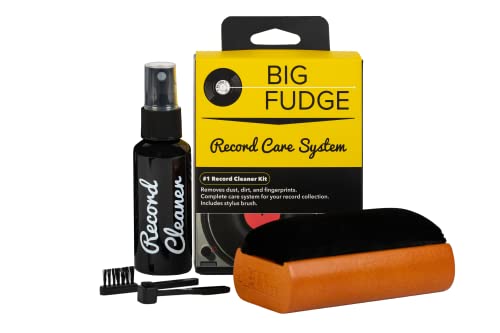
If you love records and record players, you must get a record-cleaning kit like this one. It is designed to ensure that your records stay in excellent condition to last you for decades.
Get this cleaning set and keep your vinyl records in perfect condition!
Proper Record Storage
This is the first step in keeping your vinyl records clean and having a dirt-free collection of vinyl records. The moment a vinyl record is purchased, keeping it clean is a major factor so it can serve its purpose perfectly to the buyer.
Get a white clean cloth about one or two yards long to cover all your vinyl collections which should be stored in a cool dry place. The cloth will help collect any dust and keep the vinyl dust free. This method cannot be over emphasized as most of the reasons why vinyl records get easily damaged is dust or dirt that is not cared for on a regular basis.
Proper Record handling
Most items usually have the “handle with care” phrase attached to them. A vinyl record is a very sensitive instrument and it requires lots of careful handling. It is very important to avoid touching the grooved surface of a vinyl record with our fingers, as our hands may have dirt on them. Even if your hands are perfectly clean, the oil from our skin can stay on the vinyl and cause it to attract dirt and dust.
Always hold the record by the edge or you can use your middle finger on the center label while your thumb is on the outer rim. Also, make sure you use both hands when you place or remove the record from the turntable.
Use a record brush
Dust always finds its way onto things and that is why brushes are made specifically for vinyl records.
If you notice any dust on your record, to avoid any damages to the vinyl, get a brush to remove the dust from it. Use long, gentle brush strokes on the record but be very careful so that the dust is removed without harming the vinyl surface.
DOn’t just use any brush or cloth either. There are several brushes out there that are specifically designed to clean records without damaging them. You just need to get one you are the most comfortable with.
Audioquest’s Original Record Brush is a good one which many people have vouched for over the years.
Use a stylus brush.
Just like the vinyl record brush, the stylus brush is a must have for every record collector.
As you play different records, small amounts of dust will accumulate on your stylus. This will transfer the dust to your records causing damage or even skipping as the stylus will force contaminants into your record’s grooves.
This is where the stylus brush comes in. It is the perfect tool to clean any lingering dust and dirt. This goes a long way in improving the sound of your records and helps keep them in good condition.
Vinyl Buddy makes a good product that is made of carbon fiber and is anti-static. It has a lot of great reviews for it on Amazon.
Static remover
There are a few different products that will help you remove static from your records. The most common ones are the anti-static gun and the anti-static brush.
The anti-static gun is a small plastic gun that cleans your record by removing any form of identified static electricity from its surface. This item usually comes with directions on how to use it on its package.
You simply have to aim it at the record without touching it. The gun helps neutralize the static electricity and the record becomes less likely to attract dust. When your record starts making a crunching, crackling or coarse sound when placed or removed from its sleeves then it needs a static clean.
The other option is an anti-static brush. You can combine the brush from above with this step and purchase a cleaning brush that is also anti-static. This will allow you to need one less item and one less step in your cleaning process as well.
One of the best static removers on the market is made by Milty.
Use a sticky roller
You know how hair rollers pick even the slightest little strand of hair? A record has its cleaning rollers too!
These rollers are specifically designed for record cleaning. All you have to do is pull the roller along the vinyl grooves, it will attract dust to its surface and make sure the roller does not leave any dust behind. After using a sticky roller you can use a micro-fiber cloth or a single test swipe just to make sure that it did its job properly.
A popular roller with good reviews can be found on Amazon here.
Use a cleaning solution
If you find that you can’t get the dirt off your records with the above methods then you should move up to a cleaning solution.
Record cleaning solutions are sold in many different places including online. They are designed to take care of vinyl records that require intensive cleaning.
A good cleaning solution is a must have for a record collector in order to always keep your records sparkling and to help avoid any permanent damage.
However, when cleaning the vinyl, you must be extremely careful to avoid touching the label with the liquid as that can cause the label to become discolored or even to peel off.
Deciding which cleaning solution you prefer can be a lot of trial and error but many people seem to like the 4 in 1 set that is made by Big Fudge (yes, that is the company’s real name).
Use sleeves
Record sleeves are a thin, plastic-like casing like the ones that are often used to keep CDs in. Sleeves are used to store records and ensure they stay in that squeaky clean condition.
Record sleeves come in different styles and materials but the most important distinction is whether they are outer or inner sleeves. Regardless of the distinctions, record sleeves are a very good way to store our clean vinyl records to keep them from getting dirty when you are not using them.
Rinse and dry the records
ANother popular way to clean your records is to rinse and dry them.
This is done using a controlled spray bottle and carefully washing away any remaining cleaning solution. The cleaning solution, although used to wipe the record to keep it clean might have left some unwanted stains on your record. This is gently washed away using the spray bottle or ninja precision and a sink.
Then, dry the vinyl record with a clean dry cloth different from the one that was used in applying the solution. This is point you will have to be entirely careful so as not to leave any fingerprints on the record. Make sure to only use a microfiber cloth or one made of another soft material to ensure you don’t scratch your records.
Regularly inspect your records
This should be done at least once every 6-8 weeks, however it depends on how often you play your records. If they are in storage for a long period of time then inspecting each record before you play it is a good idea.
Inspect your records for any sign of fingerprints, stains, cracks or marks. If none of these impurities are found, your vinyl is safe and in good condition.
However, if you notice any blemishes or sign of scratches the vinyl needs to be cleaned or fixed before you play it.
Take the time to look over each record to make sure you don’t damage or dirty the record further by playing it.
Additional tips
There are of course many other ways to clean your records and to ensure that they stay clean. Rather than make this article longer than it already is, you can check out the videos below to see some additional ways to clean your records to keep them in as good of condition as possible.
Conclusion
There are many different ways to clean your records and all of them can work just fine. Ultimately you have to find the products and the ways that you like the best.
Just because someone in a video says that a certain method is the “best” doesn’t mean you should only use that method. Feel free to branch out a little and find what you like the best.
Afterall, your collection will be cleaned a lot over the time that you own them so find a way to clean them that you actually enjoy!