
*This post may contain affiliate links. As an Amazon Associate we earn from qualifying purchases.
Sony recently announced that the Playstation would no longer be welcoming Facebook integration into their ranks of social connectivity. Sony explained this move publicly, writing that Facebook Integration on the Playstation would no longer be available from October 7th, 2019
So why did Sony remove the Facebook login option from Playstation ?
No one really knows for sure why Sony removed the integration with Facebook. Some people believe it was because they no longer wanted to abide by Facebook’s constantly changing rules while others believe it was just not worth the hassle on Sony’s end.
If you want to know more about why Sony removed the Playstation from Facebook keep reading. Here is a link to a video about this topic if you want to know more.
If you love PlayStation you need to check out this amazing game room light decor. It looks just like the buttons on the PlayStation controller and the light reacts to the music that you are playing as well! You can check it out by clicking here.
Before we delve into the why’s and how’s of this move, it’s time to explain what Facebook Integration was, to begin with.
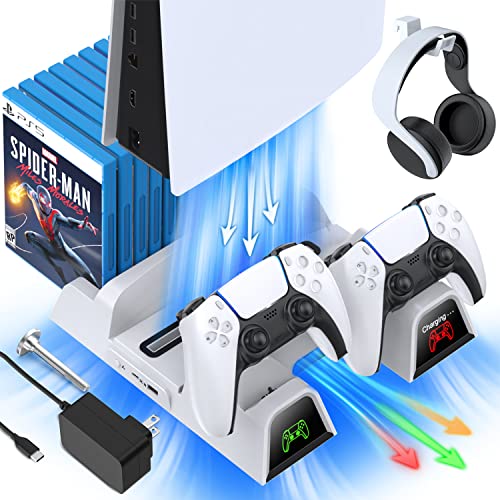
If you have a PlayStation console you should also have one of these stands. It makes it incredibly easy to organize your console and games as well as charge your controllers at the same time.
Plus it has a cooling fan to make sure your console doesn’t overheat when you have your weekend gaming marathons!
What is Facebook integration
Facebook Integration was an option through which you could link your game console to your Facebook account. This option was available only on the Playstation 4. However, Facebook Integration made the operation of the Playstation easier by leaps and bounds. For instance, connecting your Facebook account to your Playstation Network also meant that you could borrow your Facebook profile picture to be your official Playstation Network avatar.
The Playstation-Facebook link also introduced a “friend-finder” feature. Playstation users could easily find their friends on the network through their Facebook accounts. This sped up the process and made it tons easier to connect. Besides, it also helped you discover which of your Facebook friends were into the same games as you.
Facebook Integration came with a set of share features. With the share features, you could upload and share gameplay highlights like videos or screenshots of your game onto the internet. You could also upload your wins and trophies online. With Facebook Integration, you could show your friends how much of a better player you were.
Unfortunately, though, all these features are no longer available. It is no longer an option to use your Facebook profile picture, post gameplay highlights and trophies or to add Facebook friends. Instead, all these will have to be done more manually than before.
The Removal of Facebook from PlayStation 4
On October 7th, 2019, Playstation delivered the news about their sad departure from Facebook. It was explained that the Playstation 4 system would henceforth no longer support Facebook. Playstation owners found that they could not link their game console and their Facebook accounts anymore.
Many, however, only got the news when they woke up to find that their profile avatars had disappeared. This is because Sony had neglected to thoroughly inform its users about the move. With no prior warning, this left many faithful Facebook integration users confused and lost. Moreover, Sony’s post on the matter didn’t resolve the tension. They revealed no motive behind the step taken.
While apologizing for any inconvenience caused, the company suggested that users adapt to one of their provided video game avatars, or even uploading an entirely new photo in case you had used your Facebook profile photo for your Playstation account.
According to speculation among the masses, this abrupt move was accounted to the fact that perhaps Sony had no further interest in pursuing a relationship with the social networking site anymore.
Other theories suggest that Facebook’s recently altered policies had started denying access to third-party companies, especially ones like Sony and Microsoft, from “a bug” that allowed these companies to access private data. This turned out to continue even after Facebook stopped integration programs that allowed data sharing.
However, it turns out a software bug could be the reason for ending relationships with Playstation, and as a result, disappointing hundreds.
There are also other rumors in action. According to VG247’s suspicions, the removal of Facebook can be attributed to the Cambridge Analytica scandal on Facebook. This is a possible reason for the removal of Facebook. This scandal exposed the wrongful handling of user data by Facebook. There is a possibility that this could be the reason behind the sudden removal of the Facebook-Playstation thread that stopped a chain of multi-integration features.
In other, more positive news, there are rumors of another Facebook-Playstation Integration floating around. According to select sources, Facebook plans to make a comeback with better, improved integration and is still talking the deal over with Sony. The present integration remains disabled while the two companies approach a new contract.
According to a Facebook qualm that was made to Kotaku, an updated contract is in the works. This new integration might introduce a fresh set of features into the Playstation and make it a hundred times better and introduce the Facebook Integration with a more improved finish.
However, until this contract comes through, the Facebook features will remain unavailable on the Playstation 4 and Facebook hopes to bring them back as soon as possible.
While it is all well and good, losing the Facebook-Playstation relationship might be inconvenient for a considerable amount of people. It hits worse when you take into consideration Facebook’s popularity and the 100 million and more PS4 consoles that are used all around the world.
On the other hand, some users took pretty generously to the loss, stating that it is barely an issue. Some people agree that the presence of Facebook Integration did not make a noticeable difference and that they would rather use other Social Media platforms instead. Here are a few examples:
“Personally not a great loss, I use Twitter to share my things anyway, I use FB only for Posts of Pages I Follow, if those would go to Twitter I wouldn’t even use FB at all, for me it’s awful! It doesn’t show like 70% of the pages I follow, so what’s the point of me Liking a page” -Sora9427
“It is weird that it’s happening with immediate effect. Never used it anyway.” – Lance_87
Regardless, it might do well to look out for a new Facebook Integration option that caters to a wider variety of needs that contributes to both Facebook and Playstations’ outreach in society.
Conclusion
So you can see that Sony made this big change in their business when they took Facebook out of the picture. And you can also see that the gamers that had used this feature in the past, weren’t very happy about the sudden move. And there are people out there that are saying that they didn’t use Facebook, or that they used something different for their games. But many gamers were upset about the change.