
*This post may contain affiliate links. As an Amazon Associate we earn from qualifying purchases.
Have you ever owned a Sony PS1 and were going to one of your friend’s houses that has a PS2 and you wanted to bring your controller? Maybe you are buying a PS2 and you want to know if you need to buy extra controllers or if you can use the ones from your PS1.
Well, in this article we will go over everything you need to know about using a PS1 controller on a PS2.
So is a PlayStation 1 controller compatible with a PlayStation 2 or vice versa?
A PS1 Dualshock controller will work on many PS2 games but not on all of them. However, a PS2 controller will work with the PS1 and ALL PS1 games on that console as well as all games on the PS2.
If you have an extra PS1 controller lying around it will work on a lot of PS2 games but not on all of them. A PS1 controller won’t work on games that require pressure-sensitive buttons since those buttons are only on PS2 controllers.
In the section below I will give the PS2 games that will not work with a PS1 controller since they require pressure-sensitive buttons.
If you love PlayStation you need to check out this amazing game room light decor. It looks just like the buttons on the PlayStation controller and the light reacts to the music that you are playing as well! You can check it out by clicking here.
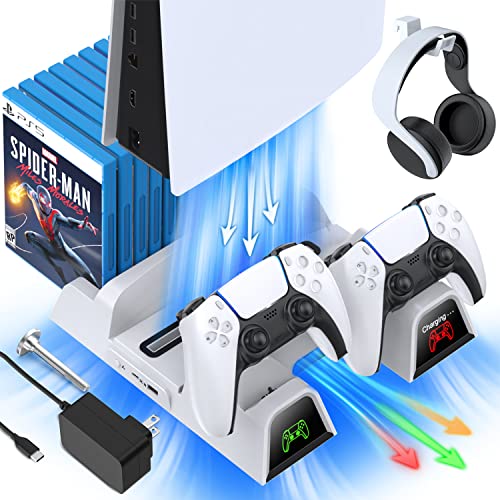
If you have a PlayStation console you should also have one of these stands. It makes it incredibly easy to organize your console and games as well as charge your controllers at the same time.
Plus it has a cooling fan to make sure your console doesn’t overheat when you have your weekend gaming marathons!
Which PS2 Games Require Pressure-Sensitive Buttons?
There are quite a few PS2 games that require pressure-sensitive buttons. These games are not compatible with a PS1 original controller since pressure-sensitive buttons weren’t put onto PS1 controllers.
While not all of these games will be unplayable when using a PS1 controller they do require a PS2 controller to get the full experience as they require pressure-sensitive buttons or a pressure-sensitive D-Pad which the PS1 controller does not have.
The following is a list of pressure-sensitive games for the PS2.
- 007: Nightfire
- 007: Quantum of Solace
- Ace Combat 4
- Ace Combat 5
- Ace Combat Zero
- Battle Gear 2
- Bravo Music: Christmas Edition
- Burnout
- Burnout 2
- Burnout 3
- Burnout Revenge
- Burnout Dominator
- Champions of Norrath
- Colin McRae Rally 3
- Colin McRae Rally 4
- Colin McRae Rally 2005
- Crash Nitro Kart
- Crash Tag Team Racing
- Crash Twinsanity
- Crazy Taxi
- Dead or Alive 2
- Dreamworks Madagascar
- Driving Emotion Type-S
- Evergrace
- F1 Career Challenge
- Ford Racing 2
- Formula One 2001
- Formula One 2002
- Formula One 2003
- Formula One 04
- Formula One 05
- Formula One 06
- Gran Turismo 3
- Gran Turismo Concept
- Gran Turismo 4
- Gran Turismo 4: Prologue
- Grand Theft Auto 3
- Grand Theft Auto: Vice City
- Grand Theft Auto: Liberty City Stories
- Grand Theft Auto: Vice City Stories
- Grand Theft Auto: San Andreas
- Killzone
- Mad Maestro
- Midnight Club
- Medal of Honor Frontline
- MLB The Show
- MLB 2006
- Metal Gear Solid 2
- Metal Gear Solid 3
- MotoGP 4
- Need For Speed: Hot Pursuit 2
- Need For Speed: Underground
- Need For Speed: Underground 2
- Need For Speed: Most Wanted
- Need For Speed: Carbon
- Need For Speed: ProStreet
- Need For Speed: Undercover
- Okami
- Onimusha
- Primal
- PSI-Ops: The Mindgate Conspiracy
- Ridge Racer V
- Shox
- Silent Hill 2
- Silent Hill 3
- SOCOM 2
- SoulCalibur 2
- SoulCalibur 3
- Star Ocean: Til The End Of Time
- Test Drive
- Test Drive: Eve of Destruction
- The Bouncer
- TOCA Race Driver 3
- Wipeout Fusion
- Zone of the Enders
- Zone of the Enders: The 2nd Runner
All of these games use the pressure-sensitive buttons on a PS2 controller in one way or another. Most of the racing games mentioned above use that option for acceleration while the fighting games will often use them for combos or different special attacks.
Are PS1 & PS2 Controllers The Same?
Many people think that PS1 and PS2 controllers will work on both of these consoles because they look virtually identical. But are these controllers actually the same?
PS1 and PS2 controllers are similar (even having the same grey color) but they are not exactly the same. The biggest difference is a PS1 controller does not have the software to work properly on all of the PS2 games (those with pressure sensitive options) while a PS2 controller can be used to control all PS1 & PS2 games.
So although these controllers might look the same they are not. The PS1 controller can only be used when you are playing on a PlayStation 1 console and with some of the games on the PS2.
However, the PS2 controller will work on the PS2 AND PS1. When the PS2 controller was designed PlayStation wanted to make sure that it could be used on both consoles. So if your old PS1 controller stopped working you can just pull out your PS2 controller and get back to gaming.
The cable, plug, analog sticks, shoulder buttons, triggers, and other Dualshock features will work the same on the PS1 and the newer system as well. However, despite a lot of things being the same gamers will not have the same experience when not using a PS2 controller for the games mentioned above.
The PS1 and PS2 controllers function slightly differently so although many of the things are the same there is no denying the fact that those little buttons made a difference in the gameplay.
Difference Between PS1 And PS2 Controllers
I have already covered that the PS2 controller will work on both the PS1 and PS2 consoles while the PS1 dual analog controller will work with the PS1 and some of the games on the PS2. But what is it that makes it work like this?
What is the difference between the PS1 and PS2 controllers?
The only difference between the PS1 and PS2 Dualsense controllers is that the PS2 controllers have pressure-sensitive buttons. Beyond that, the PS1 and PS2 controllers are exactly the same.
Now that might seem like a small difference (and really it is) however, this small change is required for some games. Some PS2 games require you to have pressure-sensitive buttons to work properly so the PS1 controller will not work on those games at all.
Most of the PS2 games were not made where they required you to have pressure-sensitive buttons so in that case, your PS1 controller will work on those games without any difficulty.
If you want to be sure that your controllers will work correctly on all PS1 and PS2 games then you will want to get the Dualsense PS2 controllers as they are guaranteed to work on all PS1 and PS2 games. If you are trying to save some money then you can get a PS1 controller but be aware that it might not work with all of your PS2 games properly.
How To Make Your PS1 or PS2 Controllers Wireless
Playing on your older consoles (whether PlayStation, Xbox, or Nintendo) can be a lot of fun. But one major issue that all of these older consoles had is that they did not have Bluetooth controllers.
Wireless PlayStation controllers are a must if you play very often and while standard on the PS3, PS4, & PS5 that was not the case with the PS1 and PS2.
If you want to play your older PS1 and PS2 console (or PlayStation classic) with a wireless controller instead of a hardwired one how can you do that?
To use a wireless controller with your older PlayStation you will need to get a Brook USB Adapter. This USB dongle plugs into your older PlayStation single controller port and then allows you to connect a wireless controller via a USB connection.
All you have to do is plug your wireless receiver into your Brook USB Super USB Adapter and you are ready to control your older PlayStation (or PS classic) with your favorite wireless controller.
Of course now you have to worry about the wireless range and battery life of your controller but hey, it certainly beats having to sit a few feet away from your TV!
Conclusion
The PlayStation 1 controllers will work on all PlayStation 1 games and on the majority of games from the PlayStation 2. However, there are some PS2 games that require you to have pressure-sensitive buttons that are only available on PS2 controllers.
The old Dual shock controller buttons are not pressure-sensitive so the PlayStation games that require that feature cannot be played with a PS1 controller (or at least not with all of the controller’s functions). With the PS1 classic controller, you will not have all of the analog functionality that will be needed for those PS2 games.
So if you have some of those games that require pressure-sensitive buttons you will have to purchase a PS2 controller to play them.
All PS1 and PS2 games will work properly with a PS2 controller so if you have both the PS1 and PS2 consoles you can play all of those games on both consoles using a PS2 controller instead of having to buy both PS1 and PS2 controllers.