
*This post may contain affiliate links. As an Amazon Associate we earn from qualifying purchases.
Have you ever been playing your PlayStation and accidentally left it on all night? Maybe you were playing it all night and then you fell asleep and forgot to turn it off. Well in this article we will go over what happens when you leave your PlayStation on overnight and if it harms the console or not.
So can you leave a PlayStation on overnight?
The original PlayStations had issues with overheating if they were left on for too long but today you can leave your modern Playstation console on overnight to download a game (or accidentally) and not have to worry about it damaging your PlayStation at all.
Overheating used to be a major issue with older electronics but as the technology has gotten better and better, overheating from leaving your console on too long has become virtually a non-issue. The only time where it might be a problem to leave your Playstation on is if you have it covered with game cases or something else close to the console that doesn’t allow the air to move as needed.
Another thing that many people worry about when leaving their Playstation on overnight is how much extra electricity it will use. Afterall, electricity isn’t free so if you are spending a fortune to keep your console on then you would want to shut it off (in most circumstances).
However, you really don’t need to worry too much about the cost of leaving your Playstation on either. The PS5 only consumes 110 watts of electricity to download a game so you will only be spending around 10 cents for every night that you leave your PS5 running to download a game. If you are just leaving it in standby mode or on the menu it will consume even less electricity bringing the costs down even further!
So, whether you are concerned with the electricity cost or overheating you really don’t need to worry either way as overheating is virtually non-existent with new consoles and electricity costs are incredibly cheap as well.
If you want to know more about exactly what you can do to download your game faster, and exactly how long you can leave your PlayStation on for, you will want to keep reading.
You can also watch this short video that will show you exactly what will happen when your PlayStation begins to overheat (although a new Playstation shouldn’t in normal conditions).
If you love PlayStation you need to check out this amazing game room light decor. It looks just like the buttons on the PlayStation controller and the light reacts to the music that you are playing as well! You can check it out by clicking here.
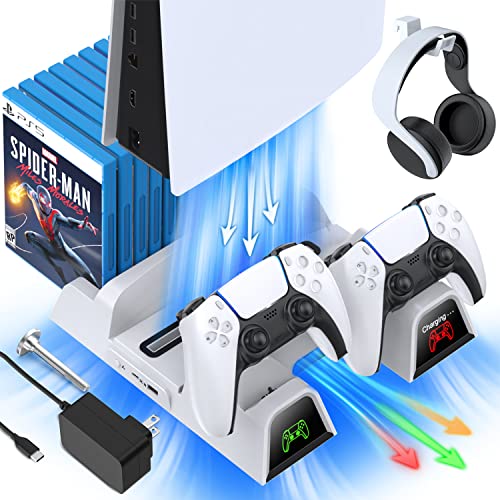
If you have a PlayStation console you should also have one of these stands. It makes it incredibly easy to organize your console and games as well as charge your controllers at the same time.
Plus it has a cooling fan to make sure your console doesn’t overheat when you have your weekend gaming marathons!
Is it bad to leave your Playstation (PS4/PS5) on for a long time?
If you are a hardcore gamer you will likely have your Playstation console on for long periods of time and no matter if that is overnight or not you might be concerned with your long gaming sessions affecting your console in a negative way.
But will that happen?
Will a Playstation that used or left on for a long time eventually break or damage something?
Playstations are designed to be used for many hours at a time without any issues but you will have mechanical parts that will start wearing out faster if you never shut it off. It’s simply the nature of all mechanical things.
For example the more miles that you put on a vehicle the more likely you are to have it breakdown or have parts wear out. The same is true with your Playstation console. The more hours you use it the shorter number of years that it will likely last.
That isn’t to say that you should not play your console as typically the consoles become obsolete far quicker than their mechanical parts will wear out but if you game 24/7 your console will obviously not last as long as someone who only breaks out their Playstation a couple of times a week.
In regards to just simply leaving it on for long periods of time that isn’t necessarily a bad thing as long as it is getting the proper air flow and isn’t overheating. However, if there are times when you won’t be using your Playstation console it is better to shut it off and give it a chance to cool down and the parts a chance to “rest” every once in a while.
Why do people leave their PlayStation on all night?
We have often seen that many gamers leave their PlayStation on for a complete night although this is often pretty rare. Some people will do this when they need to download big game files.
Also, sometimes you might forget to turn it off causing the PlayStation to remain on for the entire night.
Leaving the PlayStation on for a complete night is not dangerous even though some people think that it is.
However, there are several things to be considered before leaving your console on all night. These things include possible concerns such as the normal flow of electricity, constant power supply, and some other things. If you do leave it on, you do not have to worry though as it will be just fine and not overheat as long as you don’t have it too close to a heat vent or covered up in some way.
The common misconception regarding the PlayStation is that leaving it on overnight will result in overheating. Although this isn’t true with the latest Playstation consoles (PS4/PS5), this is not completely false. This can happen to some older versions of the PlayStation but it can be completely avoided using different modes available in the PlayStation settings.
Another thing that commonly occurs due to excessive use of the PlayStation is that you start to hear its fan moving faster and getting louder as it cools off the console. This is normal and does not mean that your console is overheating just that there is more heat in general because of the amount of time that the Playstation has been running.
Leaving the PlayStation on Overnight
Many people will leave their PlayStation on overnight because they have to download huge files from the internet.
Well, this is completely safe to do.
You can leave the PlayStation 4 (or PS5) turned on for many days at a time before there is any risk of failure or possible damage assuming that you allow for plenty of airflow around the console. Multiple people broke world gaming records with the PS3 playing for over 5 days straight so with the newer technology in the PS4 and PS5 you can definitely leave them on overnight without damaging them.
The newer console will also alert you that they are overheating and will automatically shut down if they get too hot so that shouldn’t be an issue with leaving it on at all.
To maintain the proper operating condition of your PlayStation while keeping it on overnight, you will also need to understand the current condition of the console.
You will want to make sure that it is not on something soft that it could sink into and block the airflow and you will also want to make sure nothing is next to or on top of it that could cause it to heat up more than normal.
Not all the Playstation consoles can be left on overnight, as it can damage the fan on older consoles and may affect how the PlayStation operates.
If you have an older console and you leave it overnight or if you play games on it for a long amount of time, you are likely to have noticed that its fan speed starts to increase and will get faster and faster. As a result, the noise and the heat releasing from the PlayStation console also increases.
Typically, this fan speed increases when the internal processors start to heat up above a certain point. When they start to produce more heat, the speed of the fan increases even further
If this continues, the fan of your console could possibly get damaged while your PlayStation console is on. If you do not have the auto shutoff enabled, the internal processors can also get severely damaged. If this happens, your memory and other components can also get damaged so leaving an old Playstation console on for long periods is not a good choice.
How to avoid Playstation overheating
There is more than one way to avoid overheating of your PlayStation. One of the easiest is to clean your fan vents from dust and dirt. If you don’t clean the fans of the PlayStation or get it serviced from time to time, you will see that the dust particles inside your console will continue to build up and that could hurt your console and keep it from staying cool.
These dust particles can damage or stop the fan from spinning, destroying your PlayStation console. Many people often accidentally leave their PlayStation consoles on and this can cost them badly if the fan is not kept cleaned.
Again, this is mostly an issue with older Playstation consoles and not really an issue with the latest ones.
Rest Mode in PlayStation
There are many times you can use Rest Mode on your Playstation console instead of completely turning it off or leaving it completely on. You can use the Rest Mode if you quickly want to access your games instead of waiting a little longer. It also reduces power consumption.
Instead of completely leaving the console all the way on, you can put it to rest mode. It will consume less power than normal mode and your normal processing will be continued easily in just a few seconds.
The plus point of this mode is that you can download the huge data and game files and updates in the background while keeping the console in the low power mode. This will also help the data and game files download faster.
This rest mode is the best thing if you want to keep the PlayStation on for overnight. Instead of leaving it on completely, you can use the rest mode so that less power will be consumed and more work will be done while keeping the console from heating up too much.
If you use the Rest mode, you will see that the online games you purchase will automatically be downloaded without any problems.
How do I turn on rest mode?
When you press the start button, a small menu on the side will appear. Just like you use to turn off the PlayStation, you can use the option appearing beneath the turn off mode named “Enter Rest Mode”.
You can use it to save power and solve your game data downloading problem while not leaving the console on all of the time.
Overheating of the PlayStation
Overheating of the PlayStation can damage the internal circuitry. It burns internal memory and can cost you quite a bit if this happens on your older console.
There are many ways that you can keep your PlayStation safe from overheating. Mostly, the overheating occurs because of the excess usage of the fan and extremely long usage of the PlayStation. The fan in the PlayStation starts to move faster when the internal circuit of the console starts to heat up.
To save your console from such an issue, it is recommended not to leave it for more than 24 hours if you have an old console. Also, you will need to do the cleanup process of the console much more often. Whenever this heating issue comes up, you need to turn off the console and wait for it to cool down and then clean out the dirt/dust to help it operate more efficiently.
You will also want to keep the console in a location with proper ventilation where it gets plenty of air movement and is not in a cabinet or covered by something.
Conclusion
No matter if you leave your PlayStation on overnight or you have been very careful to never let this happen, you can rest assured that PlayStation doesn’t want your PlayStation console to burn up or get damaged from overheating. This is why they automatically turn off if they begin to overheat and also why this issue is virtually non-existent in the newer consoles.
PlayStation has been very smart to put in this feature as it has saved many people from their console overheating.
If your PlayStation has overheated though and it does not work anymore, you can purchase a brand new one right here.